
Marketing automation software is the best way to give your small business a competitive edge. Automation software allows you to deliver personalized customer experiences without increasing your headcount.
According to Deloitte, 80% of consumers surveyed prefer brands that offer personalized experiences and reported spending 50% more with such brands.
When you’re a small business with a limited budget, automation software is your best chance to track customer data and interactions and deliver tailored brand experiences.
This article covers the ten best marketing automation tools for small businesses. We show you the specific use cases where each tool thrives, its limitations, and what real users have to say.
Key takeaways
- Marketing automation software allows small businesses to personalize customer interactions at scale while maintaining a lean marketing team.
- The best tools offer crucial automation capabilities like behavioral targeting, conditional branching, revenue attribution, unlimited flow steps, and workflow A/B testing.
- Consider price-to-value, automation capabilities, reporting, integrations, and your future needs to identify the right tool for your small business.
- GetResponse is a marketing automation platform that helps small businesses automate the entire customer lifecycle. It was also named a 2026 finalist in The SaaS Awards’ Best SaaS Product for Workflow Automation category.
Best small business marketing automation software comparison
| Tool | Best for | Key automation features | Starting price |
|---|---|---|---|
| GetResponse | Customer lifecycle automation | Branching and split logic Omnichannel automation (email, SMS, push) Transactional email automation Lead scoring & contact tagging AI assistant builds workflows from prompts | $15.58/mo Advanced automation: $48.38/mo |
| HubSpot | All-in-one automation | Drag-and-drop workflow editor Multi-channel automation Automated lead scoring engine Breeze AI assistant builds workflows via prompts | $7/mo Advanced automation: $800/mo |
| Kit | Creators | Tagging based on subscriber behavior Platform-triggered workflows (Thinkific, Calendly, Shopify) Subscriber Signals (automated alerts) | Free (1 workflow) Advanced automation: $33/mo (Creator, unlimited automations) |
| Brevo | Free multichannel automation | Omnichannel automation (email, SMS, ad retargeting) Multiple entry points & real-time triggers Aura AI builds workflows from prompts | Free (up to 2,000 contacts) Advanced automation: $449.08/mo |
| Klaviyo | Ecommerce automation | Multi-channel automation in one workflow Klaviyo AI builds workflows from prompts Composer AI agent suggests/creates campaigns AI-powered segment suggestions | $45/mo |
| ActiveCampaign | AI-supported automation | Branching paths for personalized journeys Active Intelligence AI builds/optimizes workflows Omnichannel automation Conditional/dynamic content | $15/mo Advanced automation: $79/mo |
| Customer.io | HIPAA-compliant automation | AI-powered real-time dynamic segmentation Real-time lead scoring triggers nurture sequences Multivariate testing of workflows | $100/mo Advanced automation: $1,000/mo |
| MailerLite | Affordable marketing automation | Multiple triggers per single workflow Date-based triggers (birthday/anniversary) Dynamic content by segment A/B testing within automations | Free (up to 3 active automations) Advanced automation: $22.50/mo |
| Sender | Free email automation | Split logic in automation builder Custom behavioral triggers Time delay steps Auto-resend to non-openers | Free (up to 2,500 subscribers) Advanced automation: $14/mo |
| Mailchimp | Simple multichannel automation | Multichannel automation Intuit AI builds workflows Predictive segmentation Multiple entry points into automations | $13/mo (up to 4 steps per flow) Advanced automation: $20/mo |
10 best marketing automation software for small businesses
Below are the top small-business marketing automation software solutions.
- GetResponse: Best for customer lifecycle automation.
- HubSpot: Best for all-in-one automation.
- Kit: Best for creators.
- Brevo: Best for free multichannel automation.
- Klaviyo: Best for ecommerce automation.
- ActiveCampaign: Best for AI-supported automations.
- Customer.io: Best for HIPAA compliance.
- MailerLite: Best for affordable marketing automation.
- Sender: Best for free email automation.
- Mailchimp: Best for simple multichannel automation.
1. GetResponse – Best for customer lifecycle automation
G2 rating: 4.3 Capterra rating: 4.3
GetResponse is the best marketing automation software for small businesses that want to automate the entire customer lifecycle. It helps with lead generation, lead nurturing, and customer retention campaigns.
Plus, GetResponse is affordable.
The Marketer plan starts at only $48.38/mo and gives you unlimited access to automation tools.
You get an easy-to-use automation builder. This supports drag-and-drop functionality that lets you create entire automation workflows without writing any code. It lets you build automation workflows for your website, email, and SMS campaigns.
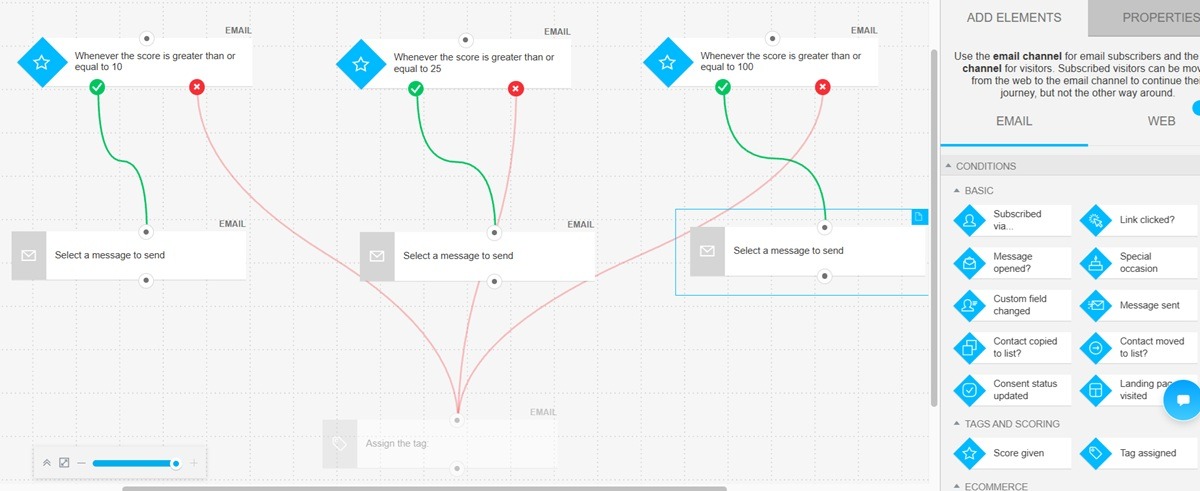
You don’t have to create these workflows from scratch. Our automation solution includes an AI assistant. Describe the campaign you have in mind and its goal to the assistant. It’ll create the workflows for you within seconds.
Alternatively, pick an automation workflow template from our extensive library. We have templates for various campaigns, including welcome series, cart abandonment, replenishment reminders, and customer surveys.
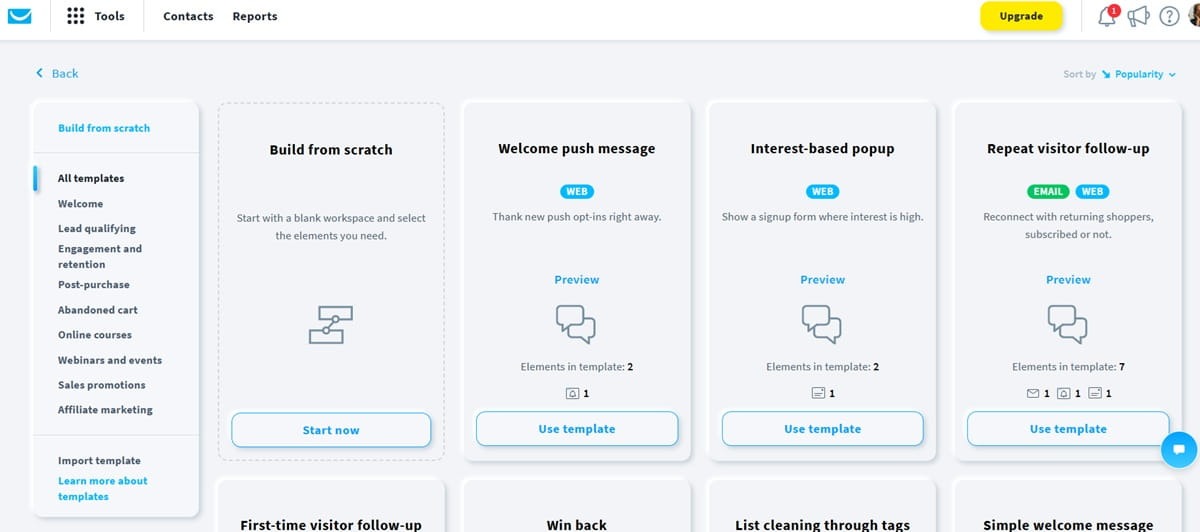
You don’t need a dedicated developer or experienced marketer to build workflows. You can do it yourself.
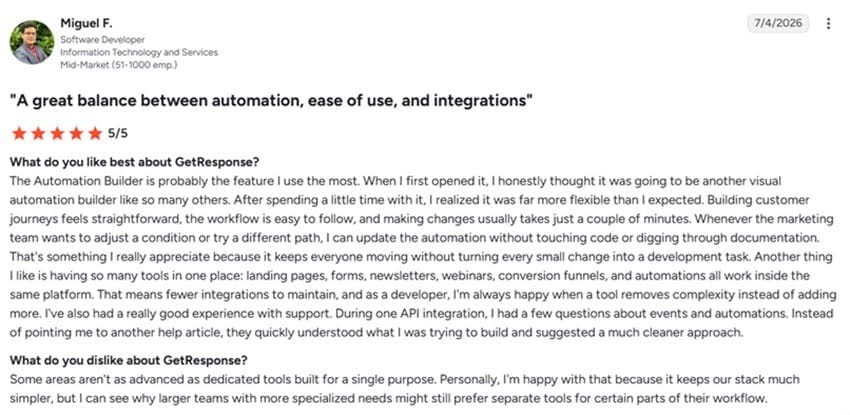
That ease of use is one reason why customers like Miguel love the GetResponse marketing software.
GetResponse automation drives sales by tracking customer behavior and data. The platform connects to your ecommerce platform and CRM of choice. We sync with popular platforms, including Shopify, WooCommerce, Magento, Zendesk, Pipedrive, and HubSpot.
The integration allows the automation platform to track what pages customers visit, the products they buy, and campaigns they engage with. You can then create strategic automation workflows that respond to individual customer actions.
A new lead enters your pipeline? That triggers a multi-step lead nurturing workflow.
A customer buys a product for the first time? They get a curated post-purchase campaign, starting with a welcome series. A replenishment reminder workflow is also added to the engagement pipeline if the product qualifies for that campaign.
AI product recommendation is another tool GetResponse customers use to drive more sales. This tool matches your product offerings to your website visitors’ behavior and preferences. It makes sure every visitor sees products or receives emails with products they’re most likely to purchase.
GetResponse has reported that personalized product recommendations can increase sales by up to 10% and average order value by 33%.
Beyond email, SMS, and push notifications, GetResponse provides other marketing tools like a landing page builder, website creator, conversion funnels, and paid ads management platform.
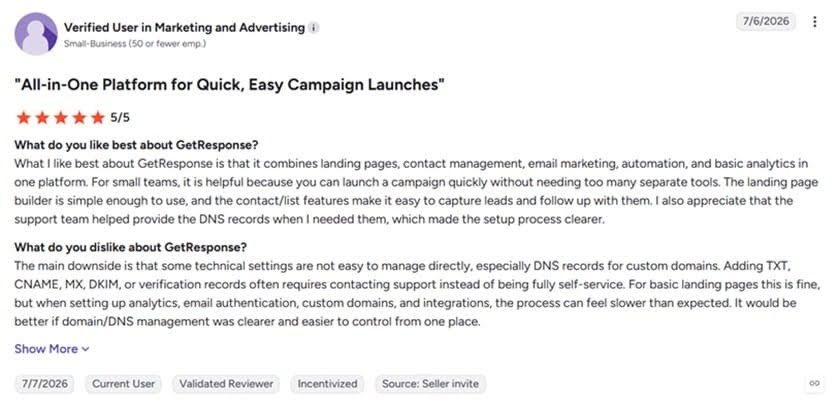
This gives you access to various marketing solutions in one platform instead of buying and jumping between various tools. It’s another thing customers love about GetResponse, as expressed by this user.
Key features
- Branching and split logic – Lead customers through different paths depending on their behavior and interactions with your brand.
- Omnichannel automation – Run automated campaigns across email, SMS, and push notifications.
- Transactional email service – GetResponse lets you automate transactional emails like order confirmations, delivery updates, and password resets.
- Lead scoring and contact tagging – Automate lead scoring and contact tagging to enhance lead qualification and customer segmentation.
- Marketing analytics – Attribute revenue to specific campaigns and automation workflows with GetResponse’s revenue attribution tool.
Limitations
- AI product recommendation, which is a powerful growth tool, is only available on the expensive enterprise plan.
- Transactional email service and SMS campaigns are also available on the enterprise plan alone.
Pricing
The GetResponse Starter plan supports one custom automation workflow, a welcome email series, and unlimited email sends. It starts at only $15.58/mo.
We recommend the Marketer plan, which goes for $48.38/mo. This one gives you unlimited automation workflows. It supports advanced audience segmentation, abandoned cart recovery, unlimited web push notifications, sales funnels, and signup forms and popups.
An enterprise plan is available for when your business grows. This offers a dedicated IP address, unlimited users, priority support, a dedicated sending domain, and single sign-on.
Start your free trial here to see how GetResponse automation turns website browsers into buyers. The trial includes premium features and doesn’t ask for your credit card details.
2. HubSpot – Best all-in-one automation tool
G2 rating: 4.4 Capterra rating: 4.5
HubSpot is not the cheapest marketing automation platform on this list. However, it provides additional tools, including a CRM system, sales hub, and customer support software.
It’s therefore an automation platform to consider if you want an all-in-one marketing automation platform. But it’s quite expensive. Advanced automation capabilities are available on the Professional Marketing Hub plan at $800/mo.
HubSpot supports seamless marketing automation campaigns since the customer data needed to power these campaigns is available within the platform.
It automates repetitive marketing tasks like lead scoring, lead qualification, and follow-ups. You can build and orchestrate entire customer journeys through the drag-and-drop workflow editor.
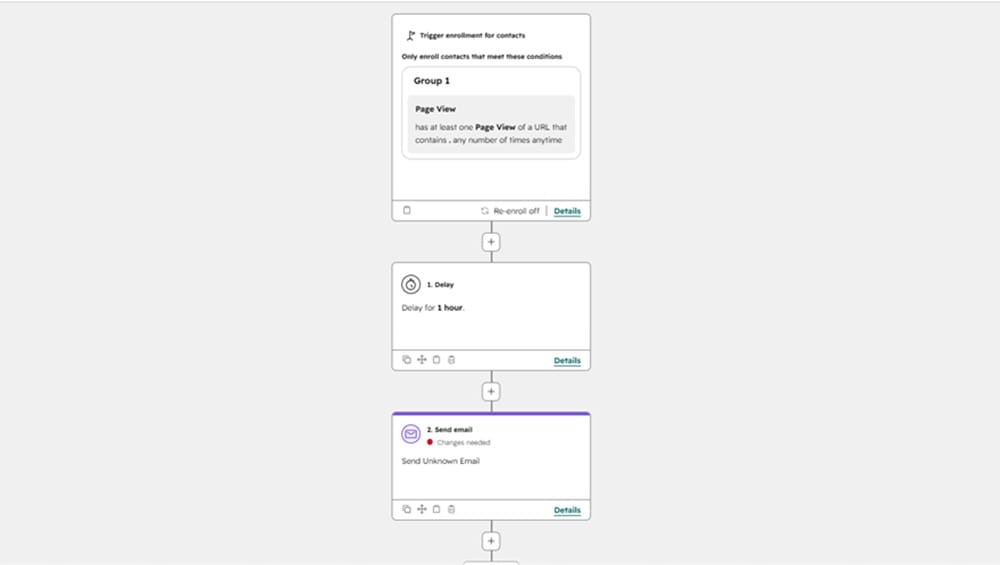
The workflow supports split logic with if/then rules. This allows you to take customers through personalized journeys based on their unique behaviors on your website.
The platform supports multi-channel marketing automation, too. It lets you create automation workflows for email, web chat, paid ads, and social media campaigns.
The automations deliver relevant content depending on the pages customers visit. But to make sure hot leads don’t cool off, HubSpot alerts sales reps when leads visit high-intent pages.
The automated lead scoring engine creates a list of leads based on how sales-ready they are. This is useful to a small business owner, since it helps you prioritize your marketing efforts and budget on leads who are ready to buy.
HubSpot’s AI, Breeze Assistant, is another tool that adds efficiency to your day-to-day business operations. It gives you access to expert advice, which is useful since most small business owners have to wear many hats.
The assistant knows your CRM data, business offerings, and target audience.
You can create entire campaigns by simply prompting the Breeze Assistant. It also tracks and reports campaign performance, delivers personalized campaign suggestions, and builds AI agents based on your prompts.
Unfortunately, you don’t get unlimited access to the Breeze Assistant when you pay for HubSpot. The assistant uses HubSpot credits. The plan you pick determines how many credits you get.
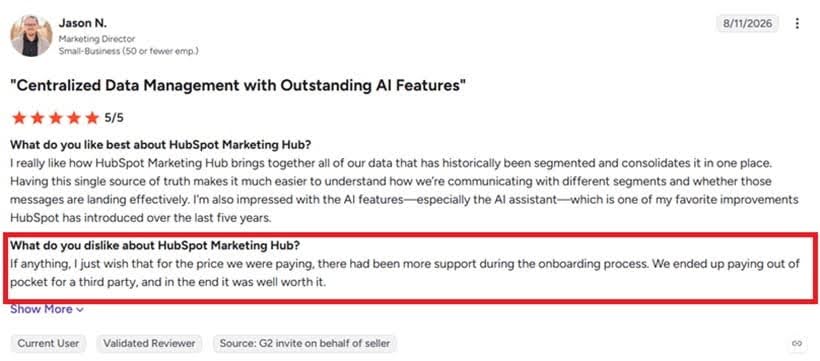
Also, the vastness of features means HubSpot has a bit of a learning curve. Some businesses are forced to pay for third-party consultants to set up their campaigns, as this HubSpot user explains on G2.
Key features
- AI-powered segments – Use AI to uncover lucrative patterns within your customer database for effective segmentation and selling.
- Ad management platform – Create and manage ads across multiple platforms, including Meta, Google, TikTok, and LinkedIn.
- Prospecting agent – Finds leads who are ready to buy and sends them personalized outreach messages automatically.
- Marketing analytics – Track campaign performance with detailed analytics and revenue reports.
Limitations
- More expensive than other marketing automation solutions
- Has a learning curve
Pricing
Simple marketing automation is available on the Starter plan. The plan costs $7 per seat per month. It offers 500 HubSpot credits and supports email campaigns, live chat, CRM segments, and ad retargeting.
But that plan only includes basic automations. Advanced personalization, lead scoring, and omnichannel marketing are in the Professional plan, which starts at $800/mo for three seats and 3,000 HubSpot credits.
The Professional plan also includes an agent hub where you manage all your sales and marketing AI agents. It also supports custom reporting and lets you organize users into teams.
3. Kit – Best for creators
G2 rating: 4.4 Capterra rating: 4.6
Kit is a decent option if you run a small business in the creator economy and are mostly interested in email automation.
The platform is specifically designed for creators. It targets artists, authors, YouTubers, online course creators, coaches, and podcasters, to name a few.
Kit’s email marketing automation software creates personalized journeys based on engagement levels, purchases, and clicks from your subscribers. It offers a visual automation builder, which most creators find easy to use.
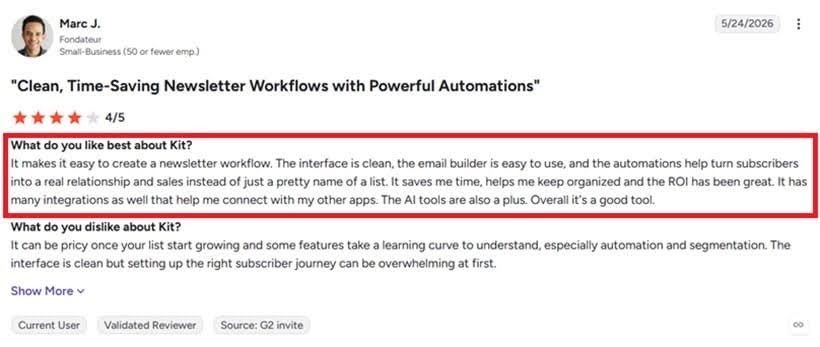
The platform provides a good selection of automation templates for popular creator campaigns. Think product launches and courses.
Additionally, it connects with other creator platforms to power automation campaigns. It connects with Thinkific, Calendly, Linktree, Mighty, and Shopify, for example. Subscriber behavior on those platforms triggers relevant automated workflows on Kit.
This improves subscriber engagement. More importantly, it turns engagement into revenue.
With Kit, you also get access to creator-specific tools that other marketing automation software on this list do not provide. For example, it lets you collaborate with other creators to cross-promote your newsletters, courses, and other products.
And it offers multiple ways to earn from your subscribers.
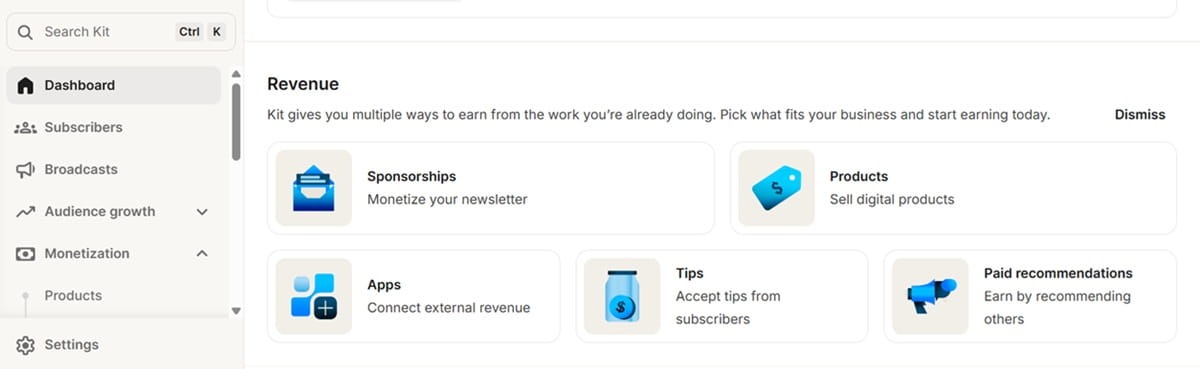
It generates audience reports in just a few clicks. The reports are detailed, showing information like the percentage of high earners, household income, and median age. These reports make it easier for you to prepare pitch decks for newsletter sponsorships.
Key features
- Tagging – Tag subscribers based on their behavior and preferences to target them with relevant content.
- Lookalike audience campaigns – Use your list of highly engaged subscribers to run targeted paid campaigns on Facebook and Instagram.
- Sell digital products – Kit lets you monetize your knowledge by selling memberships, digital products, and subscriptions.
- Subscriber signals – It alerts you when someone influential joins your subscriber list.
- Kit MCP – Connect your Kit account to ChatGPT or Claude to use the AI tools for campaign analysis and brainstorming.
Limitations
- Gets expensive as your email list grows
Pricing
Kit has a free forever plan, but it only supports one visual automation workflow.
Unlimited automations are available on the $33/mo Creator plan. This accommodates 1,000 email subscribers and offers unlimited email sequences, SMS marketing, survey polls, and the Kit MCP.
Subscriber Signals, engagement analytics, insights dashboards, and collaborative editing are available on the $66/mo Pro plan.
Like Kit, GetResponse also offers a content monetization tool. It lets you build premium newsletters, subscriptions, and online courses. The tool also gives you unlimited access to marketing automation tools to promote digital products.
4. Brevo – Best for free multichannel automation
G2 rating: 4.5 Capterra rating: 4.6
Brevo supports free omnichannel marketing automation across email, SMS, and ad retargeting. The automations are limited to up to 2,000 contacts, but they support multiple entry points, real-time triggers, and pathway reporting.
If you upgrade to the paid plans, you unlock additional tools like live chat, WhatsApp marketing automation, landing pages, pop-ups, and web push notifications.
Brevo has a built-in customer relationship management and data platform. These are available as add-ons. Though they add to the total cost, they simplify automated marketing campaigns by bringing the customer data needed for automations inside the platform.
The platform lets you build and orchestrate automation journeys across the different channels from one editor. It offers an AI that simplifies this process even further. Describe to the AI what campaign you want, and it creates the marketing workflow for you.
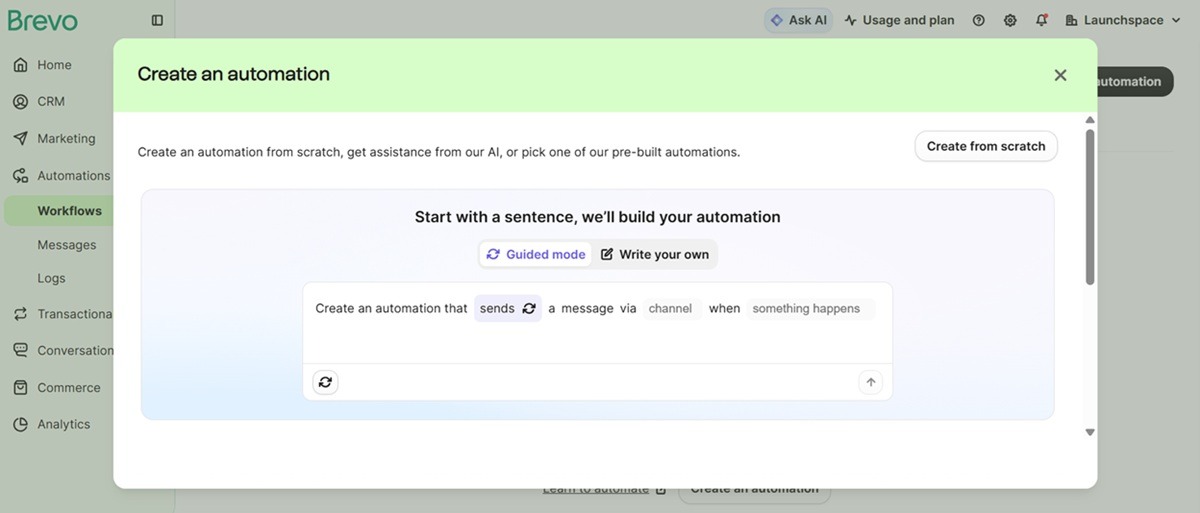
The AI, called Aura AI, also helps with generating campaign content.
Designing the emails is also easy, thanks to the drag-and-drop email builder. Brevo offers a decent selection of email templates to pick from, too.
Brevo supports web and event tracking. The platform monitors on-site behavior of your customers. This triggers relevant automated campaigns.
Tracking insights also support precise behavioral segmentation.
Brevo offers detailed analytics to track your automated campaign’s ROI. It lets you pick the conversion metric that matters to you, like a purchase or signup, and track how each channel and campaign performs.
The marketing analytics include click heatmaps, device reports, and custom and prebuilt reporting dashboards.
Beyond marketing and CRM, Brevo offers a sales management solution and a customer loyalty program builder.
Key features
- Send time optimization – Auto-optimize send times to ensure your marketing campaigns are delivered at the right time for maximum engagement.
- Advanced segmentation – Segment your audience based on engagement levels, demographics, website activity, and custom events.
- Contact scoring – Scores contacts based on their actions and engagements. Scores trigger specific automations and segmentations.
- Transactional messages – Send transactional campaigns via email, SMS, or WhatsApp using Brevo.
Limitations
- The jump from the Standard plan, which offers some automation features, to the Professional plan, which offers advanced features, is pretty massive.
Pricing
Marketing automation is available from the Standard plan, which starts at $16.17/mo. This is super affordable, but that plan doesn’t support contact scoring or AI segmentation.
For those features, you need the professional plan, which goes for $449.08/mo. This plan also unlocks WhatsApp, pop-ups, and mobile and web push notifications.
For comparison, GetResponse’s $48.38/mo Marketer plan includes unlimited pop-ups, forms, and push notifications.
Still, Brevo’s Professional plan provides additional features like an AI data analyst, phone support, deliverability support, and multi-user access for up to ten seats.
An enterprise plan is available at a custom price if you want tailored onboarding, a dedicated IP address, a loyalty program, and multi-account management for managing multiple businesses.
The sales platform is available as an add-on, starting at $27.92/mo on the Standard plan and $58.50/mo/user on the Professional plan.
5. Klaviyo – Best for ecommerce automation
G2 rating: 4.6 Capterra rating: 4.6
Klaviyo is a popular marketing automation platform among online stores built on Shopify. It supports automation campaigns across email, SMS, WhatsApp, and mobile apps.
The platform offers prebuilt automation templates. These templates are fully customizable through the visual automation builder.
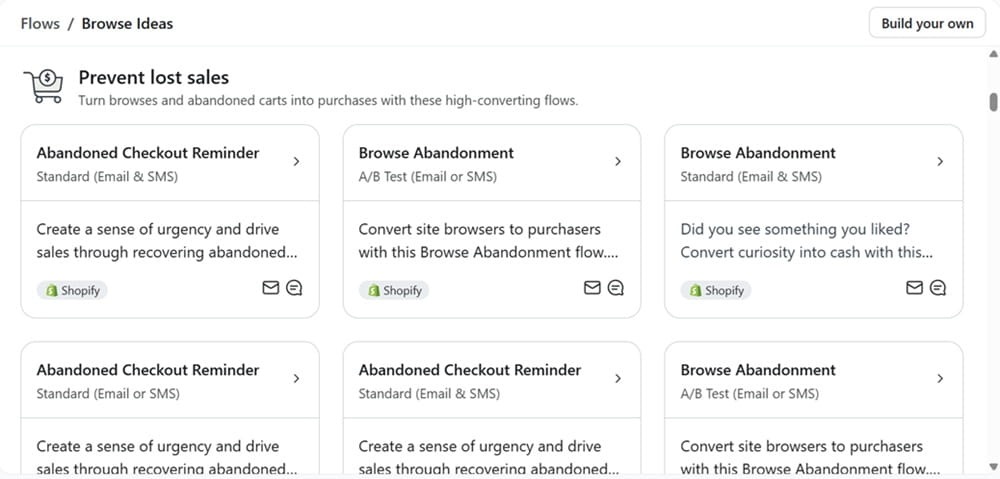
The builder lets you orchestrate multi-channel automations within a single workflow. You can have one workflow that sends email, SMS, WhatsApp, or push notifications based on the channel each customer prefers.
Klaviyo AI is very helpful with campaign creation. It uses your prompts to create workflows. The same AI tracks customer behavior to understand their preferred channel. That data is used to determine where your marketing messages are deployed.
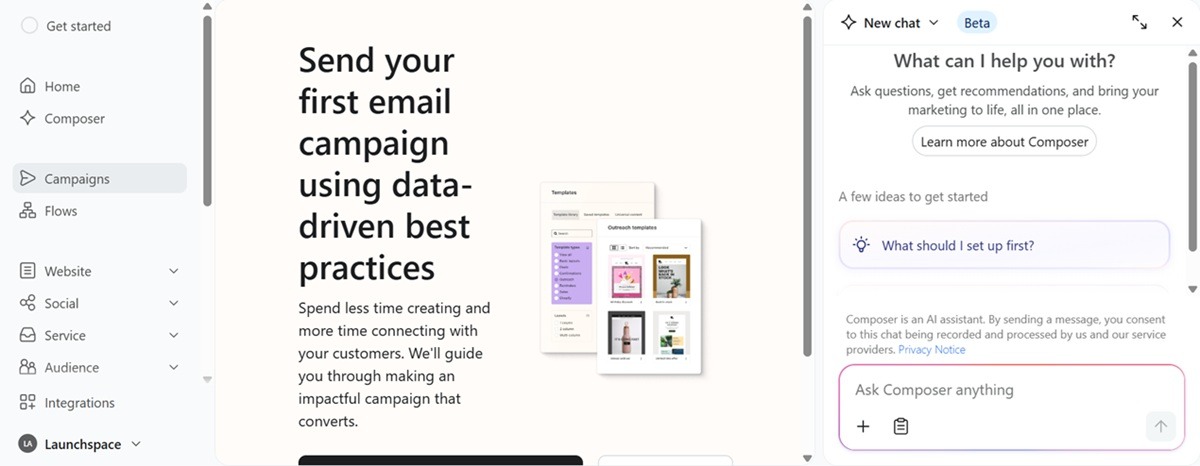
Klaviyo offers an AI marketing agent called Composer. The agent is always working in the background to identify your biggest selling opportunities. It suggests improvements to your existing flows, segments, and campaigns.
You can also prompt it to create specific campaigns. It uses data on your audience, business context, and performance history to create campaigns in your own brand voice.
Klaviyo offers an advanced data management platform for brands that prefer to house and manage their data within the platform. The CDP supports deeper personalization since all the data lives in one place.
It also simplifies automation campaigns by reducing reliance on integrations, which sometimes break and affect campaign delivery.
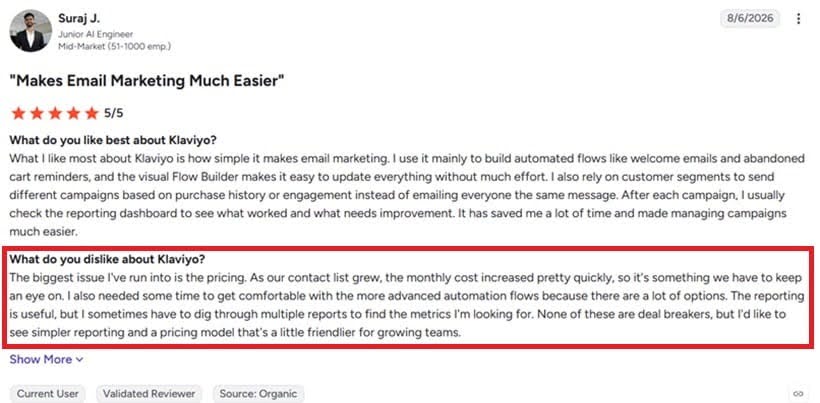
The problem, however, is that the Klaviyo data platform is quite expensive. Pricing starts at $500/mo.
And it’s not the data software alone. The whole Klaviyo platform is quite expensive, as Suraj notes below.
Key features
- Marketing analytics – Offers detailed analytics, including custom reports to track metrics that matter to your business.
- AI-powered segments – Let Klaviyo AI analyze your customer database to suggest relevant customer segments that match your business goals.
- Mobile-app marketing – Engage customers through mobile push notifications and in-app pop-ups on iOS and Android devices.
- Reviews platform – Collect and display product reviews on your website.
Limitations
- Has a learning curve
- Gets expensive as your list and needs grow. Check out our review of Klaviyo alternatives if pricing is a deal breaker for you.
Pricing
Paid plans for email marketing start at $45/mo. This includes 15,000 monthly emails sent to up to 1,500 subscribers. It offers predictive analytics, AI-generated segments and content, and the marketing agent that allows you to create workflows and forms.
The Composer marketing agent is available as a separate package starting at $14 for 2,000 credits.
SMS marketing is also sold separately, going for $15 for 1,000 messages.
The Reviews platform starts at $25 for 250 monthly orders.
Advanced Klaviyo CDP starts at $500 for 100,000 customer profiles. Meanwhile, marketing analytics that offer advanced revenue attribution, predictive insights, and RFM analysis start at $100/mo for up to 13,500 active profiles.
6. ActiveCampaign – Best for AI-supported automations
G2 rating: 4.4 Capterra rating: 4.6
ActiveCampaign is an AI-powered marketing automation platform. It has a very well-integrated AI system that basically lets you run all your marketing automations through prompts.
As such, ActiveCampaign can be a good option for the small business owner who doesn’t want to spend much time creating campaigns or analyzing performance. The AI, called Active Intelligence, can do all that.
ActiveCampaign provides a visual automation builder, but you can set your business goal and let the AI create the workflows. The workflows are customizable so you can always go in to make any tweaks you want.
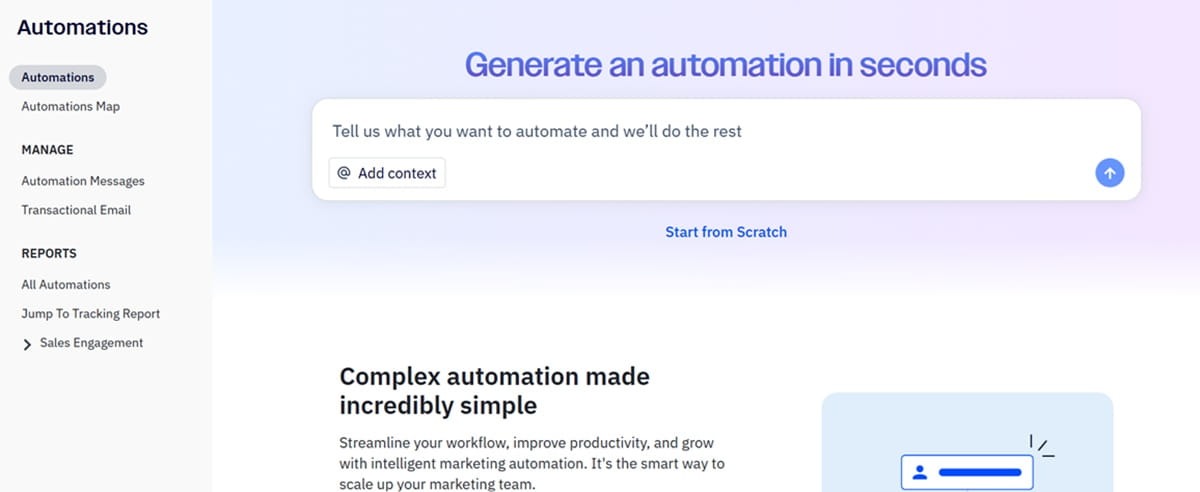
Active Intelligence tracks all your business goals, even after executing the automation campaigns. It monitors progress and will occasionally alert you with suggestions that bring you closer to hitting your goals.
The suggestions are not just based on your business or campaign performance. The AI also uses anonymized data from other businesses like yours. So it recommends campaign improvements based on what it has seen work with other similar businesses.
The platform also offers AI agents that track your audience and engagement levels. It notifies you when it uncovers customer segments that can be lucrative. It tells you what those segments are and the campaigns you could run to generate revenue.
It also monitors engagement to see when customers open your campaigns and the channels they use the most. These insights are used to optimize send times and channel selection.
And the AI makes campaign adjustments in real time based on performance.
ActiveCampaign supports omnichannel automations. You can include email, SMS, and WhatsApp marketing automations in the same workflow. It makes automations easier to manage.
Key features
- 350+ integrations – Connects to your CRM, ecommerce, and other tools to ensure seamless automations.
- Branching paths – Take customers through personalized journeys based on their preferences and engagement behavior.
- Event tracking – Tracks customer behavior on your website and uses the insights, like the pages they visit, to personalize campaigns.
- Marketing attribution – Shows the specific campaigns and automations that generate the highest ROI.
- Conditional content – Send customers different content based on user data, actions, and segments.
- CRM – Built-in CRM stores the customer data needed for automations.
Limitations
- Lead scoring is only available with the Sales tool add-on.
- Users have also complained that it is expensive.
Pricing
Multi-step marketing automation is available on the $15/mo starter plan. But this plan has limited segmentation.
Active Intelligence capabilities are also limited, and it only supports five actions per automation.
Automation actions are what happen when an automation is triggered. The limit means you can’t build long, complex automation journeys.
The Plus plan starts at $49/mo. It offers unlimited automation actions and provides access to the landing pages tool. Active Intelligence is still limited on this plan. Conditional content and predictive sending are not supported here.
You’ll need the $79/mo Pro plan to access conditional content, predictive sending, and full access to Active Intelligence.
For context, conditional or dynamic content and perfect timing (similar to predictive sending) are available on the $48.38/mo plan on GetResponse.
Still, ActiveCampaign’s Pro plan gives you automation maps, which show how your different workflows are connected.
The Enterprise plan is available for $145/mo. It supports advanced integrations with premium CRM platforms like Salesforce and Microsoft Dynamics.
These plans support campaigns across email, website, push notifications, and forms. WhatsApp messaging and SMS campaigns come as add-ons.
7. Customer.io – Best for HIPAA compliance
G2 rating: 4.4 Capterra rating: 4.7
Customer.io is a marketing automation platform worth considering if you run a small business in the healthcare industry, where HIPAA compliance is important. Customer.io supports HIPAA compliance on Premium and Enterprise plans and lists GDPR, CCPA, and SOC 2 Type II compliance.
Additionally, Customer.io has a startup program for businesses that have raised less than $10M in total funding. Eligible startups can get up to 12 months of Customer.io for free. That free plan automates email, SMS, and push notifications. It also gets you access to their AI agent.
Customer.io’s automation platform starts by unifying your customer data. It connects to your current tech stack to collect and enrich your customer data. The platform uses prebuilt integrations, webhooks, APIs, and SDKs to pull the data.
The unified data is then used to create AI-powered segments and multi-step automation campaigns.
It offers a visual workflow builder.
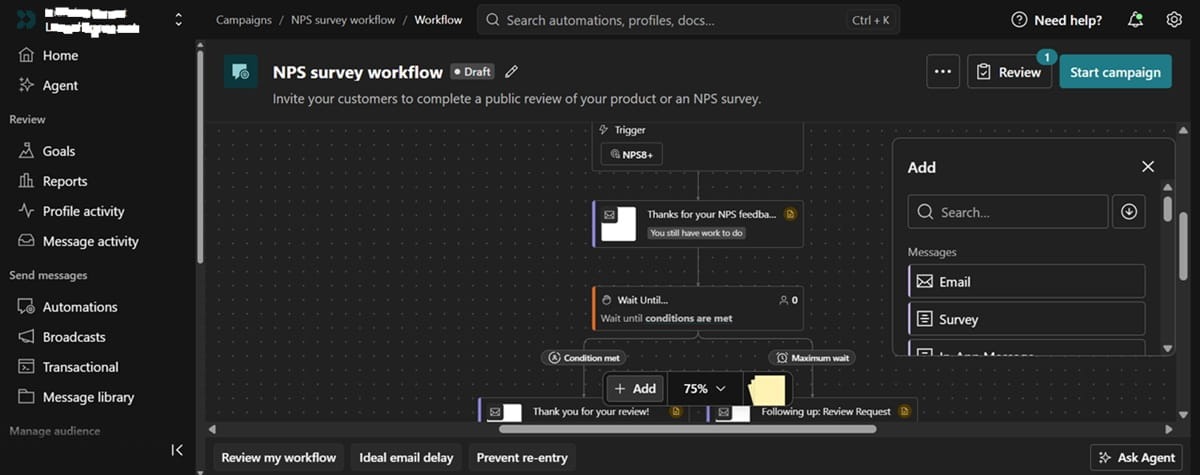
You can prompt the AI within the workflow builder. It provides action recommendations based on the event data and customer context.
The platform also supports real-time lead scoring. It automatically launches lead-nurturing sequences when customers hit a particular score.
You can set up the platform to send you a list of hot leads that need following up on. The leads can also be routed to your sales reps if you have a sales department.
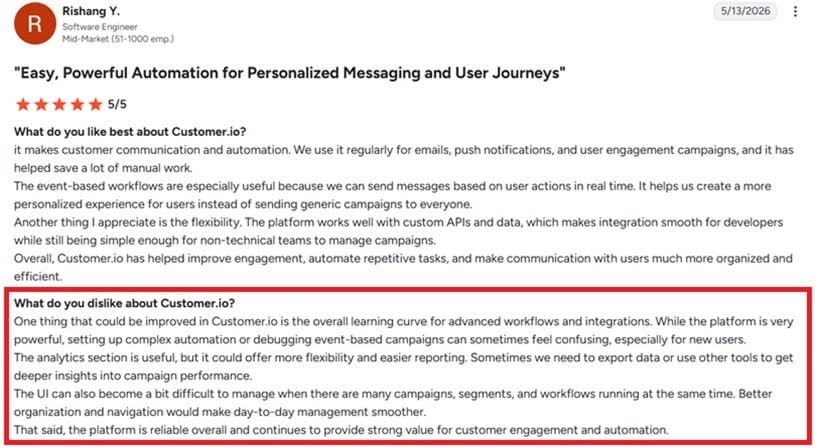
In terms of limitations, pricing and the learning curve for advanced workflows are some of the issues users point out on Reddit and G2.
Key features
- Dynamic customer segments – Uses real-time customer actions and behavioral attributes to segment customers. It also syncs these segments with ad platforms for paid retargeting campaigns.
- Multivariate testing – A/B test workflows to determine what resonates best with your target customers.
- Transactional messages – Send transactional email and SMS messages for order receipts, shipping updates, and account activations.
Limitations
- HIPAA compliance is only available on Premium and Enterprise plans.
- A fairly steep learning curve
Pricing
Plans start at $100/mo for 5,000 profiles and up to 1 million emails per month. This makes Customer.io slightly more expensive than other solutions on this list.
For context, GetResponse costs $77.90/mo for the same 5,000 contacts, plus unlimited monthly email sends. MailerLite costs $62.10 for 5,000 contacts and unlimited sends.
That $100/mo plan includes the AI agent, visual workflow builder, and basic data integrations.
The Premium plan starts at $1,000/mo. Email volume and contact profiles are customized to your usage on this plan. The plan is HIPAA-compliant and supports advanced agent capabilities with custom skills.
It also comes with 90-day onboarding support and premium chat and email customer support.
An enterprise plan is available for when your small business grows into a larger brand that requires enterprise-grade tools.
8. MailerLite – Best for affordable marketing automation
G2 rating: 4.6 Capterra rating: 4.7
MailerLite is an affordable automation tool that helps you nurture leads, recover lost sales, and drive customer loyalty.
The platform has an easy-to-use drag-and-drop automation builder. It lets you use different triggers like link clicks, cart abandonment, form field updates, and product purchases to activate automations.
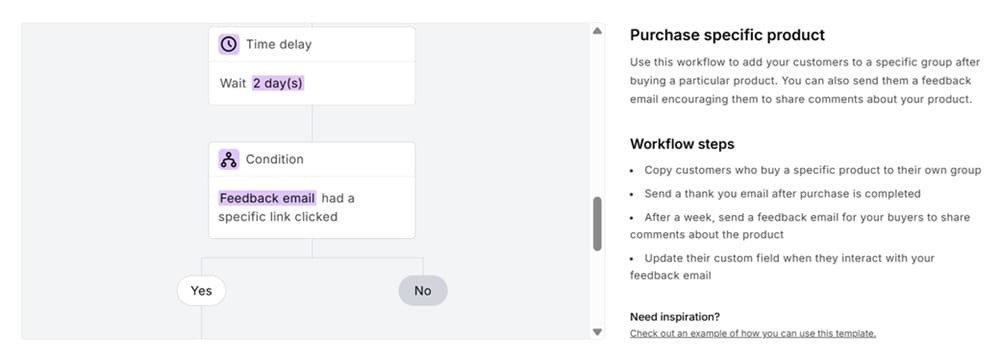
Also, it doesn’t limit you to just one trigger per automation. Customers can enter the same workflow from multiple triggers.
This feature reduces the number of workflows you need to build and maintain.
You can also use dates as workflow triggers. This helps with anniversary and happy-birthday campaigns, which are vital for customer retention.
The platform supports dynamic email content. This lets you display different types of content to different audiences based on their segments and attributes. It personalizes the customer journey to increase engagement and conversions.
Key features
- Pre-defined segments – Provides the most popular customer segments to speed up the segmentation process.
- A/B tests – Test subject lines, send times, and email content to optimize campaign performance.
- MCP – Connect MailerLite to ChatGPT, Claude, or Gemini to use the AI tools as your marketing assistant.
Limitations
- Users have complained of poor customer support.
Pricing
MailerLite is a cheap marketing automation platform with a competitive plan starting at $10.80 for 50 visual automations.
That price supports 500 subscribers and 5,000 monthly email sends. It includes multivariate testing, smart sending, an AI writing assistant, and unlimited automation templates.
Even MailerLite’s free plan supports up to three active automations. But it limits you to 250 subscribers and 2,500 email sends per month.
It doesn’t support A/B testing, and campaigns carry the MailerLite branding.
The Power plan is the highest-tier MailerLite plan starting at $22.50/mo for 500 subscribers and unlimited email sends. It’s the only plan that supports multiple automation triggers and 24/7 live chat support.
9. Sender – Best for free email automation
G2 rating: 4.7 Capterra rating: 4.7
Sender supports both email and text message automation. It’s one of the more affordable automation platforms on this list, with paid plans starting at $7/mo. Their free plan is pretty decent too.
Ecommerce brands use it as a mass email sender and to automate lead nurturing, abandoned cart recovery, winback campaigns, and customer feedback collection.
Besides ecom brands, it supports marketing automation for small businesses like agencies, restaurants, SaaS, nonprofits, and startups.
It offers a visual automation builder that supports split logic.
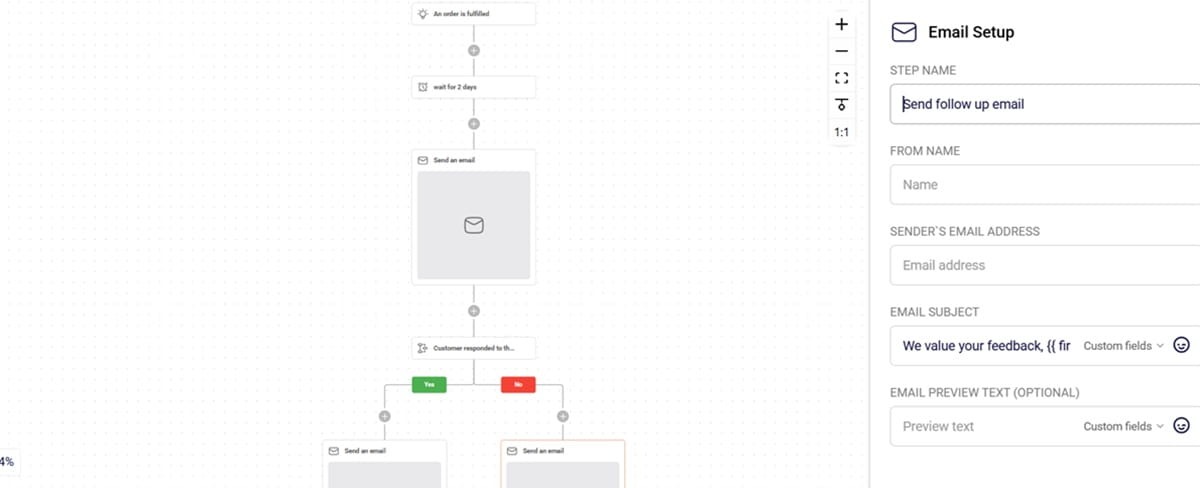
The platform comes with several prebuilt automation templates to get you up and running quickly. You’ll find templates for welcome series, customer onboarding, post-purchase campaigns, and re-engagement series.
It also lets you set up custom automation triggers and has an auto-resend feature that resends campaigns to subscribers who didn’t open.
You can also run split tests inside automations. This lets you test different workflow paths to determine what journeys generate the most revenue.
Key features
- Dynamic content – Include different content in every email depending on the recipient’s attributes, purchase history, and behavior.
- Time delay – Delay campaigns to avoid overwhelming recipients and make sure messages are sent when customers are most likely to engage with them.
- Dynamic personalization – Pulls product data and customer attributes to personalize campaigns.
- Behavioral targeting – Tracks customer behavior like link clicks, cart activity, and website visits to deploy relevant workflows.
Limitations
- Automation templates are pretty limited.
- Some users, like this G2 member, have complained of poor “robotic” customer service.
Pricing
Sender has a free forever plan that supports email automation for up to 2,500 subscribers and 15,000 monthly email sends. It includes signup forms, pop-ups, and landing pages.
Paid plans start at $7/mo. This unlocks A/B testing, SMS messaging, unlimited email and pop-up templates, and unlimited landing pages. It removes the Sender branding and lets you send up to 12,000 emails per month to 1,000 subscribers.
Monthly email sends are 12X your list size. So you get 60,000 email sends when your list grows to 5,000 subscribers, and you pay $23.10/mo.
The professional plan starts at $14/mo for 1K subscribers and 24K email sends. This unlocks additional features like advanced email editor tools (like countdown timers and review blocks), multichannel automation, priority support, and advanced reporting like ecommerce sales reports.
An enterprise plan is available at a custom price if you need advanced user permissions, a dedicated success manager, and activity logs for auditing.
Pricing for SMS marketing starts at $0.015 per SMS.
10. Mailchimp – Best for simple multichannel automation
G2 rating: 4.4 Capterra rating: 4.5
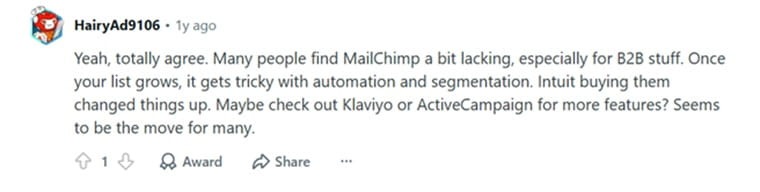
Mailchimp is considered a good marketing platform for when you’re getting started. But as many Reddit users and G2 reviews point out, the platform gets expensive fast as your contact list grows and your business needs evolve.
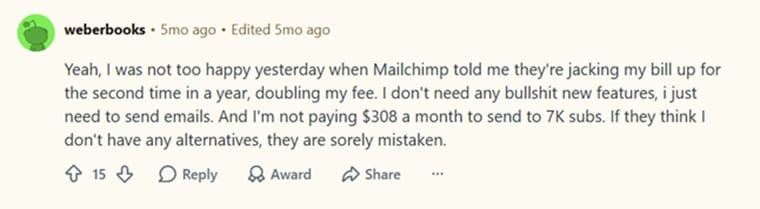
Additionally, some people report that Mailchimp’s automation software is not very flexible for complex campaigns compared to other alternatives like Klaviyo and ActiveCampaign.
That said, Mailchimp does provide decent marketing automation tools that most small businesses will find sufficient for their needs. Prices also start at $13/mo, which is accessible for budget-conscious brands.
The automation builder itself supports drag-and-drop functionality. You don’t need any coding skills to create or launch workflows.
Flow templates are available for all popular campaigns.
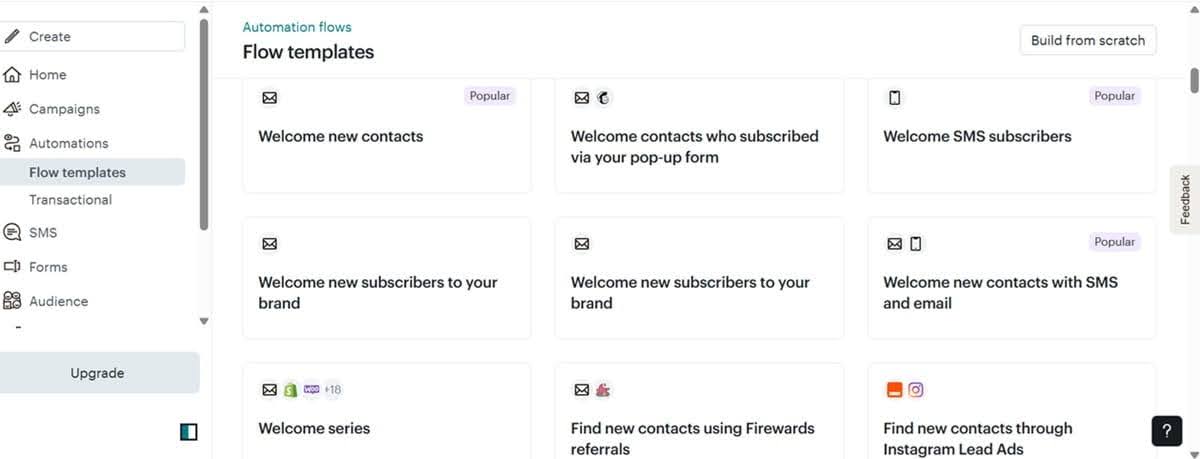
The automation builder supports multichannel campaign orchestration. It lets you create workflows for email, SMS, and social campaigns.
Mailchimp tracks customer activities on your website through a tracking pixel. The platform looks at the pages your customers visit and the products they add to carts. That data is used to deploy relevant automated campaigns like browse and cart abandonment sequences.
The platform comes with an AI assistant called Intuit AI. Intuit AI can create workflows and emails from scratch. It also generates and repurposes email content for other channels like SMS and social media.
Additionally, it explains campaign performance, showing you what’s working and where you need to improve.
Key features
- Send time optimization – Tracks best days and times to send emails for maximum subscriber engagement.
- A/B testing – Test different content and automatically send the winning content to your subscribers.
- AI-powered analytics – Provides insights showing which customer journeys have the highest ROI. It also shows the channels where your best customers come from.
- Predictive segmentation – The AI predicts your customers’ future buying behavior and uses the insights to segment and target them with tailored content.
- Audiences – Separate your contacts into different audiences for better contact management. The drawback with this feature is that if you have the same contact in two audiences, they’ll be counted twice. This adds to how much you pay.
Limitations
- Gets expensive with list growth
- Not very flexible for complex automations
Pricing
The Essential plan starts at $13/mo for 500 contacts and 5,000 email sends per month. This supports up to 4 flow steps in the workflows.
It doesn’t support dynamic content, custom reports, delivery by time zone, or send time optimization.
All those features are available on the Standard plan, which starts at $20/mo for 500 contacts and 6,000 emails per month. This plan comes with 200 flows, multivariate testing, behavioral targeting, multiple entry points for automations, and predictive segmentation.
The Premium plan starts at $350/mo. Mailchimp’s pricing page lists Premium with a 10,000-contact base plan and a 15X monthly email send limit. It includes up to 200 flows, four personalized onboarding sessions, premium migration services, and unlimited audiences.
How to pick the right marketing automation tool for your small business
There’s no single marketing automation platform that’s “best” for every small business. That’s why knowing what truly matters when picking a marketing automation software solution is so important.
It helps you understand how these tools work so you can pick the right one for your unique business needs.
Quick checklist: prioritize pricing, automation depth, ease of use, scalability, integrations, and reporting before choosing a platform.
Pricing
Most marketing automation solutions charge based on your contact list size. Some, like Klaviyo, also limit how many emails you send per month.
Ideally, you want a platform whose pricing is only influenced by subscriber count. That way, you never have to worry about hitting your sending cap.
This is especially important during peak shopping seasons like Black Friday and Cyber Monday, when businesses send lots of campaigns in the days leading up to and during BFCM.
The other thing to consider is the value you get for how much you pay.
Instead of optimizing for the cheapest automation tool, find one that gives you the critical automation features you need at a good price.
We recommend unlimited automation flow steps, split logic, and multichannel automation on whatever tool you pick. These features are crucial for personalized automation campaigns that actually generate revenue.
Marketing automation features
Does the platform provide advanced automation capabilities to support personalized customer journeys? And at what price points do those features come in?
Here’s why you must consider both elements.
Mailchimp’s Essential plan limits you to only four automation flow steps. That means you cannot build long and complex automation flows unless you upgrade to higher-tier plans.
In addition to split logic and multichannel automation, you need:
- Visual flow builder – This simplifies the flow creation process so you don’t waste time building campaigns.
- Multiple entry points – It lets customers activate the same workflow through several triggers. This saves you time. You are not forced to create several flows for every possible entry point.
- Dynamic content – It makes sure your flows deliver different content to different users based on their attributes.
- Time delays – This gives you control over when campaigns are delivered.
- Frequency control – It stops you from overwhelming subscribers with too many automated campaigns. The best platforms enforce frequency limits by channel and contact.
- Multivariate testing – It lets you test different workflow paths to find the highest ROI options.
- Revenue attribution – It tracks revenue by workflow, so you know what paths and campaigns drive sales.
Note that advanced capabilities like revenue attribution and multivariate testing are usually only available on the premium plans.
Ease of use
As a small business owner, you don’t have time to dig through technical documentation to understand how a platform works.
Look for a solution that has a visual, drag-and-drop builder with relevant workflow templates you can pick, customize, and deploy within minutes.
The solutions we’ve covered above all have visual builders. Some, like GetResponse, Klaviyo, and ActiveCampaign, also offer AI assistants that create workflows.
Scalability
Your goal is probably to grow your business. As that happens, the marketing automation platform you have should accommodate the growing needs. And that should happen without massive price jumps.
So consider your future needs. Maybe you’re okay with capped monthly email sends and only 4 workflow steps today. But what happens 12 months from now when your subscriber and customer base grows?
You don’t want to go through a platform migration headache if you can avoid it now. Pick a platform with your future needs in mind.
Integrations
Make sure the platform you pick connects to your existing marketing stack. This is particularly crucial if you use niche platforms like Ecwid, Faire, and Printful.
Though you can use Zapier as a connector, that adds extra cost to your limited budget.
Reporting and analytics
Finally, get a marketing automation platform that delivers actionable insights. The ability to create custom reports and dashboards is also useful. It lets you track the specific metrics that matter to you.
Several platforms use AI to deliver predictive analytics and optimization recommendations. These are nice extras that can give you a competitive edge.
Running marketing automation campaigns for small businesses on GetResponse
Marketing automation software helps you convert leads, recover lost sales, retain existing customers, and increase customer lifetime value on autopilot.
The best solutions personalize campaigns through event tracking and dynamic content. So you’re not just automating communications but also delivering personalized customer experiences.
GetResponse offers an affordable marketing automation platform that supports event tracking, dynamic content, and conditional branching. The platform is easy to use with a visual builder and an AI assistant.
Although it’s not the best for everyone, GetResponse is a great choice for any small business owner who wants to automate the entire customer lifecycle.
Small business marketing automation software FAQs
1. What are the best marketing automation tools for small businesses?
The best marketing automation tools for small businesses are GetResponse, MailerLite, HubSpot, Brevo, and ActiveCampaign. Each tool has its strengths and weaknesses. Use our guide to identify the right choice for your business.
2. How do I automate my small business?
You can automate your small business through a marketing automation software solution like GetResponse. These solutions create workflows that track customer behavior on your website. Behaviors like abandoning a cart, making a purchase, or joining your newsletter trigger automated email, SMS, and even WhatsApp campaigns.
3. Can I use AI to automate my business?
Yes, you can use AI to automate business functions and campaigns like customer segmentation, product recommendations, and post-purchase interactions.
ActiveCampaign has a powerful AI that creates automations from scratch and suggests new segments and campaigns. GetResponse offers an AI product recommendation engine that matches your offerings to customer preferences for optimal conversions.
