
Marketing automation helps scale your marketing campaigns while making sure your brand maintains its human touch. It’s about showing up at the right time with the right message to ensure sales-driving opportunities don’t pass you by.
But all of that is only possible when you have the correct marketing automation software solution in place. A system that supports seamless integration with your existing tech stack to pull and use customer data correctly. One whose workflows don’t break randomly, leaving gaps in customer journeys and your team resending campaigns manually.
Our team examined several marketing automation tools that support multi-channel campaigns across email, SMS, push notifications, social media, and paid ads. This article covers the ten best marketing automation software solutions.
TL;DR- The best marketing automation software
Below is a shortlist of the top ten marketing automation tools for 2026, including email service providers, ecommerce automation platforms, CRM-based solutions, and cross-channel workflow tools.
| Platform | Key features | Pricing | Best for |
| GetResponse | Visual drag-and-drop builder for email and web automations, behavioral personalization, and AI product recommendations. | From $48.38/mo | Comprehensive AI-powered email and web marketing automations |
| HubSpot | All-in-one CRM with visual automations, conditional email and form flows, lead scoring, and AI-powered insights. | From $800/mo | Teams already using HubSpot CRM |
| Klaviyo | Multi-channel email, SMS, push, and WhatsApp automations with AI workflows and a built-in CDP. | From $60/mo CDP sold separately | Ecommerce brands |
| ActiveCampaign | AI-powered omnichannel automations with visual workflows, predictive actions, and real-time attribution. | From $49/mo | Sophisticated AI-driven automations |
| Omnisend | Email, SMS, and push workflows with split paths, AI-assisted content, and multi-channel A/B testing. | From $41.30/mo | Ecommerce stores |
| Brevo | Email, SMS, WhatsApp, and push automations with drag-and-drop flows, AI agents, and pathway reporting. | From $16.17 | Multi-channel campaigns |
| Mailchimp | Prebuilt automation templates and drag-and-drop journeys with AI for content, timing, and campaign optimization. | From $20/mo | Beginners and small teams |
| MailerLite | Focused email automations with drag-and-drop journeys, dynamic content, and simple AI-powered workflows. | From $18/mo | Marketing teams interested in email automations alone |
| Zapier | Connect 8,000+ apps with prebuilt Zaps, multi-step automations, tables, and AI agents for workflow building. | From $19.99/mo | Teams using tools with no native integrations |
| Instantly | Deliverability-first cold email sending with an AI campaign builder, automated warmup, and a 450M+ B2B lead database. Rated 4.8/5 on G2. | From $37.6/mo (billed annually) | Outbound sales and cold email automation |
What to look for in a marketing automation system
How do you determine whether a particular automation system is right for your business? Well, here are the key elements to consider when selecting a marketing automation platform.
Automation features
The best marketing automation platforms go beyond basic automation of repetitive tasks. These platforms support complex automation workflows that respond to real-time data and contribute to your company’s bottom line.
For example, a complex automation workflow with split logic can direct leads through different paths based on their actions or behaviors. These workflows provide more value because they don’t lock your leads into a single predefined customer journey.
Remember, your business attracts different types of customers. You need an automation platform that can meet the different needs of your ICPs.
Consider the following automation capabilities:
- Multi-entry point – This allows leads and customers to enter a workflow through different triggers. It’s one of the most efficient ways to run automation campaigns because you won’t have to create and maintain multiple workflows for the different potential entry points or triggers.
- Conditional logic – It allows workflows to take leads through different paths depending on their behavior and actions. It keeps your campaigns personalized by adapting your campaigns to real-time customer behavior.
- Split workflows – Conditional logic works alongside split or branching workflows to help you create multiple paths within a single workflow.
- Multi-step workflows – Multi-step workflows execute several tasks across different systems. For example, when a particular customer converts, it can automatically update the customer data on the CRM, deploy an onboarding workflow, and assign a customer success manager.
AI capabilities within automations can also be a huge plus. GetResponse, for example, has a self-learning AI model that powers personalized product recommendations within automated email and web campaigns. Meanwhile, automation platforms like Klaviyo use AI to analyse customer data and suggest campaign ideas.
Integrations
The success of your automation campaigns relies on your system’s ability to access accurate data. The system must connect with your customer relationship management platform, content management system, analytics platform, and other critical tools within your tech stack.
That’s where an automation platform like HubSpot gets an upper hand over other competitors because those tools are built in. Still, seamless integration can work just as well to ensure your automation system can track the leads captured on your website, add the leads to your CRM system, pull customer data from the CRM to send targeted email campaigns, score the leads, and so on.
Check the supported integrations of the automation platform you want to ensure it syncs with the specific CRM, CMS, and other tools your marketing team uses.
Ease of use
The whole point of investing in an automation platform is to scale your marketing campaigns and free your team to focus on strategic initiatives. But that’ll be difficult to achieve if your team is stranded with a complex platform that requires technical expertise to use.
A complex automation platform can also get expensive if you have to hire a specialist for the role. For example, this is one of the major complaints among Adobe Marketo users, as you can see below.
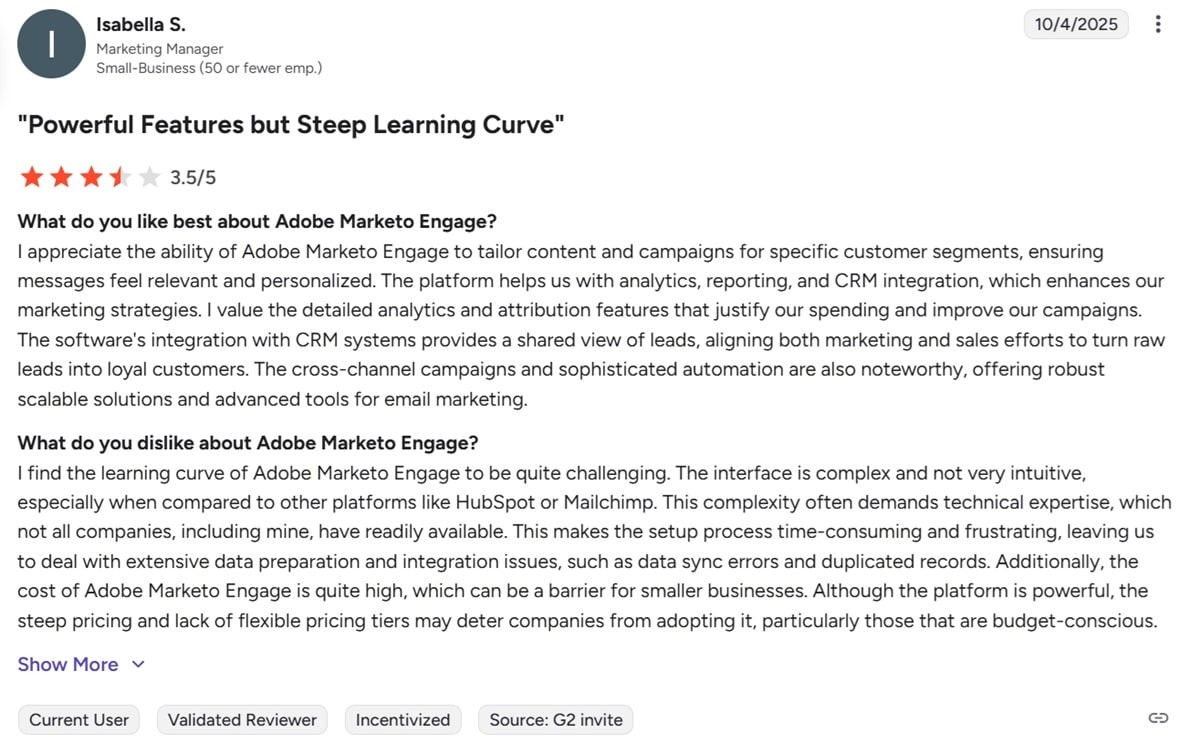
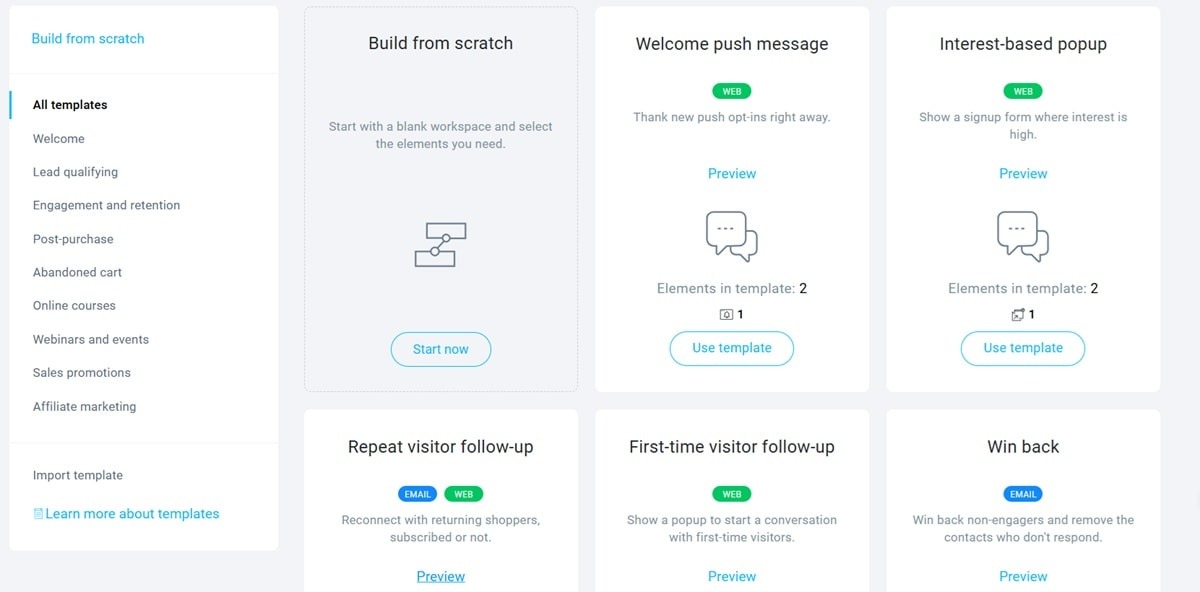
Thankfully, powerful automation capabilities don’t come at the expense of ease of use. Automation platforms, such as GetResponse, provide visual automation builders to enhance this process. They save your time even further by providing pre-built workflow templates for some of the most common marketing automation workflows.
Platforms like ActiveCampaign also provide AI assistants within the automation builder. The AI can create automation workflows from scratch based on user prompts.
Look for a tool with a drag-and-drop automation builder and customizable workflow templates. Clear tutorials, a testing environment for your workflows, and version tracking are also helpful.
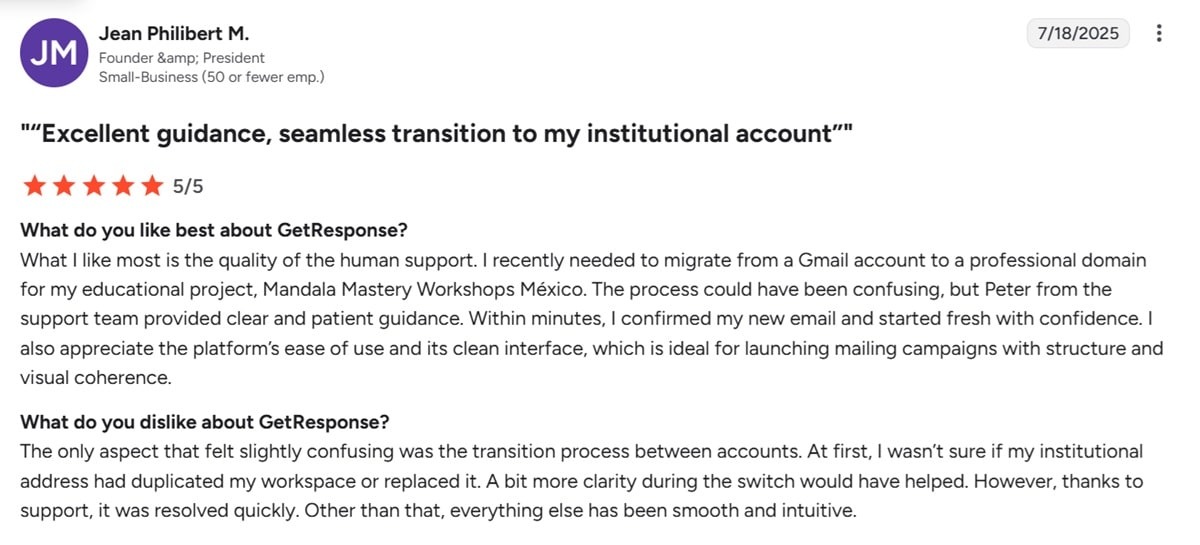
Responsive customer support is crucial when you can’t resolve an issue by yourself. User reviews on G2 should help you determine the responsiveness and helpfulness of your desired automation platform.
GetResponse users constantly commend the platform for its helpful, human customer support team, for example.
Detailed analytics
Detailed analytics help you pinpoint the specific workflows that generate revenue. They show you how leads interact with the different campaigns and where most of them drop off.
More importantly, detailed analytics help demonstrate the ROI of your marketing automation efforts.
Pick an automation platform that offers customizable dashboards showing the key metrics that matter to your team. It must support conversion tracking and attribution reporting. You should also be able to perform path analysis to see how specific campaigns land with customers.
Pricing
Finally, consider what you’re getting for the price. The majority of tools on this list have simple pricing plans where you pay based on the number of contacts on your SMS and email list.
That said, some solutions sell critical solutions as separate add-ons, which can raise the total cost considerably. For example, Klaviyo has a decent automation solution, but advanced analytics and automated customer review requests are sold separately.
1. GetResponse
The best marketing automation platform is easy to use and supports seamless integrations with critical apps to ensure personalized automations that drive sales.
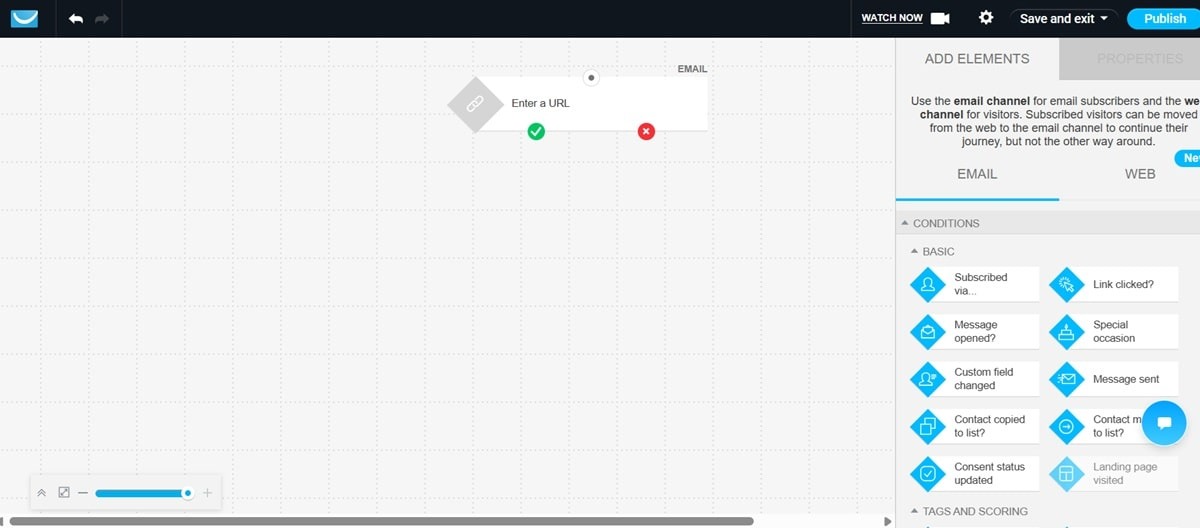
GetResponse offers an easy-to-use automation platform that features a visual drag-and-drop builder. You don’t need any coding skills to create workflows. Simply drag and drop the automation elements to create the customer journeys you want.
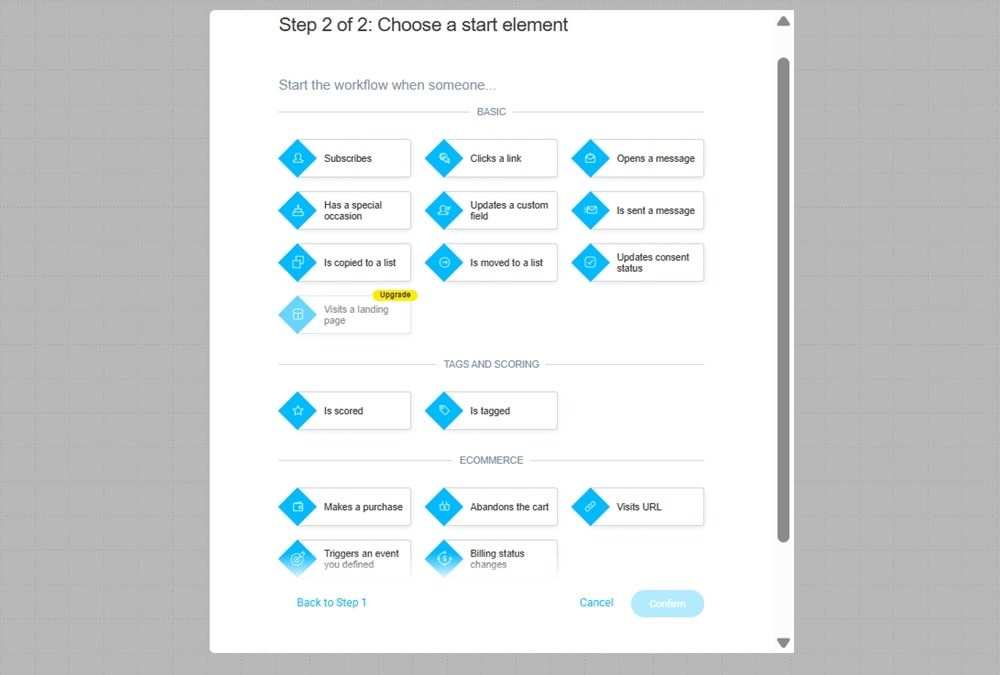
The starting element (or trigger) can be subscribing to your newsletter, clicking a link, visiting a particular landing page, or updating a consent status.
Your workflows can also start when a lead is tagged or scored.
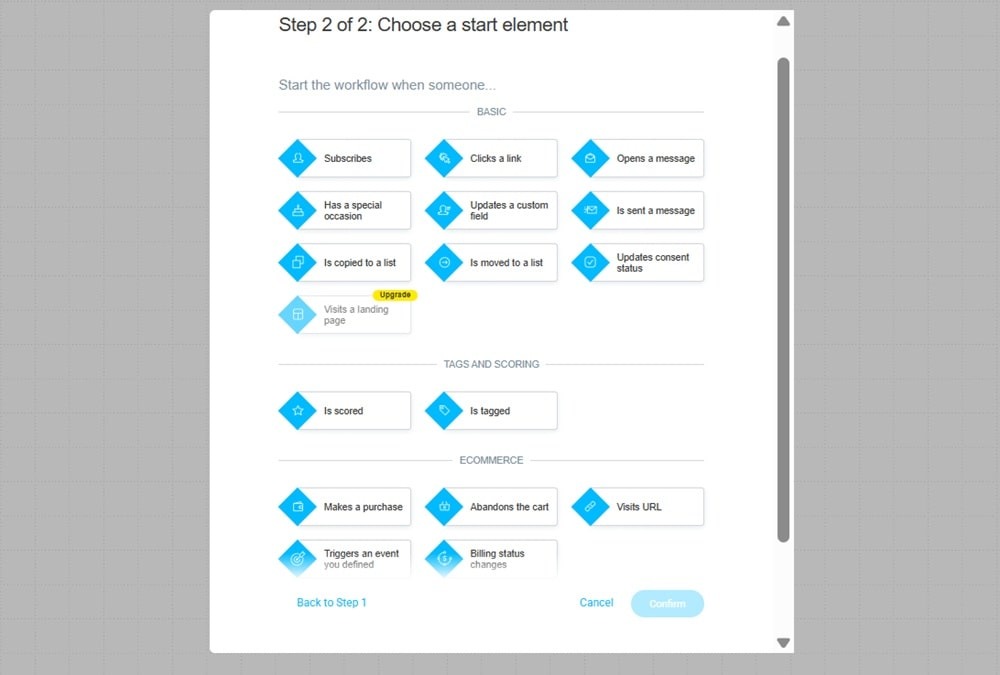
Select the starting trigger, and that will immediately redirect you to our visual automation workflow builder. This builder supports both email and web automation campaigns.
And if you prefer not to start from scratch, we provide various automation workflow templates, covering the most popular campaigns. You’ll find templates for customer retargeting, contact retargeting, rewarding loyal customers, abandoned cart reminders, upselling, post-purchase follow-up, and post-webinar follow-up.
97 to 98% of website visitors leave without sharing their contact details or buying anything. GetResponse’s web automations allow you to engage such leads. And the best part is that you can personalize the web automation workflows based on the specific user actions on your website.
Instead of displaying a generic opt-in pop-up across your entire site, GetResponse allows you to use a personalized, interest-driven pop-up relevant to the page a customer visits. Someone browsing your pricing page would encounter a discount pop-up, for example. While a user going through your blog would be targeted with an informational lead magnet.
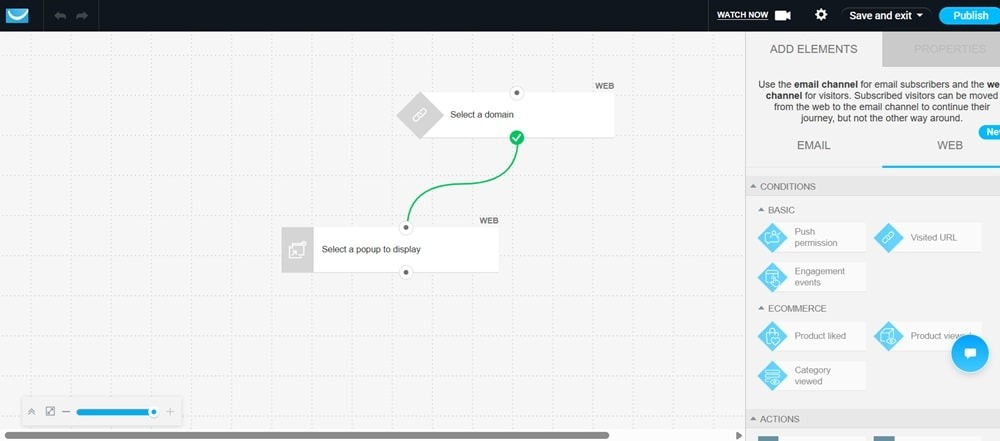
Personalized web automations increase conversions significantly. Plus, you can set up the workflows to detect repeat web visitors who are already subscribed and take them through a different path.
Assume you have a user navigating away from your site after adding items to the cart. If the potential buyer is already subscribed, the workflow deploys a cart abandonment email series automatically. If they’re not, they receive a discount pop-up.
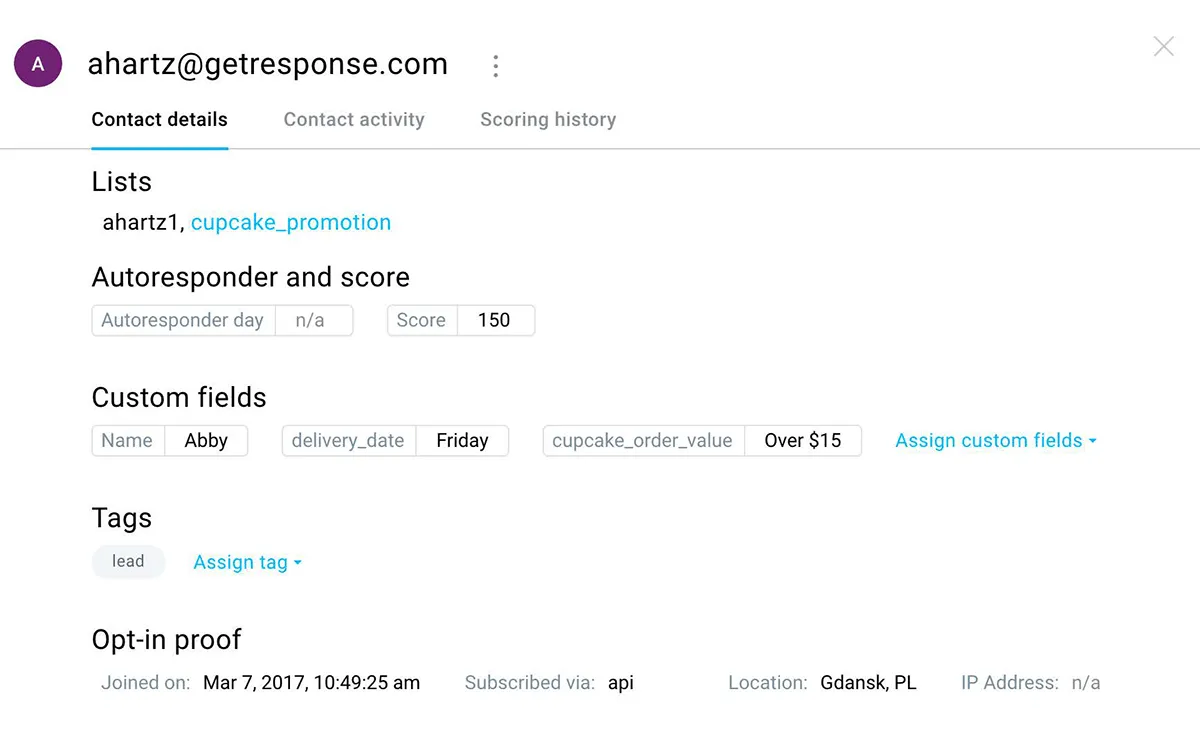
GetResponse’s automation platform also allows you to build customer profiles for better targeting. It lets you use unlimited tags on customers to create precise customer profiles. This is further supported by lead scoring, where you can add points based on customers’ activities on your site and their engagement with your emails.
GetResponse automation learns your customers’ preferences based on their purchase history. Our AI-powered product recommendations engine also tracks customers’ needs and purchasing patterns. These valuable insights are used to deploy personalized product recommendations in emails and on your website.
The self-learning model can detect and recommend items that get the most views within a product category, for example.
Our data shows that personalized product recommendations generate website and email CTR of up to 70% and boost sales by up to 10%. The online store daag used GetResponse automation to generate $17,000 in two days from a single campaign and $87,000 over ten months, for example. Another store, Med & Beauty, made $43,000 in five months with an impressive ROI of 873%.
GetResponse also offers AI features like an AI subject line generator and an email writing assistant.
Other key features
- Supports behavioral targeting, where you can target customers based on how they interact with your site, landing pages, and email.
- Includes sign-up forms and pop-up builder
- Advanced audience segmentation
- Offers an AI-powered autoresponder generator
- Also supports digital ads, SMS, and push notifications
- Offers an AI-powered website builder and a landing page creator
Pros
- Supports unlimited automation workflows
- Includes lots of web and email automation templates
- Supports enterprise-grade omnichannel marketing automation campaigns
- Syncs with 170+ apps, including CRM integrations with HubSpot, Zendesk, and Salesforce
Cons
- The AI recommendations feature is sold separately as an add-on to the GetResponse Max plan.
Pricing
Marketing automation features are available from the Starter plan, which starts at $15.58/mo. The plan includes one custom automation workflow and AI-powered content generators.
The Marketer plan offers more features at a starting price of $48.38/mo. It includes unlimited automation workflows, unlimited web push notifications, abandoned cart recovery, sales funnel, advanced segmentation, promo codes, and revenue reports.
Creators who want to monetize their knowledge can use GetResponse’s Creator plan to create and market their online courses and premium newsletters. You get both the course creator and access to our suite of marketing and automation tools for $56.58/mo.
GetResponse Max provides advanced email and marketing automation capabilities for large enterprises.
Max offers a dedicated sending domain to maintain a stellar sender reputation and a dedicated customer experience manager. It also includes SSO, unlimited users, and mobile push notifications.
The plan is customized to your needs, so book a call with our team to learn how we can support your business.
2. HubSpot
HubSpot’s biggest advantage as a marketing automation solution is that it is an all-in-one platform.
You get a CRM, sales, customer service, and marketing solution within one platform. That means you don’t have to rely on integrations or third-party connectors like Zapier that can break. Your marketing automation workflows access the data they need within the platform.
Of course, that only makes sense if you’re also using HubSpot as your CRM and sales solutions. If not, then not only do you miss out on the platform’s main strength, but you also end up paying a lot more for features you can get at a fraction of the cost with the other solutions on this list.
That said, HubSpot does offer plenty of compelling automation features powered by the CRM data. It all starts with a visual automation builder for email and form automations. The builder allows you to drag and drop triggers and actions to create your automation workflows. It also offers plenty of templates.

HubSpot’s automation workflows support if/then branching rules. This splits paths, taking leads down different customer journeys based on their interactions with your brand.
Form automations can remember returning site visitors. The forms also support conditional logic, so they can adapt to the visitor’s behavior and actions.
For example, a user can be redirected to a meeting link to schedule a call if they meet certain rules. In other cases, form fields disappear or new ones appear depending on the user’s actions. All this delivers a personalized experience that can help you generate more leads.
Speaking of personalization, HubSpot’s email automations allow you to send tailored email content based on the specific pages a customer viewed.
Automated lead scoring is also supported within the HubSpot automation system. The system uses different signals to score leads. You can also set it up such that when a lead hits a particular score, they’re automatically routed to a specific sales rep. This is useful in making sure hot leads do not fall through the cracks.
Other key features
- Supports campaigns across multiple marketing channels email, your website, and social media accounts
- A data enrichment tool automatically enriches customer data to give you more information about your target customers. A similar tool exists for companies. It adds data like revenue, number of employees, and industry.
- Powerful segment analytics show engagement levels and overall performance across customer groups. It also shows overlaps between customer segments.
- HubSpot Breeze brings AI capabilities into the workflow builder. The AI can analyze and summarize data from your workflows to create personalized marketing campaigns.
- Breeze Studio provides HubSpot users access to different AI agents, including a prospecting agent, a personalization agent, a data agent, and a customer support agent.
- Supports social media management
Pros
- An all-in-one platform that brings multiple solutions together
- Access to lots of AI tools through Breeze Studio
- Supports effective lead management
Cons
- Expensive
Pricing
The Starter Individual plan inside HubSpot’s Marketing Hub supports simple marketing automation. It costs $9/mo. Unfortunately, the truth is that most businesses will need at least the Professional plan to build effective and scalable marketing automation campaigns.
The plan supports advanced personalization, lead scoring, custom reporting, omnichannel marketing automation, and the Breeze assistant. HubSpot’s Professional plan costs $800/mo for three core seats. Additional core seats cost $75/seat.
AI tools like the Data Agent are paid for separately through HubSpot Credits. These credits are available from $45/mo for 5,000 credits/mo.
3. Klaviyo
Klaviyo supports marketing automation across email, SMS, mobile push, and WhatsApp. In addition to marketing automation, the platform offers AI agents that can analyze and execute based on your commands.
Klaviyo’s automation features start with an easy-to-use automation builder. The visual, drag-and-drop builder allows you to create entire customer journeys within minutes.
Klaviyo AI is also accessible within the automation editor. You can prompt the AI to create workflows for you by describing what you want the workflow to do, who you want to target, and through what channel.
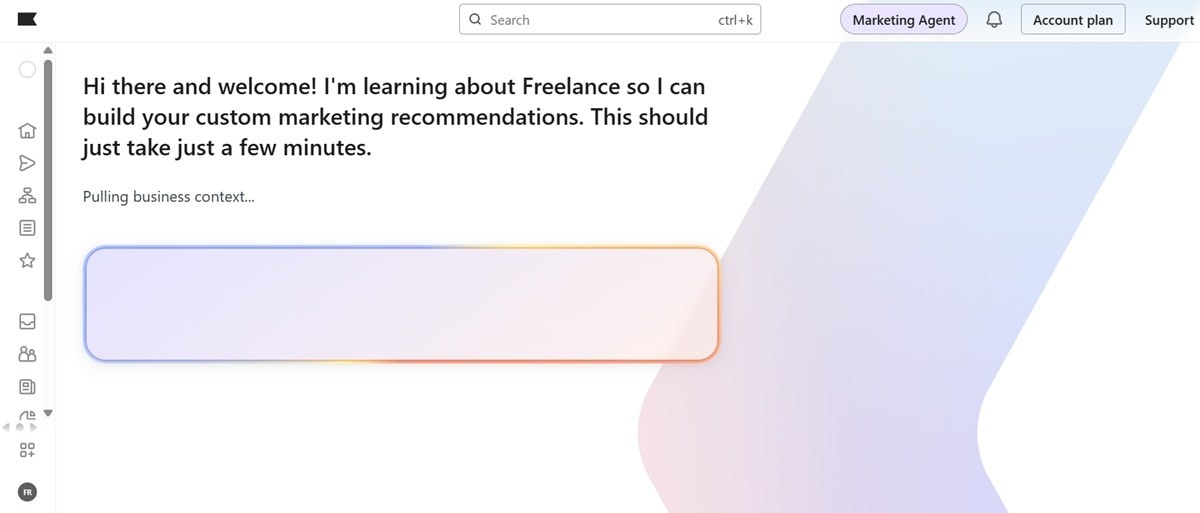
Plus, there are several prebuilt automation templates you can activate with just a few clicks.
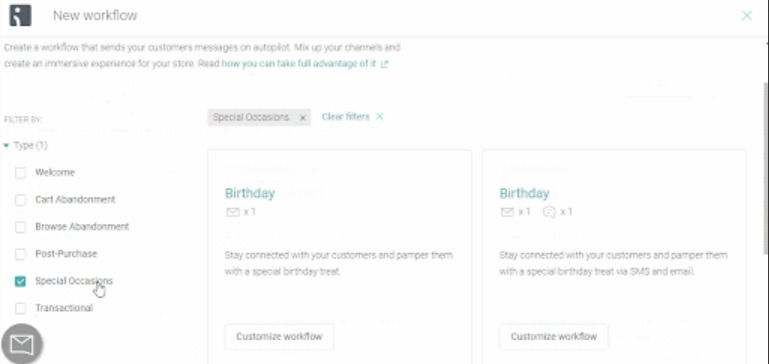
Klaviyo tracks how customers engage with your messages and determines their preferred channel. This insight can be included within the automation workflows.
Basically, when a specific trigger is activated, the platform can quickly determine that customer’s preferred channel and send the message there. Not only that, but it can also look at each customer’s historical data and behavior to make sure the message is sent at the perfect time.
Besides sending communications to customers’ preferred channels, Klaviyo lets you create multi-channel campaigns within a single workflow. So you can create one workflow that engages customers via email, SMS, push notifications, and WhatsApp.
One of the key advantages of Klaviyo’s marketing automation features is that the platform also provides a data solution. The customer data platform (CDP) brings together data that would otherwise be scattered across the different digital tools you normally use. Klaviyo connects with over 350 data sources to create a single source of truth for your business.
The advantage of this is that your marketing automations will be powered by customer data within the platform. This reduces the chances of something breaking within your automation campaigns.
Having all the data on the platform also helps with better and faster decision-making. This is enhanced further by the customer profiles. These profiles are built using data from the connected sources. It shows you how each customer engages with your business.
The drawback is that Klaviyo’s data platform is an add-on you must pay for separately. It’s also quite expensive, with prices starting at $500/month for 100,000 customer profiles.
Other key features
- Klaviyo Reviews help you collect feedback from customers automatically
- Klaviyo AI works as a sidekick to suggest improvements, create campaign content, segment customers, and build workflows
- Customer Hub helps customers find answers to their questions through an AI agent. It also provides personalized product recommendations through dynamic content.
- Supports A/B testing of content, workflows, and even lead capture forms
- Sending reputation repair helps your campaigns reach customers’ inboxes
- Help desk allows you to use Klaviyo AI for customer support
Pros
- Supports omnichannel marketing automation campaigns
- Customizable automation workflow and email templates are available
Cons
- Tends to get expensive when you want advanced capabilities because key features like reviews and advanced marketing analytics are sold as separate add-ons
- Multiple users have complained of poor customer support
Pricing
Paid plans start at $45/mo if you’re only interested in email campaigns. The plan supports up to 15,000 monthly email sends and 1,500 active customer profiles.
For omnichannel automation campaigns, you need the Email + mobile messages plan, which starts at $60/mo for 1,500 active profiles and 15,000 emails. The plan provides 1,250 mobile messaging credits to use for SMS and WhatsApp campaigns.
The other tools sold as add-ons include:
- Advanced Klaviyo Data Platform – $500/mo
- Reviews – $25/mo
- Customer Agent – $140/mo
- Customer Hub – $20/mo
- Helpdesk – $185/mo
- Marketing Analytics – $100/mo
Note that the standard email and email + mobile messaging do come with some basic analytics. The marketing analytics add-on offers advanced features like customer purchase patterns, personalization based on RFM analysis, and audience and conversion dashboards.
For some context, RFM analysis capabilities are present within standard plans of some marketing automation platforms like Omnisend.
Ready to Automate Your Marketing Like a Pro?
GetResponse combines powerful automation with AI-driven personalization to help you convert more leads into loyal customers. Start your free trial today and see why thousands of businesses trust us.
4. ActiveCampaign
ActiveCampaign offers an AI-powered marketing automation platform. The platform’s AI, called Active Intelligence, can anticipate customer actions and provide relevant suggestions to engage customers and generate revenue more effectively.
For example, it can analyze customer data to suggest new audience segments. It can also suggest new campaigns based on the business goals you provide. Plus, it can adjust your campaigns in real-time based on campaign performance and customer sentiment.
ActiveCampaign’s AI helps with creating automation workflows. Describe the campaign goal to the AI, and it will create the necessary automations for you.
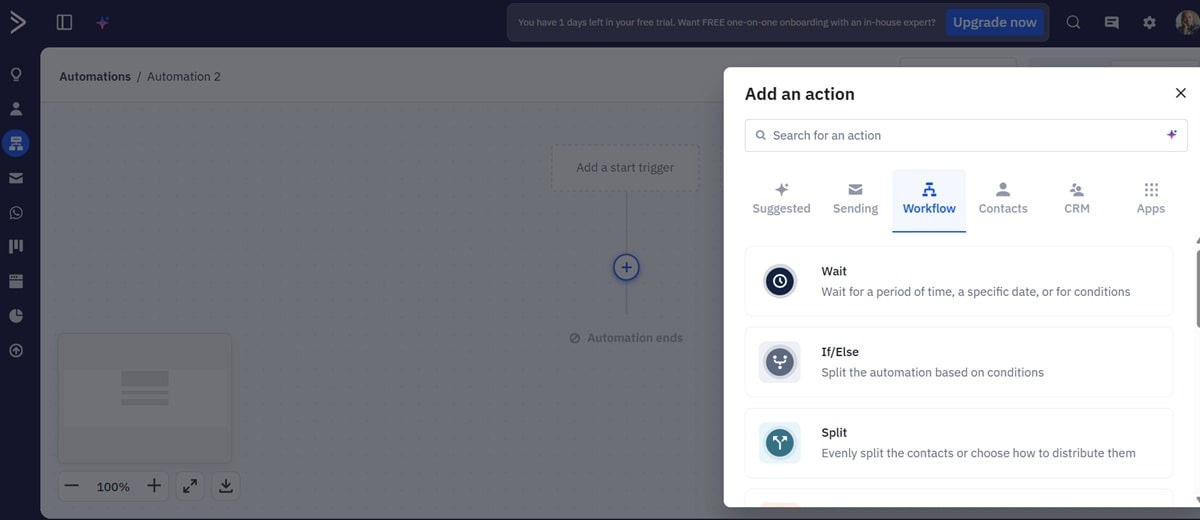
The platform provides a workflow editor where you can customize the workflows, edit the prebuilt workflow templates available on the platform, or build new workflows from scratch.
ActiveCampaign’s automation platform supports advanced personalization. The platform connects with over 900 apps, including CRM and eCommerce solutions, where it can pull customer data for personalization.
In addition, the AI agents track user behavior and analyze customer data to support a personalized marketing automation strategy. They personalize the email content and make sure campaigns are delivered at the right time by tracking customer behavior.
The AI agents can even personalize the channels because ActiveCampaign supports automations across SMS, email, and WhatsApp.
ActiveCampaign includes conditional and split actions within the automation workflows. You can take customers through different personalized paths based on their engagement levels, preferences, and overall behavior.
Additional automation and AI capabilities are possible on Active Campaign through the MCP server. The server allows you to connect your ActiveCampaign account with an AI app, like Claude and Cursor.
The connection allows you to access your ActiveCampaign data on the AI app. It also allows you to adjust your ActiveCampaign marketing strategies and do other things from the AI app. For example, you can prompt the AI to find specific customers from your database and create new segments.
Other key features
- Supports coordinated cross-channel automation campaigns
- Site and event tracking help you optimize campaigns based on how customers engage with your brand
- Supports advanced segmentation based on customer preferences and behavior
- Supports marketing attribution, which shows you how much each campaign generates in revenue
Pros
- Active Intelligence is quite useful in saving time and highlighting new revenue-generating opportunities.
- Supports real-time analytics and reporting that can help you adjust ongoing campaigns for optimal performance.
- AI agents create on-brand emails with the help of ActiveCampaign’s Brand Kit feature, which imports your branding style from a URL.
Cons
- The AI is slow when executing complex tasks
Pricing
Though marketing automation features are available across all plans, including the entry-level $15/mo plan, you’ll need to spend $49/mo (for 1,000 contacts) on the Plus package to get more compelling automation and AI features.
The Plus package includes unlimited automation triggers and actions, multi-step marketing automation, and generative AI for content creation.
Unfortunately, that plan does not include conditional content, predictive sending, or A/B testing of emails and workflows. The three features are critical for successful marketing strategies. They’re available on the Pro plan, which goes for $79/mo. This is the ideal plan for most businesses.
An Enterprise plan is also available, starting at $145/mo. It offers additional features like SSO and a dedicated account team.
WhatsApp and SMS automation campaigns are sold separately, starting at $99/mo and $16.83/mo, respectively.
5. Omnisend
Omnisend offers a marketing automation solution and AI tools to support campaigns across email, SMS, and mobile push. It provides a drag-and-drop automation builder where you can create email, SMS, and push automation workflows.
You can build the workflows from scratch by simply dragging and dropping triggers, conditions, and actions. Alternatively, the automation platform offers several pre-built workflow templates that you can edit and deploy within a few clicks. These include welcome, re-engagement, abandoned cart recovery, and post-purchase campaigns.
The automation builder supports multi-step automation workflows. This helps you create several customer journeys through split paths and conditional logic. It helps you deliver personalized customer experiences.
You can also add all or any of the three channels within a single automation. That allows you to send your messages through your customers’ preferred channels for high customer engagement rates.
Omnisend AI helps with several repetitive marketing tasks. Generative AI helps with writing email content. It uses your input and historical data from past campaigns to create compelling, on-brand emails. The Brand Assets AI analyzes imported branding assets like your logo, fonts, and colors to produce branded email campaigns.
An AI writer is also present within the email editor. It analyzes your writing and offers suggestions that help with maintaining your brand tone and voice. It can make recommendations on the email content itself based on email marketing best practices.
The platform also offers a preheader and subject line generator.
Besides the generative AI capabilities, Omnisend AI can boost sales through personalized product recommendations. The AI tracks customer behavior and purchasing history to identify their preferences. These products are then included within each email through dynamic content.
And if customers don’t open emails, the AI-powered campaign booster resends those emails automatically with fresh subject lines.
Omnisend reports show overall campaign performance as well as detailed metrics for each step of your automations. It can show opens, clicks, and conversions of each campaign within an automation workflow.
Revenue attribution also helps you see how much revenue each automation campaign generates, so you know what’s working and what isn’t.
Additionally, the platform supports A/B testing of campaigns within automations.
Other key features
- Supports smart segmentation based on RFM analysis
- Churn prediction helps you identify at-risk customers and target them with tailored campaigns to boost retention.
- Omnisend AI helps you create new customer segments through prompts
- Supports channel-specific reporting
- Supports email, SMS, and push A/B testing
- Includes signup form, pop-up, and landing page builders
Pros
- The SMS marketing package supports two-way conversations, which can help with collecting feedback, providing support, or making a sale.
- Decent price for what you get.
Cons
- Email templates are not very customizable
Pricing
Email, SMS, and push automation campaigns are supported across all plans, including the free plan. However, the free plan limits you to only 500 contacts.
Paid plans start at $11.20/mo for 500 contacts or $17.50/mo for up to 1,500 contacts. Monthly email sends are capped at 12X the contact list size. This Standard plan includes all the compelling features except for one really important one, personalized product recommendations.
For that feature, you can either buy it as an add-on within the Standard plan for $5/mo or upgrade to the Pro plan and access it for free.
The Pro plan starts at $41.30/mo for up to 2,500 contacts. It offers unlimited monthly email sends and advanced reporting.
SMS marketing is sold separately, at $0.015/SMS, so $15 per 1,000 SMS messages within the US. The location where you’re sending the SMS messages influences pricing. For example, in the UK, the rate is $0.082/SMS.
6. Brevo
Brevo offers marketing, sales, and customer data solutions. The marketing solution supports email, SMS, WhatsApp, and push notification campaigns.
The platform also provides several marketing automation features. Like Klaviyo, the presence of a customer data platform allows marketing automations to work more efficiently since all the customer data is unified in one single solution within the platform.
Brevo also offers several workflow templates right out of the box. These include welcome email series, abandoned cart campaigns, and anniversary emails.
Building new automation workflows is also fairly straightforward, thanks to the drag-and-drop editor. It supports time delays for perfect timing and split paths to deliver personalized customer journeys tied to the specific actions and behaviors of individual customers.
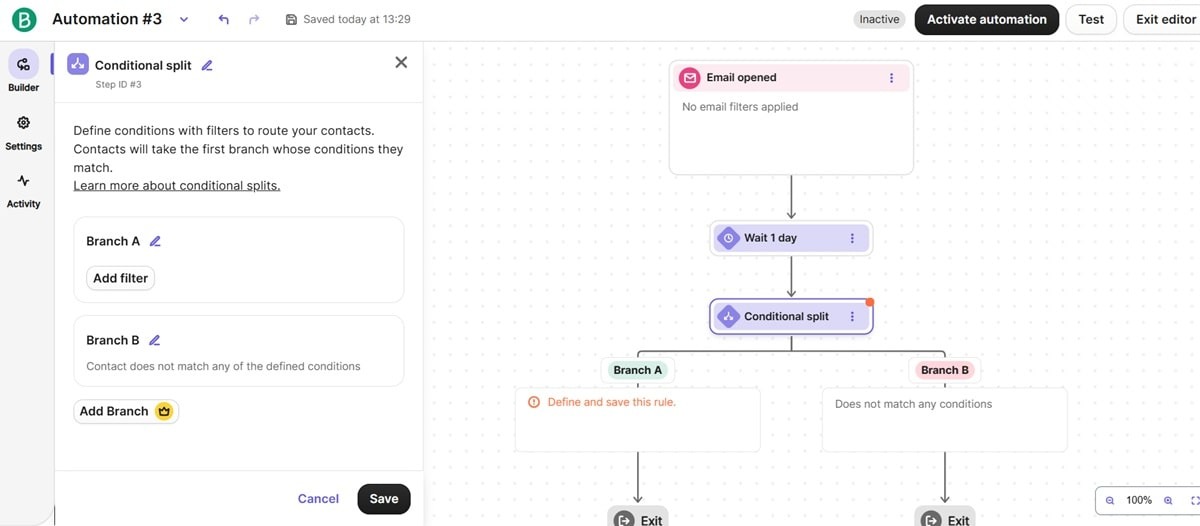
The automation workflows support multiple entry points. So, a workflow can be activated when a customer visits a specific page, clicks a certain link, or submits a form. Multi-entry points help you build fewer automation workflows.
Creating and managing campaigns is further enhanced by Aura, Brevo’s AI.
The platform offers several AI agents for marketing, sales, and customer support. The marketing agent can write your subject lines and email content. It can also track how customers interact with your campaigns and make sure all your automated email campaigns are delivered at the perfect time.
Additionally, it can identify patterns within your customer base and suggest relevant segments.
Besides the inbuilt AI capabilities, Brevo can connect to your favorite AI apps through an MCP server. This gives the AI apps direct access to your Brevo account. It unlocks new possibilities, like using your AI app to brainstorm campaign ideas and analyze performance.
Other key features
- Multi-branch testing helps you test the performance of different possible paths within an automation workflow.
- Pathway reporting gives you granular insights into how each workflow performs.
- Dynamic content helps you deliver personalized marketing campaigns efficiently.
- Email frequency management makes sure your subscribers are never overwhelmed by your communications.
- Click heatmaps show how users interact with your campaigns
Pros
- Fairly easy to use
- Supports multi-channel marketing
- Decent free plan
Cons
- Multiple G2 users have complained that the analytics could be more in-depth and flexible.
Pricing
Brevo’s free plan rivals Omnisend’s. That plan supports most automation features, including multi-channel automations, real-time event triggers, multiple entry points, and pathway reporting. Notable features not included in the free plan are AI send time optimization and multi-branch testing.
Unlike Omnisend’s free plan, which only supports 250 contacts, Brevo’s accommodates up to 10K contacts, but only 2,000 contacts will enter multi-channel automations. Email sends are also capped at 300/day.
Paid plans start at $8.08/mo with the Starter plan. The plan lets you send up to 100K emails per month. Multi-channel automations are still limited to 2,000 contacts, though. In fact, the number of monthly email sends is the only significant difference between the Starter plan and the free plan.
Most of the things that are absent on the free plan are also not available here. Actually, the Starter plan still comes with Brevo branding, which you can remove for $10.80/mo.
You must spend from $16.17/mo on the Standard plan to remove Brevo branding, unlock A/B testing, get AI send time optimization, and access click heatmaps. Still, you get only one landing page on this plan, and no popups, multi-branch testing, mobile push notifications, or WhatsApp marketing.
Those features are available on the Professional plan, which starts at $449.08/mo. That’s quite expensive for some of the features. For example, GetResponse’s Marketer plan starts at just $48.38 and provides access to unlimited landing pages and pop-ups.
7. Mailchimp
Mailchimp provides hundreds of automation templates to get you started with pop-up, SMS, and email marketing automation. You’ll find customizable templates to welcome new contacts, nurture leads, recover lost sales, re-engage at-risk customers, and send transactional emails.
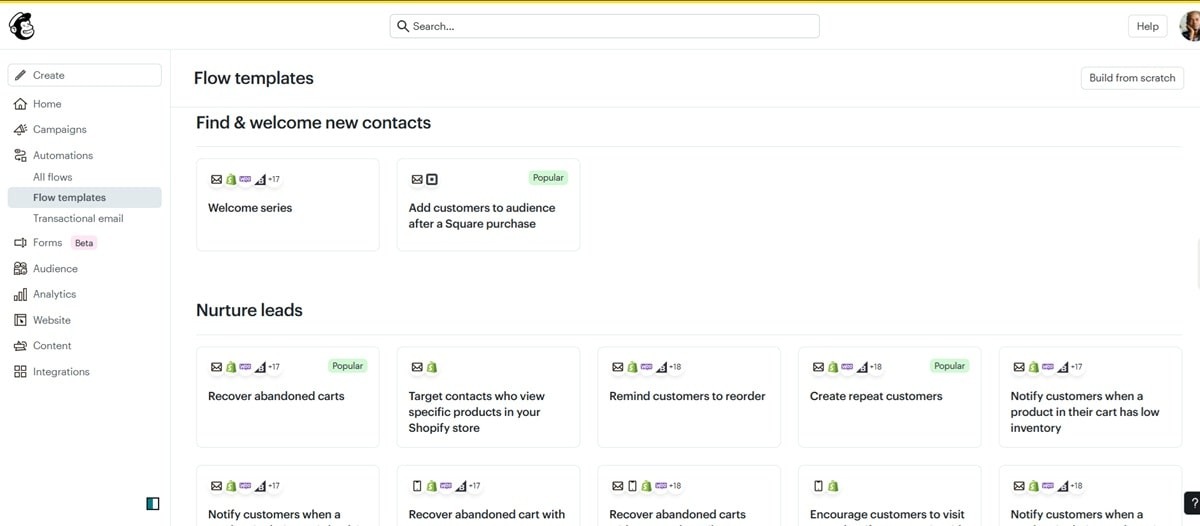
The automation builder is also easy to use. Drag and drop the triggers, conditions, time delays, and actions to build your workflow. You can also use conditional split rules to create several paths within a single workflow.
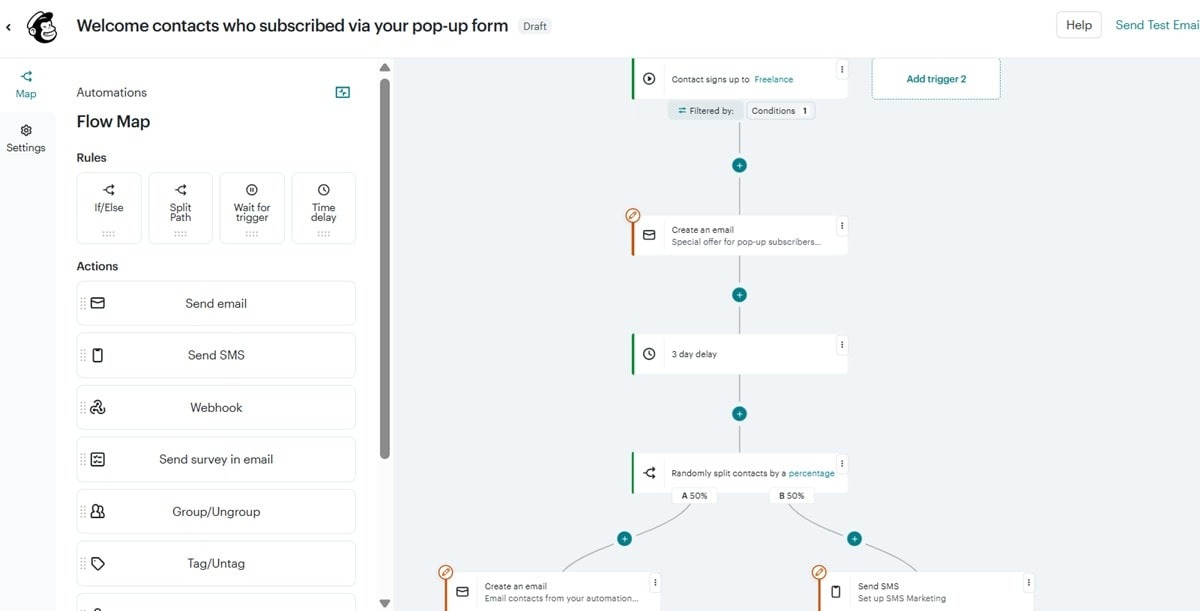
Mailchimp supports A/B testing of automation workflows. It lets you split your audience into two groups using the percentage split rules and have them go through different paths. This helps you see how each path performs, so you can scale the one that generates the most ROI.
Like the other marketing automation platforms on this list, Mailchimp provides an AI assistant to help with creating content, building campaigns, and other marketing processes. It’s called Intuit AI. It can generate automation campaigns, write email copy, and produce email designs based on your brand colors, fonts, and logo.
Intuit AI can analyze customer behavior and campaign performance, then predict the best days and times to send emails. It also provides suggestions on how to improve campaigns.
Other key features
- Campaign Manager helps you create and manage omnichannel campaigns from a single dashboard.
- Supports 300+ integrations to access the data you need for personalized automations
- Content optimizer provides real-time suggestions on how to improve the content you’re writing.
- Predictive segmentation uses predictive analytics tools to estimate the future buying behavior of customers. It helps you target these customers with unique content to win more repeat business.
Pros
- Relatively easy to use
Cons
- Mailchimp audiences count subscribers multiple times as long as they appear on different managed audiences. This can increase prices significantly.
- Tends to get expensive fast as your list and number of monthly email sends increase
- Limited customer support
Pricing
Mailchimp has a free plan and an entry-level $13/mo Essentials plan, but neither of them provides compelling features for scalable automation campaigns. For example, they don’t support send time optimization, dynamic content, or generative AI features.
Those features are available from the $20/mo Standard plan. Additionally, you get the content optimizer, delivery by time zone, multivariate testing, comparative reporting, advanced segmentation, predictive segmentation, multiple starting points for automations, and behavioral targeting. But you’re limited to five audiences.
The Premium plan starts at $350/mo. It supports unlimited users and unlimited audiences. Mailchimp audiences are the number of contacts you can manage within your account. Keep in mind that if the same contact appears in several audiences, Mailchimp will count them as separate contacts when calculating pricing.
Check out our review of Mailchimp alternatives to understand the platform’s shortcomings and how other options perform better.
8. MailerLite
MailerLite’s primary focus is email marketing. It doesn’t support push and SMS automation campaigns. Therefore, it’s a marketing automation software solution you may want to consider if you’re only interested in email marketing automation.
MailerLite’s single focus makes it a much neater platform in general. It’s not bloated with too many features. Unfortunately, there’s also an argument to be made that you can’t rely on MailerLite alone because businesses must reach their customers wherever they are. That requires multi-channel marketing, which MailerLite doesn’t support.
That said, MailerLite’s automation solution helps you build workflows that nurture leads, generate sales, and encourage customer loyalty. The platform offers several pre-built automation workflow templates to get you started quickly. These templates can be customized easily within the workflow editor.
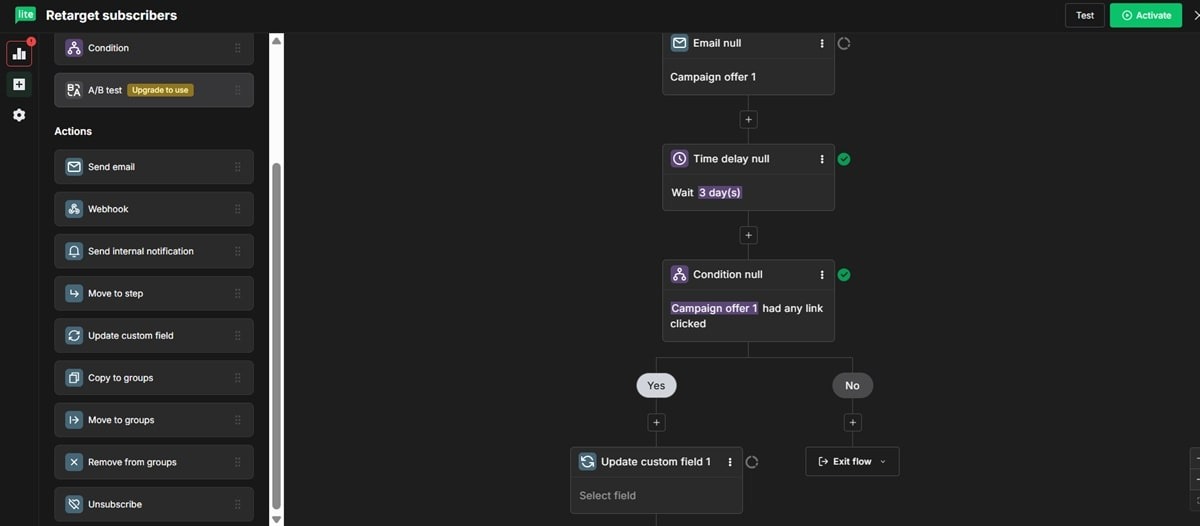
The editor supports drag and drop functionality, so you don’t need any coding skills to edit the templates or create new workflows. Use triggers like buying a specific product, clicking a link, joining a group, completing a form, or buying from a certain category to activate a workflow.
Even date-triggered workflows are possible, which help you celebrate customer birthdays and anniversaries.
MailerLite’s email marketing software also supports dynamic email content. That allows you to create emails with dynamic blocks where the content is adapted automatically based on a customer’s preferences, purchase history, and behavior. It helps deliver personalized campaigns that are likely to generate more revenue for your business.
Other key features
- MCP server allows you to connect your MailerLite account with AI apps like Claude
- Supports transactional email campaigns
- Includes multi-variate testing to help optimize your campaigns
- Offers a testing environment where you can send campaigns to your own inbox to confirm whether your emails look as they should.
- Supports multiple triggers for the same automation workflow
Pros
- It’s a neat platform due to a strong focus on email marketing alone
Cons
- Doesn’t support multi-channel marketing
Pricing
Paid plans start at $9/mo with the Growing Business plan. Though the plan includes the automation builder and API documentation, it has limited automation templates and doesn’t support multiple automation triggers.
The Advanced plan costs $18/mo. It provides unlimited access to email automation templates and supports multiple automation triggers. It also includes smart sending, an AI writing assistant, and 24/7 live chat support.
9. Zapier
Zapier is unique in that it doesn’t provide email, SMS, push, or social media marketing automation services as we’ve seen with the other solutions on this list. Instead, Zapier connects several apps, allowing activities on one app to trigger actions on another.
For example, it lets you connect an eCommerce store built on Shopify with an email marketing tool. And when customers interact with or place an order on the Shopify store, it triggers a relevant email to be sent from the email marketing solution.
Zapier is quite easy to use, providing lots of prebuilt automation workflows called Zaps. It connects with 8,000 apps. Pretty much every tool you use for marketing is supported. That makes Zapier a marketing automation tool worth considering if your team uses lots of marketing apps, some of which do not support native integrations.
Zapier also provides AI features and agents to help with automation orchestration. For example, you can describe what you want a workflow to do, and the AI-powered automation builder will create the workflow for you.

The platform connects with generative AI tools like Claude and ChatGPT. This allows you to use the AI app to write email or SMS content, summarize campaign performance, brainstorm campaign ideas, and segment audiences.
Zapier’s Tables is another noteworthy feature that supports advanced marketing automation campaigns. Tables pulls data from the 8,000+ potential data sources and stores it in one place. Not only that, but the data stored there can also trigger actions on other apps.
For example, a specific workflow can be activated when a certain data field is updated or a new record is added.
Tables also supports automatic data enrichment. Zapier AI can research and add more details about your qualified leads or target accounts.
Other key features
- Zapier Tables supports structured data management and automations
- Supports real-time reporting
- Provides an AI agent and chatbot builder
- Offers enterprise-grade security
- Supports multi-step zaps or automations
- Zapier MCP lets you connect AI apps to any of the 8,000+ supported apps
Pros
- Connects with lots of apps (8,000+ integrations)
- Beyond marketing, it can also automate repetitive tasks across customer support, sales, and other business functions.
Cons
- You’ll need to pay for Zapier separately
Pricing
Zapier pricing is based on the number of tasks you expect to perform each month. Tasks are the automated actions Zapier performs.
The platform offers a free plan that supports 100 free monthly tasks and two-step automations.
Paid plans start at $19.99/mo for 750 tasks with the Professional plan. This plan supports unlimited “premium apps,” which are not included on the free plan. Some of these apps are Salesforce, Shopify, QuickBooks Online, Facebook Leads Ads, and LinkedIn Lead Gen Forms.
The plan also supports conditional form logic and AI fields that help with enriching data stored in Tables.
The Team plan starts at $69/mo and supports 2,000 tasks. It accommodates 25 users and supports shared app connections as well as shared zaps and folders.
An Enterprise plan is also available that supports a custom number of users, advanced admin permissions, and a technical account manager.
Zapier AI Agents and Chatbots are sold separately. The free AI agents plan can perform up to 400 activities per month. Paid plans start at $33.33/mo. It raises the monthly activities to 1,500.
Meanwhile, the Chatbot builder starts at $13.33/mo for up to five chatbots.
10. Instantly
Instantly.ai is a sales engagement and lead intelligence platform for cold email outreach at scale, prioritizing deliverability. It’s the pick for teams running outbound to book meetings and generate replies from cold audiences. It carries a 4.8/5 rating from 4,000+ G2 reviews. Instantly also reports 40,000+ customers on its careers page.
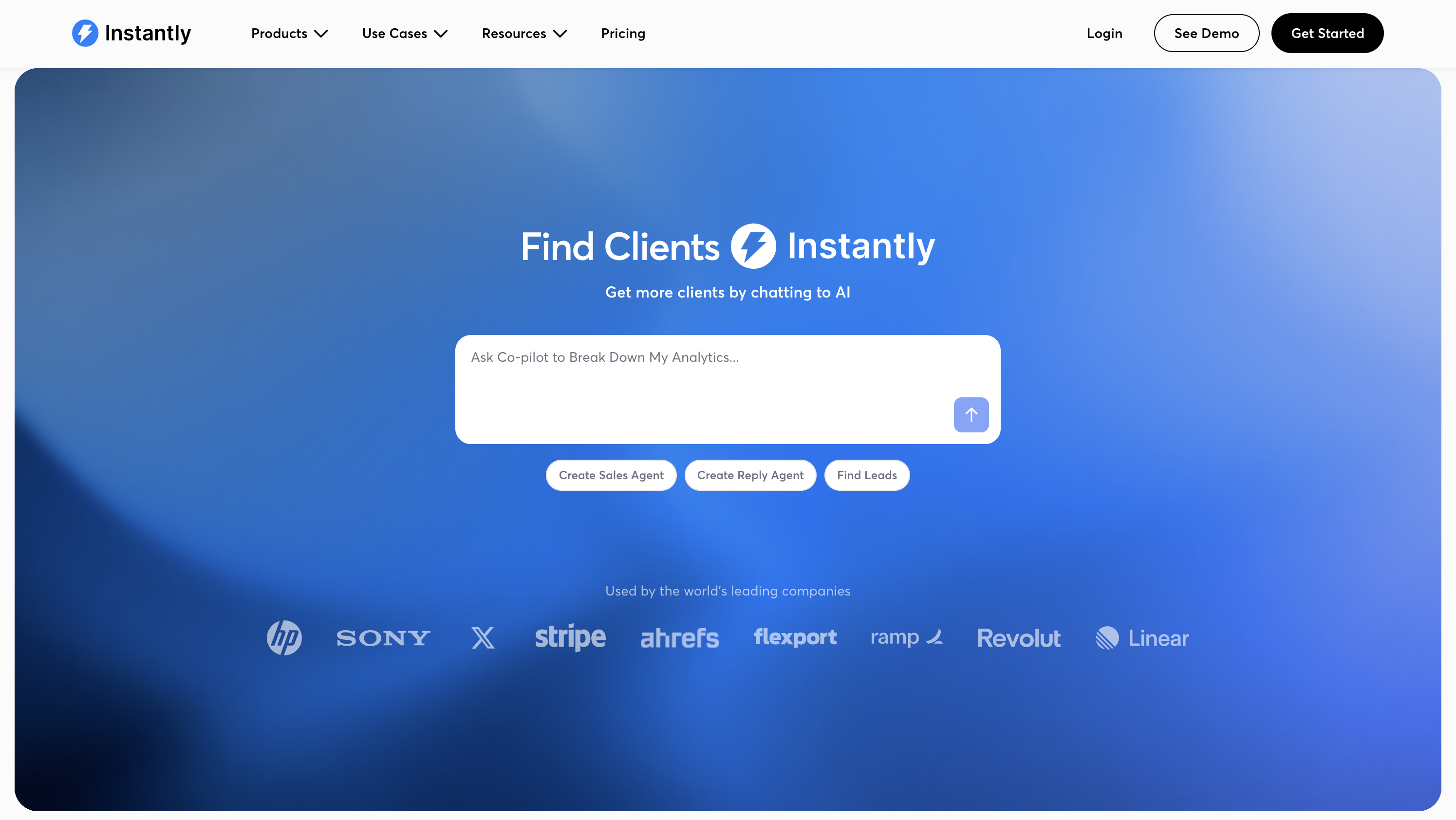
Automation rests on two pillars. Deliverability-first sending gives every plan unlimited connected inboxes with automated warmup across a private network Instantly describes as 4.2M+ accounts, plus reputation protection and bounce detection. Light Speed adds SISR, dedicated server and IP rotation, for high-volume senders. The AI campaign builder pairs the AI Sequence Writer, which drafts a full sequence from one prompt, with an AI Reply Agent that answers interested leads and updates CRM status automatically, typically within five minutes.
Lead generation lives in the same workflow. SuperSearch holds 450M+ B2B leads, enriched via waterfall verification across 5+ providers. Unibox tracks every reply and pipeline stage in one place.
Most users choose Instantly for its pricing model. Unlimited email accounts come on a flat monthly fee rather than per seat, letting agencies scale to hundreds of inboxes without paying per account
Other key features
- Deliverability-first sending: unlimited connected inboxes, automated warmup across a network Instantly cites as 4.2M+ accounts, reputation protection, and SISR dedicated IP pools on Light Speed
- AI campaign builder: AI Sequence Writer, included on Outreach Growth and above, paired with an AI Reply Agent billed via a separate Instantly Credits subscription
- SuperSearch: database of 450M+ B2B leads with 5+ provider waterfall enrichment
- Unlimited email accounts: connect every inbox on every Outreach plan at no per-seat cost
- Unibox: centralized reply and pipeline tracking
- Calling & SMS: available on Hyper CRM
Pros
- Rated 4.8/5 from 4,000+ G2 reviews
- Unlimited email accounts at flat pricing rather than per seat
- Deliverability-first sending and built-in warmup replace multiple separate tools
Cons
- AI Sales Agent and AI Reply Agent run on a separate Instantly Credits subscription, not included in Outreach pricing
- No native Salesforce integration (sunset mid-2026). CRM sync elsewhere often relies on Zapier or Make
- SuperSearch and higher sending tiers price separately, raising total cost beyond the entry plan
Pricing
Outreach plans start at $47/mo (Growth), or $37.60/mo billed annually, including unlimited email accounts and automated warmup. SuperSearch and higher-volume tiers are priced separately.
Transform Your Marketing with GetResponse
Experience the power of AI-driven automation, personalized customer journeys, and seamless integrations. Join thousands of businesses scaling their marketing efforts effortlessly.
In closing
A great marketing automation software solution generates a clear ROI. Sure, generative AI features help with writing email content and subject lines, which saves you time. However, the best automation platforms offer additional features to generate new revenue and support business growth.
I’ve shown you how GetResponse’s automation platform boosts sales through automated AI-powered product recommendations. The self-learning model tracks customer behavior and purchasing patterns to determine their preferences and needs. It then recommends relevant products within email content and on your website.
Split paths, lead scoring, and send time optimization are other vital features that help deliver personalized campaigns for optimal conversion rates.
Get started with GetResponse for free today to see how our solution can support your automated campaigns.
Marketing automation software FAQs
1. What is a marketing automation tool?
A marketing automation tool is a software solution that automates repetitive marketing workflows like segmenting leads, sending emails, scoring leads, and monitoring and adjusting campaigns. They bring efficiency and allow businesses to scale their marketing efforts.
2. What is the best marketing automation platform?
The best marketing automation platform automates campaigns across multiple channels while delivering a personalized customer experience. GetResponse, HubSpot, Klaviyo, and ActiveCampaign are examples of great marketing automation software solutions that generate meaningful ROI.
