
Ecommerce marketing tools are the software solutions online stores use to attract and retain customers.
But customers discover and engage with brands through different channels. This forces ecommerce businesses to invest in multiple tools to reach their target customers.
The problem with this is that tracking customer data becomes a nightmare. Without a good strategy, you can end up with scattered customer data that’s difficult to use. Attributing revenue to specific campaigns also becomes a real pain.
This article will cover the crucial ecommerce marketing tools every business needs. We’ll show you how they support growth, conversion attribution, and customer data tracking.
Key takeaways
- The best ecommerce marketing tools integrate with your CRM and ecommerce platform to use customer data effectively and ensure automation workflows run smoothly.
- A connected marketing tech stack is vital to ensure consistent messaging across various marketing channels.
- As acquiring new customers gets more expensive, successful businesses prioritize retention tools and campaigns to increase repeat purchases and optimize customer lifetime value.
- GetResponse is an omnichannel marketing platform that automates the entire customer lifecycle, from customer acquisition to retention to loyalty. It provides ecommerce marketing tools for email, SMS, paid ads, and push notification campaigns.
Why you must invest in a unified ecommerce marketing tech stack
Accurate customer data is the backbone of successful ecommerce marketing campaigns. You need to know what products each customer browses and the items they buy.
You must also track and understand how shoppers move through the customer lifecycle.
That data helps you personalize customer relationships with your brand. This is crucial to success, as 80% of customers report preferring brands that deliver personalized experiences. These customers spend 50% more with such brands.
A solid ecommerce marketing tech stack brings together several tools to create a unified system that serves as a single source of truth. It shows you exactly how each customer interacts with your brand across SMS, email, social, and paid campaigns.
In addition to helping you personalize customer relationships, this system also:
- Improves marketing attribution – A well-integrated tech stack helps you track the specific campaigns and channels responsible for every sale. It shows the path every customer takes and the key conversion events. This helps you identify the campaigns and customer touchpoints with the highest ROI.
The system also allows you to build a multi-touch attribution model. This helps you credit each channel and touchpoint appropriately, based on their impact on the conversion.
- Delivers a consistent customer experience – A unified marketing tech stack lets you track how customers interact with your brand across different channels. It allows you to keep your messaging consistent, as the interactions shift from SMS to email to retargeting display ads.
Beyond enhancing your marketing efforts, this system helps you deliver better customer support since all interactions are captured in one place. It gives your customer service team all the context they need to resolve issues fast. This boosts customer satisfaction and retention.
- Supports accurate automation – Effective marketing automation relies on seamless integration between different tools. For a cart abandonment workflow to activate, your email automation system must be connected to your ecommerce platform to detect the abandonment.
Similarly, a replenishment workflow can only be activated if the system can accurately track when the customer last made a purchase.
These automated campaigns would fail unless your marketing tools support seamless integration with your ecommerce platform.
A solid ecommerce tooling strategy also includes customer retention tools. Customer acquisition costs have increased by 60% in the last couple of years.
Retention increases customer lifetime value, lowers CAC, and reduces the CAC payback period through strategic post-purchase campaigns.
Educational product guides and timely replenishment reminders are excellent examples of such campaigns. They reduce reliance on expensive customer acquisition to grow your business.
7 crucial marketing tools for ecommerce success
Below are the seven tools you need to grow your ecommerce business.
1. Email marketing tool – GetResponse
Email marketing is arguably the most important marketing channel for an ecommerce business. Email helps with lead nurturing, conversions, and customer retention.
It also has one of the highest ROIs of any marketing channel.
Email marketing statistics show that 75% of businesses that spend $100 or less per month on email campaigns generate $21 or more for every dollar spent.
For context, the average return on ad spend for Google Ads is $2 for every $1 spent. And $8 for every $1 spent on the Google Search Network.
In addition to marketing, email helps with business-critical communications. Your customers expect transactional email campaigns like order confirmations and shipping updates.
You need a reliable email marketing platform to ensure these campaigns reach your customers on time.
GetResponse is an email and marketing automation software. Our solution provides email marketing tools that have helped ecommerce businesses like Tortli and Med & Beauty generate tens of thousands of dollars in revenue from automated campaigns.
We provide a drag-and-drop email editor to help you design pixel-perfect emails without writing any lines of code.
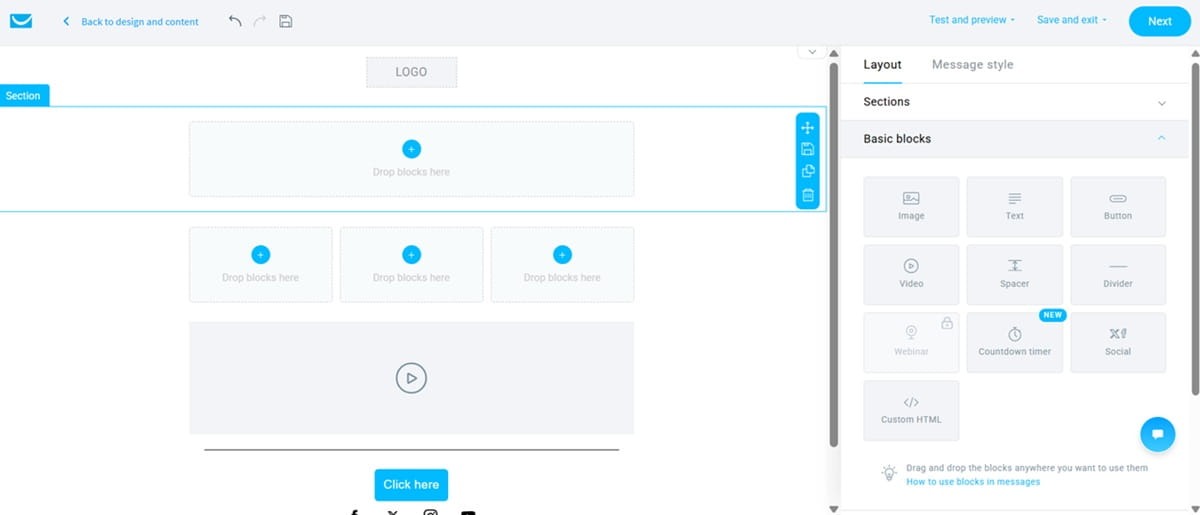
We also have an email template library with templates for all popular ecommerce email campaigns. That includes win-back, replenishment, cart abandonment, and customer survey campaigns.
The templates save you time, but we also provide an HTML editor in case you want to customize your email designs in detail.
But where GetResponse shines above other ecommerce email marketing tools is in automations.
Our platform lets you automate the entire customer lifecycle with personalized email campaigns.
It connects to your ecommerce store and tracks customer activities. It monitors the products they browse, what they buy, when they abandon carts, and even when they hit specific milestones.
This triggers different automated email campaigns, including cart and browse abandonment campaigns, product replenishment reminders, and customer loyalty campaigns.
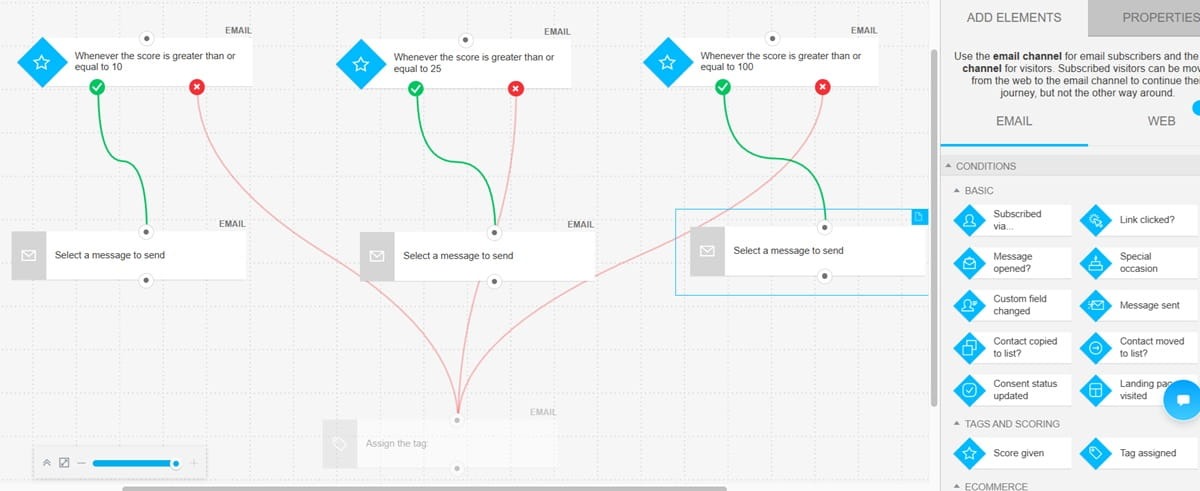
Setting up those email automations is straightforward. Pick a prebuilt automation workflow template from the library and customize it using the visual automation editor.
GetResponse also supports AI-powered product recommendations within email campaigns. The AI analyzes your product offerings. It then matches specific products to every customer’s preferences and needs.
These AI-powered recommendations boost sales by up to 10% and the average order value by 33%.
Eveline Cosmetics, a Polish-based beauty store, saw $7,000 worth of AI-powered product recommendations added to carts in a single month. Read the full case study here.
Finally, GetResponse is ideal for ecommerce email marketing because it supports newsletter attribution. Our solution provides detailed analytics showing the specific email campaigns and automations driving revenue. It also filters bot traffic and engagement from your metrics.
Key features
- High deliverability – 99% deliverability rate across more than 160 countries. This ensures inbox placement for your email campaigns.
- Supports transactional email campaigns – GetResponse supports transactional and RSS-to-email campaigns. Our transactional email service is available on the GetResponse Max plan, alongside AI product recommendations.
- Supports A/B testing – Run split tests to identify the elements that resonate with customers. You can A/B test subject lines, CTAs, and email copy.
- Advanced segmentation – GetResponse collects data like customer behavior and engagement. It also supports contact tagging and scoring. Use these data points to create strategic customer segments for effective targeting.
- Omnichannel marketing – Beyond email, you can automate SMS and push notifications through GetResponse.
- Integrations – Supports seamless integrations with major ecommerce platforms like Shopify, WooCommerce, BigCommerce, and Magento. It also connects with other crucial marketing platforms, including CRMs, Google Analytics, customer support tools, social media platforms, and ad and conversion tools.
Pricing
GetResponse has a free forever plan that supports 500 contacts and 2,500 emails per month. But that plan has limited automations and email templates.
Paid plans start at just $15.58 per month. This supports unlimited newsletters and autoresponders.
Most marketers prefer the Marketer plan, which starts at $48.38/mo. The package includes additional features like unlimited automation workflows, promo codes & revenue reports, and AI content generators.
For ecommerce businesses, we recommend upgrading to the GetResponse Max plan. This plan supports advanced email and marketing automation. It offers AI recommendations, which increase the ROI of your cross-selling and up-selling campaigns.
An independent analysis by Forrester reported that GetResponse Max has a 305% ROI and a less than 3-month payback period.
Get in touch with our team to discover how GetResponse Max can grow your online store.
2. Social media marketing tool – Buffer
According to a Sprout Social report, 76% of social media users said social content influenced them to make a purchase in the last 6 months. The figure jumps to 90% when you look at Gen Z.
37% of consumers also reported they prefer social search when looking for product recommendations and reviews.
Ecommerce brands need a sound social media marketing strategy and a solid tool to execute that strategy.
Buffer is a popular social media management tool. It’s considered especially ideal for small businesses because it’s more budget-friendly than enterprise-grade solutions like Hootsuite.
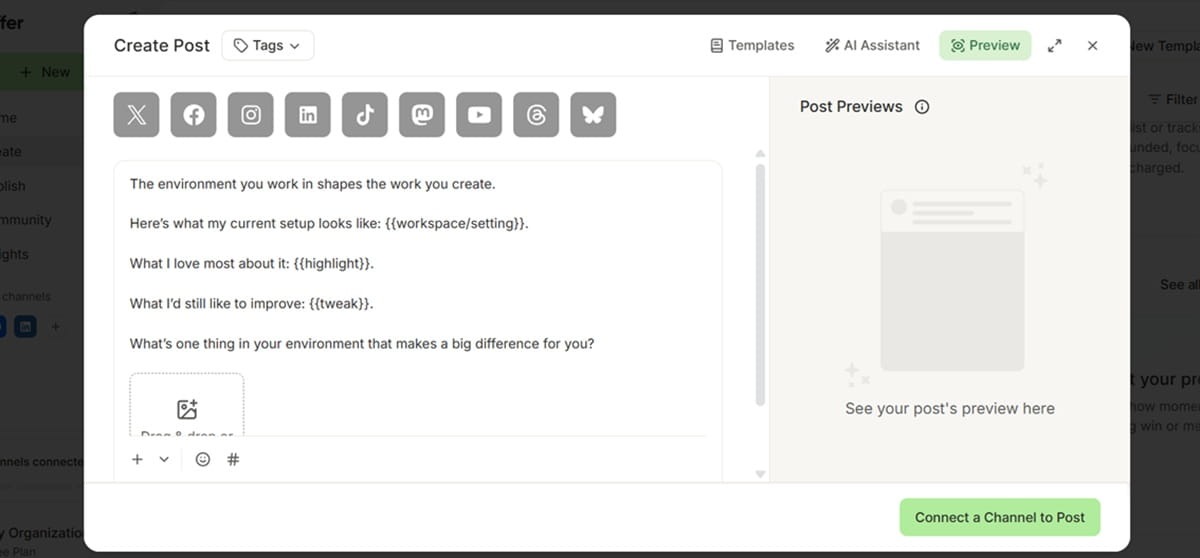
The platform gives you incredible tools for creating, posting, and scheduling social media posts. They offer an AI assistant that helps with content ideas. Simply write a prompt describing the post you want and let the assistant create it for you.

The solution offers social media templates to enhance your creative process. They have templates for popular social campaigns like behind-the-scenes, case studies, product launches, and sales promos.
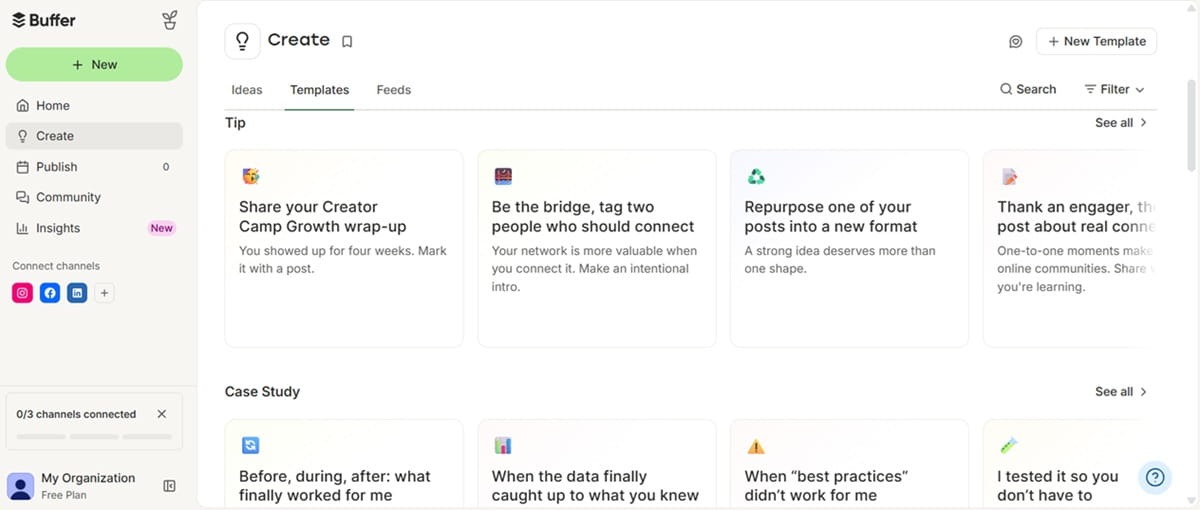
You can customize these templates easily from within the content editor.
Buffer connects with other platforms, including Canva, Google Drive, Claude, ChatGPT, Bitly, and Dropbox. This helps you import content from various platforms for your social media campaigns.
Integrations with AI tools also help you brainstorm campaign ideas and analyze marketing performance directly within ChatGPT or Claude.
Buffer itself does provide helpful analytics. It shows performance by the different social channels and campaigns. You can also compare social media performance by different dates to track progress. But this is only available on the paid plans.
Collaboration is another area where Buffer performs quite well. The platform lets you invite collaborators into your workspace. You also get to manage their permissions.
This allows different team members to work on the same social media campaigns easily. Users can leave notes and share feedback within the platform.
Key features
- Shared content calendar – Boosts visibility to your entire content plan. The platform provides both a grid and a kanban-style board to track content as it moves through the pipeline.
- Community inbox – Pulls comments from 10 social media platforms, including Instagram, Facebook, TikTok, YouTube, Google Business Profile, and LinkedIn. You can then track and respond to all comments from within Buffer.
- Hashtag manager – Create groups of hashtags so you can reuse them quickly when posting. You can create hashtags for the different products and product categories on your store.
For example, an apparel store could have separate groups for summer clothes vs winter clothes. Then just pull the right hashtags whenever you post. No need to write them manually or do any copy-pasting.
- Content approval workflows – Since Buffer supports team collaboration with different access levels, approval workflows help the manager review and approve other team members’ drafts before they’re published.
- First comment scheduling – Lets you schedule the first comment on your post. It helps provide additional context that may not have been captured in the post and caption.
Pricing
Buffer offers a free forever plan. The plan supports up to 10 scheduled posts per channel. It lets you store up to 100 content ideas and supports only one user account. You also get one API key for integrations with 3,000 requests per month.
Paid packages start at $5/mo with the Essentials plan. You get unlimited scheduled posts, unlimited ideas, 3 API keys with 7,500 monthly requests, and a hashtag manager.
The Team plan is ideal if you need several team members working on your social media marketing campaigns. The plan starts at $10/mo and supports unlimited team members. It offers access levels that let you decide what social channels each team member can access.
The plan also supports content approval workflows.
3. Influencer and affiliate marketing tool – Upfluence
Influencer marketing falls under social media marketing for most brands. Also, a good number of brands don’t need to pay for a dedicated influencer marketing platform. Especially not on a monthly basis if you only do occasional influencer campaigns.
However, if influencers and creators are a crucial part of your marketing strategy, then you need a dedicated tool for these campaigns. This is particularly important if TikTok Shop is part of your strategy.
TikTok does provide an affiliate marketing dashboard where businesses can upload their products and invite creators for partnerships. It also helps with managing sample requests, tracking sample shipments, and paying creators.
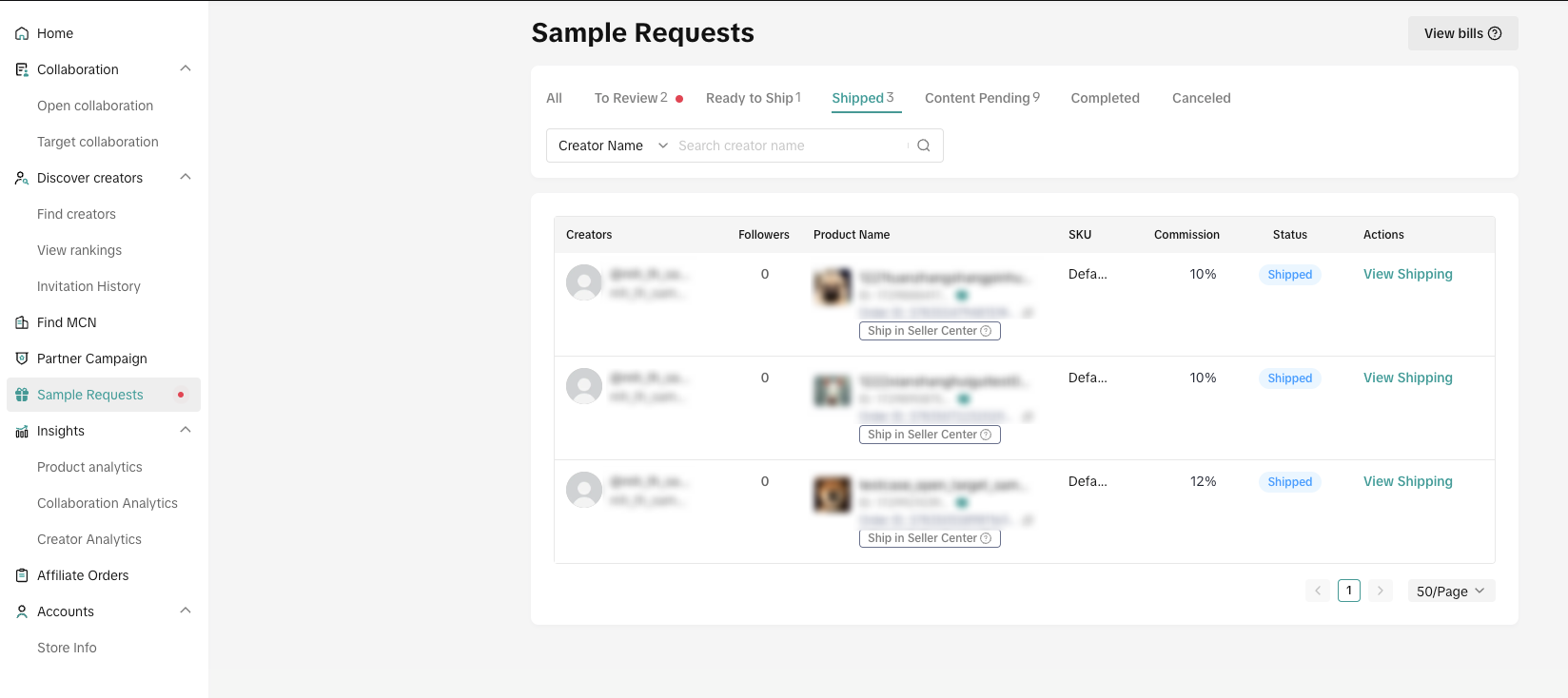
It lets you add a basic commission rate as well as special rates for particular products.
Upfluence comes into the picture when you want to build affiliate and influencer marketing campaigns that go beyond TikTok.
The software offers an influencer discovery platform where you can find relevant influencers for your brand. It helps you find creators who already use your products. Activating these creators to become your brand ambassadors is much easier than cold outreach to influencers who’ve never interacted with your brand.
The platform provides detailed insights to help you find relevant creators. It scans the creators to understand their engagement rate, audience authenticity, and potential fraud signals.
Like TikTok Shop, Upfluence also gives you the option to create a partnership program to attract creators.
So, instead of actively searching for creators, you can set up the collaboration you desire and your product catalog. Interested creators reach out to you or even select the products they want to promote from the live catalog.
Upfluence has an AI assistant called Jaice. It helps with several marketing tasks, including finding relevant influencers.
The platform integrates with Shopify, WooCommerce, and other CMSs. That integration allows Jaice AI to analyze and understand your brand. It uses those insights to find the right influencers for your brand.
It scans through your customer database to identify existing customers who are creators. You can also describe the influencers you’re interested in and your campaign goals to Jaice. It’ll use your prompt to create a shortlist of relevant influencers.
And it doesn’t stop at creating shortlists. The AI creates and sends outreach messages and follow-ups through Gmail and Outlook integrations.
The team behind Upfluence also created a lite version of the platform called Wednesday. This cheaper alternative has a free plan that also helps with finding influencers and creators.
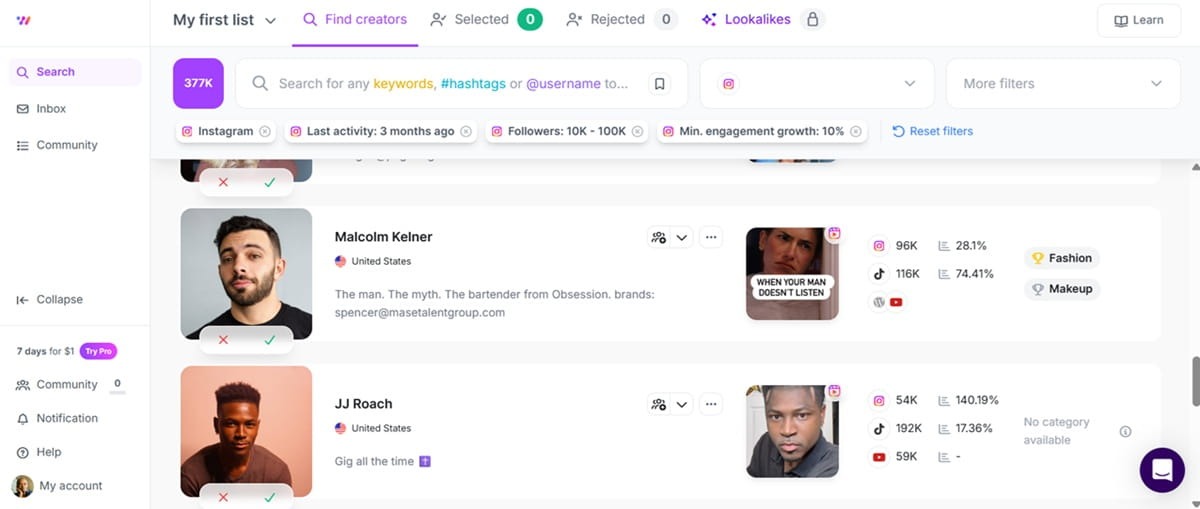
But it lacks advanced influencer management and AI capabilities.
Key features
- Influencer relationship management – Provides a dashboard to manage all your influencer relationships. It lets you track history, performance, and relationship status.
- Influencer analytics tool – Track revenue by creators and programs so you know which influencer collaborations work for your brand. You can also rank creators by the revenue they generate and track the average order value and CLV of the customers each influencer brings.
- Simplifies compliance – Upfluence collects and files tax documents and KYC verification automatically. It also lets you pay your creators across different regions and currencies in just one click.
Pricing
Upfluence has a custom pricing model. Prices are based on the plan you pick, the size of your team, and program volume.
They have three paid plans: Find Creators, Scale Programs, and Auto-Pilot Run.
Find Creators provides only the tools you need to find relevant influencers. You don’t get campaign management tools or drip email sequences for influencer outreach.
Those tools are available on the Scale Programs plan.
The Auto-Pilot Run plan offers additional features like multi-currency payment and credit card or wire transfers.
Worth noting that Upfluence has a fixed pricing model. They do not take a cut from the sales generated by influencers.
4. SMS marketing tool – GetResponse
SMS is the best channel for time-sensitive content. It also supplements email for crucial communications like transactional emails.
You can use it alongside emails to alert customers when their orders are out for delivery. You could also use it for account or password resets.
The best part is that you can also automate SMS marketing campaigns.
GetResponse’s marketing automation supports both email and SMS marketing. The SMS marketing solution lets you automate SMS campaigns based on customers’ activity. This is crucial for lifecycle marketing, as it ensures you send relevant messages based on individual customers’ actions or tags.
You can set up happy birthday wishes (with a special discount) that activate when it’s the customer’s birthday, for example. You could also use it to alert customers of flash sales and other time-sensitive promotions.
The best thing about using GetResponse for SMS marketing is that you get both email and SMS from one platform. This is crucial for consistent omnichannel marketing automation. It helps you orchestrate and manage your automated campaigns since they all live in one platform.
Additionally, it saves you from having to pay for a separate SMS marketing platform and dealing with additional integrations.
Building SMS campaigns on GetResponse is pretty straightforward. You get the same visual builders to create the automation workflows. We also have several prebuilt SMS workflow templates you can customize and deploy in just a few clicks.
Key features
- Supports personalization – The platform uses contacts’ attributes and activities to send personalized text messages. This boosts engagement rate significantly.
- GDPR compliant – Supports GDPR-compliant SMS marketing campaigns. We provide consent tools to help you collect email addresses and telephone numbers. You can also include a short unsubscribe link within the text messages to ensure compliance and prevent spam complaints.
- Insightful analytics – Get actionable insights showing what SMS campaigns and workflows have the highest conversion rates.
- Perfect timing tool – Sends text messages at the time when each customer is most likely to engage with them.
Pricing
SMS marketing is part of the GetResponse Max plan. We customize the price based on your unique needs. That plan also supports email marketing automation, AI-powered product recommendations, transactional email campaigns, and push notifications.
Contact our team to get a tailor-made quote for your online store.
5. Conversion rate optimization tool – Hotjar
Conversion rate optimization makes sure traffic converts into leads and sales.
Great CRO tools show you how users interact with your online store. You need those insights to improve the customer experience and optimize conversions.
These tools also help you identify friction points where you lose potential customers.
HotJar, now part of Contentsquare, is a popular conversion rate optimization tool. It provides heatmaps and session recordings.
Heatmaps show how users interact with the different elements on your ecommerce website. It shows scroll depth and the elements users engage with the most. This tells you what’s important to your customers.
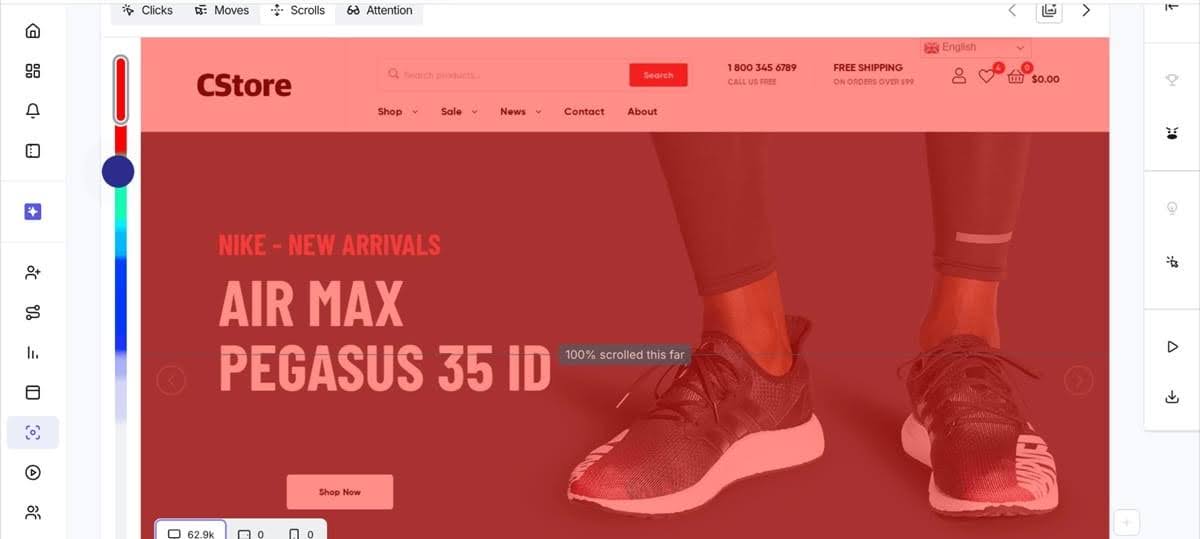
Source: Hotjar
The platform also tracks rage clicks. This is when users click one element repeatedly. It highlights sections of your website that are not working as intended.
Heatmaps are useful when running A/B tests. If you’re trying a new product page design layout, Hotjar’s heatmaps can tell you how users interact with the new layout vs the old one.
Session Replays from Hotjar give you recordings of the paths users take when they land on your ecommerce website. It shows complete sessions from when they land on the site to how they navigate, discover products, add items to cart, and convert or bounce.
These recordings help track customer journeys in your store. They show you the actual paths customers take, which allows you to enhance their experience.
They also show sections where customers spend most of their time. This can tell you either what’s important to users or sections that are confusing or causing hesitation among your target audience.
Hotjar offers an AI feature called Sense that provides summaries of key moments within replay sessions. It helps you analyze the replays much faster for quicker decision-making.
We must point out that session recordings and heatmaps are great at showing potential friction points. What they do not tell you is why the friction happens.
That’s where you need qualitative data.
If you notice customers spend more time than usual on the product or checkout pages, talking to them is the best way to identify what exactly the issue is.
Key features
- Masks sensitive data – Hides sensitive data like credit card details from the replays. This protects your customer’s data and makes the tool GDPR compliant.
- Frustration detection – Helps you identify friction points from session replays much faster.
- Survey tool – Offers a survey tool that supplements the insights from heatmaps and session replays with qualitative data. Use the tool to collect customer feedback. The AI assistant helps summarize findings from your surveys.
- Collaboration – Adds several team members like marketers, designers, and developers to see how users interact with your website.
Pricing
Hotjar has a free forever plan. It supports only one project, 200K monthly session replays, basic surveys, and heatmaps. And while it doesn’t come with Hotjar’s built-in AI, it supports integration with LLMs through an MCP server. That means you can use your favorite LLM to help with analyzing your heatmaps and replays.
Paid plans start at $39/mo. It includes up to 10 million monthly sessions, 3 projects, and access to Contentsquare’s Sense AI for heatmap summaries and session analysis. It also supports side-by-side heatmap comparison and customer journey analysis.
Pro and Enterprise plans are available at a custom price. These are ideal for larger businesses that want more CRO capabilities. The Pro plan offers additional features like APIs, while the Enterprise plan includes advanced security features like custom user roles and audit logs.
6. PPC advertising tool – GetResponse
Paid advertising is a powerful ecommerce growth channel. Both Meta and Google provide targeting tools to help you reach your ideal customers. They also offer tracking pixels for retargeting campaigns.
Meta and Google offer powerful built-in advertising tools. You can use them to create and manage all your paid advertising campaigns. The problem is that these are separate platforms, and most marketers run paid ads across Google and Meta platforms. This makes multi-ad management a pain.
GetResponse provides a paid ads platform that lets you manage paid campaigns across Google and Meta’s platforms. Our solution supports seamless integration with both Google and Meta. It lets you create, deploy, and manage ads from within GetResponse.
The best part about using GetResponse for paid ads is that you can use insights from your email marketing campaigns to enhance your ads.
For example, you can retarget subscribers with paid ad content you already know they like. This increases your conversion rate significantly.
You can also use insights from your email list and campaigns to target lookalike audiences with more precision. That helps you find high-quality leads quickly to increase conversions and optimize your paid ads ROI.
Key features
- Supports retargeting ads – Install the Facebook pixel on your GetResponse landing pages to track and retarget website visitors. Create curated paid ad offers and content based on the pages users visit.
- Paid ads creator – The built-in paid ads creator lets you build compelling ads within GetResponse.
Pricing
Paid ads are available on the GetResponse Marketer plan, which starts at only $48.38 per month. It’s also included in the GetResponse Max package, which we recommend to ecommerce stores.
7. SEO tool – Semrush
Search engine optimization helps your site rank organically for the keywords your target customers use on search engines. Effective SEO reduces reliance on expensive Google Ads for discovery.
“Ad blindness” is also a thing. It’s when users scroll past sponsored results intentionally to click on organic results. Effective SEO helps you capture those clicks.
The good news is that most ecommerce platforms come with built-in SEO tools. Shopify, for example, generates sitemaps automatically and creates canonical tags to prevent duplicate content issues.
You can also find more SEO apps within the Shopify App Store. These help with additional AI features that are either missing or not well executed within Shopify.
Semrush is a decent alternative for marketers who want an enterprise-grade ecommerce SEO tool. This marketing platform helps businesses optimize their sites for both search engines and LLMs like ChatGPT and Claude.
It provides a powerful keyword research tool. The tool shows you relevant keywords you can target in your product descriptions, URLs, product category names, and blog. It gives you additional insights like the search volume and ranking difficulty of each keyword. That data helps you target relevant keywords that your store can rank for and generate revenue from.
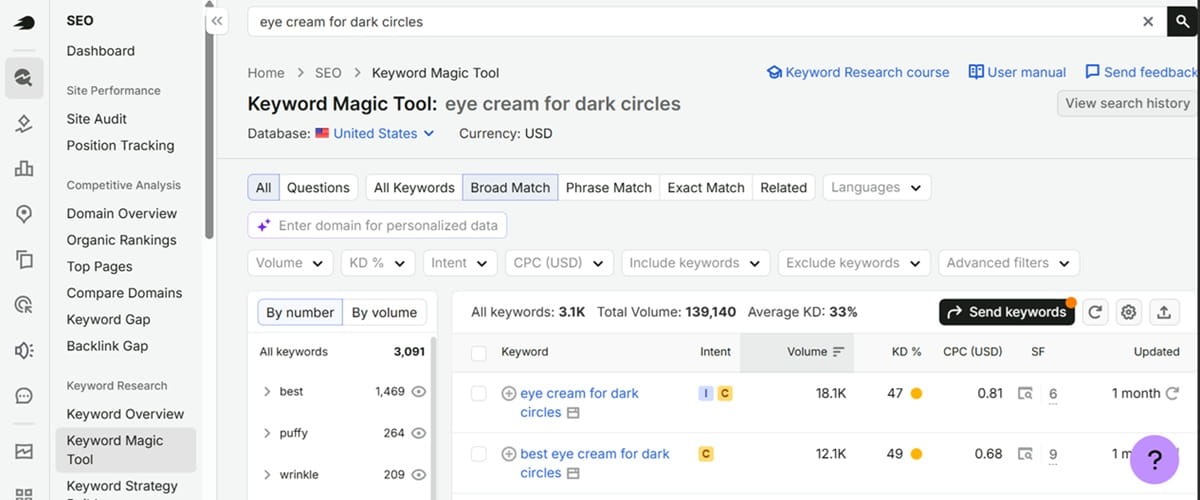
The platform also offers a competitor analysis tool. Drop your competitors’ URLs into the tool, and it’ll show you the keywords they rank for and how much traffic those keywords generate. These insights show your competitors’ strengths and weaknesses.
For example, it shows lucrative pages on their sites that are missing from your own store. Use that information to create a better SEO strategy for your ecommerce website.
Technical SEO is another important element for effective organic visibility. Semrush offers an audit tool that scans your site to identify technical issues. It points out broken internal links, crawling and indexing issues, broken images, and duplicate content.
It also provides tips on how to fix the issues.
Lastly, Semrush offers an AI brand sentiment analysis solution. This tool tracks how AI platforms like ChatGPT describe your brand. It also demonstrates how your competitors appear in the AI answers.
And it shows your share of voice so you can see how your visibility on AI platforms compares to your competitors.
Key features
- SEO writing assistant – Helps you write optimized content for your website while maintaining your brand voice.
- Backlink auditor tool – Audit your backlink health to stop spammy websites from linking to your store. The backlink tool is also useful for link building.
Pricing
Semrush is quite expensive, with paid plans starting at $165/mo. This provides keyword research, competitor analysis, and other SEO tools. It doesn’t include competitive tools like Share of Voice. For that, you’ll need the Advanced plan, which starts at $455.67/mo.
Omnichannel ecommerce marketing with GetResponse
The best ecommerce marketing tools drive traffic to your online store and convert that traffic to leads and sales. You’ll need a reliable tool for every marketing channel crucial to your business.
Luckily, most ecommerce marketing platforms provide several tools for the different marketing channels. That means less hopping between multiple tools and fewer subscriptions.
GetResponse supports omnichannel marketing across email, SMS, paid ads, and push notifications. Our platform lets you automate campaigns across these channels to deliver a consistent customer experience.
It connects directly to your ecommerce store and CRM tool to track customer behavior. This powers personalized campaigns that respond to specific customer actions and inactions as well as the tags you’ve applied.
We recommend at least the Marketer plan for ecommerce businesses. Create a free account today with the premium features (no credit card required) to see how GetResponse can drive revenue for your store.
Best ecommerce marketing tools FAQs
1. What are the tools used in ecommerce?
Ecommerce businesses use several tools, including an ecommerce platform like Shopify and marketing tools like GetResponse for email and SMS marketing, Buffer for social media marketing, and Upfluence for influencer marketing campaigns.
2. How to promote an ecommerce store?
The best way to promote an ecommerce store is through a combination of paid and organic campaigns. It involves PPC ads, email marketing, influencer partnerships, SMS campaigns, and SEO.
3. How do you choose the right ecommerce marketing tools?
To choose the right ecommerce marketing tool, consider your specific needs, budget, and integration with your existing ecommerce tech stack. We recommend picking a platform that provides several marketing tools in one solution to simplify automation setup, customer data tracking, and revenue attribution.
