
GetResponse, Klaviyo, Omnisend, TxtCart, and Brevo are five SMS marketing apps for Shopify worth comparing. Choose GetResponse for lifecycle campaigns, Klaviyo for AI, Omnisend for email-and-SMS flows, TxtCart for conversational SMS, and Brevo for multichannel campaigns. Shopify merchants should compare total costs, automation, and consent tools.
| App | Best for | Starting price and SMS costs | Free plan or trial | Standout feature |
|---|---|---|---|---|
| GetResponse | Lifecycle marketing automation | Enterprise / MAX: custom quote; confirm SMS usage charges | Demo available; confirm SMS trial terms | Behavior-triggered SMS alongside email automation |
| Klaviyo | AI-assisted SMS campaigns and flows | Free: $0, including $5 of mobile messages/month; paid costs depend on configuration | Free plan: up to 250 active profiles and 500 emails/month | Shared customer data for segmentation and SMS |
| Omnisend | Email-and-SMS automation with volume pricing | Pro: from $59/month plus SMS credits; US rates start at $0.009/SMS | Free email plan; new customers need Pro for SMS | SMS blocks in ecommerce automation workflows |
| TxtCart | Conversational SMS and cart recovery | Starter: $29/month for up to 500 orders, plus messaging usage | 14-day free trial with test credits | AI agent with escalation to human agents |
| Brevo / Brevo PushOwl | Multichannel Shopify campaigns | Basic bundle: $0 with no SMS credits included; SMS costs depend on configuration | Free bundle available; SMS credits are paid | Shopify email, SMS, web push, and WhatsApp campaigns |
How we chose these Shopify SMS marketing apps
These five Shopify SMS marketing apps were compared on store integration, behavior-triggered automation, consent tools, reporting, and total cost.
The comparison uses vendor product pages, pricing pages, and setup documentation checked on October 22, 2026. It is a documentation review, not a hands-on performance test. No deliverability tests or revenue experiments were run for this update.
Each app was assessed against the same buying questions:
- Shopify data: Can the app use customer records, purchase history, and abandoned checkout activity to trigger relevant campaigns?
- Automation: Can you build welcome messages, cart recovery, and win-back flows, with conditions that stop unnecessary follow-ups?
- Channel coordination: Can SMS work alongside email or other channels, or will you need a separate integration?
- Consent and reporting: What tools support opt-outs, audience eligibility, delivery tracking, link clicks, and sales attribution?
- Total cost: What do the subscription, SMS segments, carrier fees, AI usage, and required add-ons cost together?
GetResponse publishes this comparison and is included in the shortlist. The recommendations reflect different store needs, rather than a single winner for every merchant. A dedicated SMS app can make sense if your email setup already works; a shared workflow builder matters more when you need to coordinate the whole customer journey.
1. GetResponse: best for lifecycle marketing automation
GetResponse is best for Shopify stores that want behavior-triggered SMS and email marketing automation in the same platform.
GetResponse is a retention and lifecycle marketing platform with an SMS automation tool. The tool supports behavior-triggered SMS campaigns. This allows you to send personalized SMS messages based on specific customer actions.
For example, you can create an SMS workflow that automatically sends an abandoned cart recovery SMS when a user abandons their cart. Or send a time-sensitive text message reminding customers of a flash sale that’s about to end.
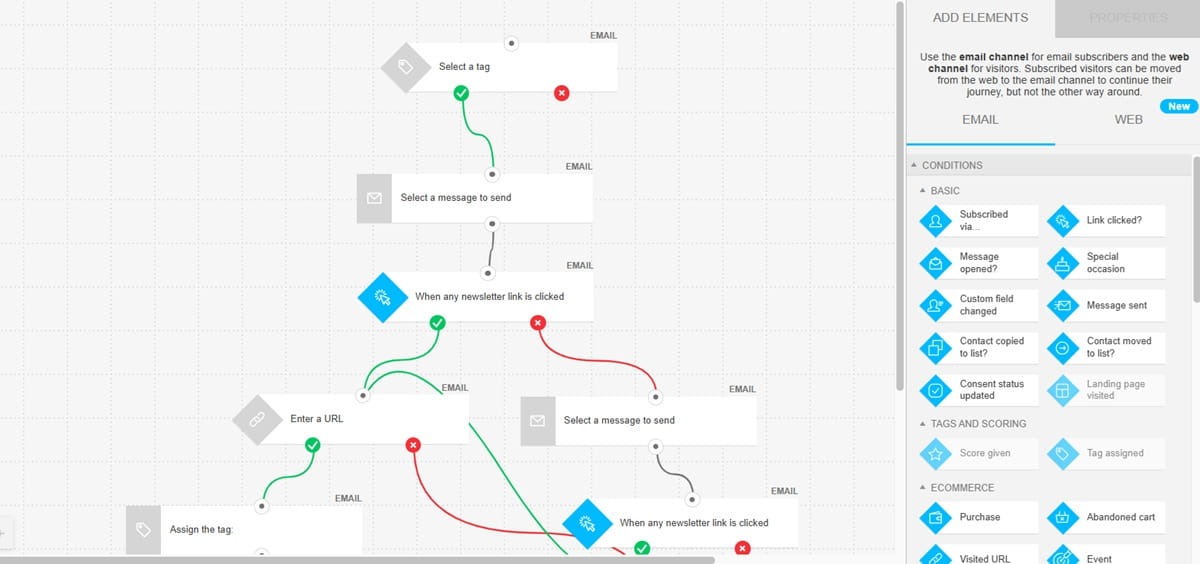
This means you can use GetResponse to create entire customer journeys that combine several marketing channels. Building those complex multichannel automation workflows on GetResponse is straightforward, thanks to the visual drag-and-drop workflow builder.
The GetResponse SMS tool offers Time Travel and Perfect Timing tools. Use the available scheduling controls alongside your audience’s local sending restrictions. Personalization still needs to respect consent and quiet hours.
Key SMS and Shopify features
- Shopify integration: Import customer information, products, orders, and abandoned checkouts. Segment your customers based on their purchase history.
- SMS personalization: Customize the sender name and message content, shorten links, and track sent messages, deliveries, and link clicks.
- Send-time tools: GetResponse lists Time Travel and Perfect Timing for SMS. Confirm the available controls for your account and recipient countries.
- Channel planning: Combine promotional SMS with email, while keeping transactional messages and marketing permissions distinct.
The GetResponse Shopify app connects your store to GetResponse. Tortli, a Shopify merchant, praises the automation tools and support in the review shown here. The review does not report an SMS-specific revenue result.

Pricing and trial
SMS marketing automation is available on the GetResponse Max or Enterprise plan. The plan is available at a custom price (based on your needs). The pricing page lists SMS marketing alongside email automation, web push notifications, and transactional emails. Ask for a quote that specifies SMS usage charges and destination coverage. A demo is available; confirm SMS trial access with the team.
Pros, cons, and fit
Pro: Shopify data and email automation can support the same lifecycle campaigns as SMS. Con: The quoted plan does not give you a public per-message price for an immediate cost comparison. Best for: Teams coordinating retention campaigns across channels. Not for: Stores that need to choose a basic SMS service from a fixed public rate alone.
2. Klaviyo: best for AI-assisted SMS marketing automation
Klaviyo is best for Shopify stores that want AI-assisted SMS campaigns, customer segmentation, and connected email flows.
Klaviyo is an AI-powered marketing automation platform. It supports marketing across SMS, email, WhatsApp, and push notifications. Channel availability depends on the market and product configuration.
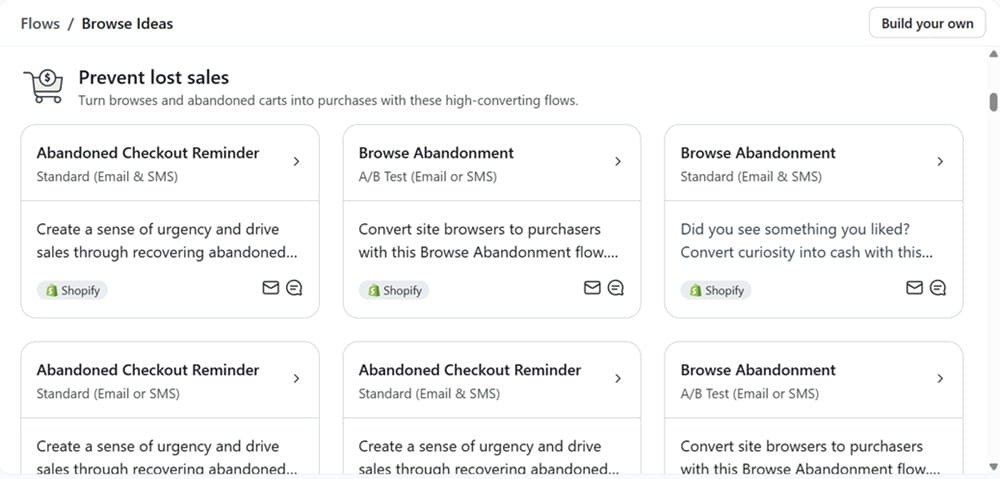
Klaviyo uses customer data like purchase history and browsing behavior to support segmentation and personalized messaging. You can prompt the AI to create SMS flows as well. There’s also an automation library with prebuilt workflows you can customize.
The platform offers an AI customer agent that answers common customer questions. The agent can also recommend products within customer support conversations. Check how customer-agent usage is billed before adding it to your SMS setup.
Key SMS and Shopify features
- Two-way conversations: Klaviyo supports two-way SMS conversations with customers. Set up automated responses to handle standard questions on things like order tracking. A human agent can also step in and handle the conversations when required.
- SMS segmentation: Build audiences around customer activity and use those segments in campaigns and automated flows.
- Compliance Hub: Monitor SMS compliance health and review issues that need attention. The platform also supports separate marketing and transactional consent.
- Campaign reporting: Track SMS clicks and attributed orders. Klaviyo does not track SMS open rates.
Pricing and trial
Klaviyo’s Free plan costs $0 and supports up to 250 active profiles, 500 emails per month, and $5 of mobile messages per month. Paid pricing depends on profiles, messaging usage, and selected products. Check the calculator for your recipient countries rather than assuming a universal $0.01 SMS rate.
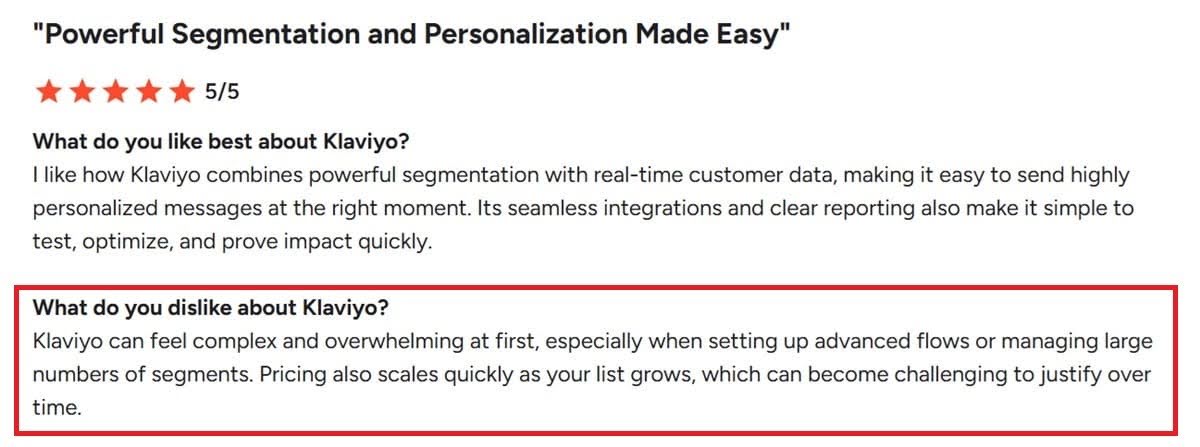
One of the differences between Klaviyo and GetResponse is how you configure and pay for the platform’s products. Compare the complete package you need, including email, mobile messaging, AI usage, and any advanced data products.
Pros, cons, and fit
Pro: The free mobile allowance lets a small store try SMS alongside email. Con: The total paid bill depends on several configuration choices. Best for: Stores building campaigns around customer data and AI assistance. Not for: Teams that want one fixed subscription covering every product and message.
3. Omnisend: best for email-and-SMS automation with volume pricing
Omnisend is best for Shopify stores combining email and SMS flows that can justify a Pro subscription and separate messaging spend.
Omnisend offers an SMS marketing automation tool alongside email marketing and web push notifications. The platform has a drag-and-drop flow builder where you can drag the SMS block and add it to an automation workflow.
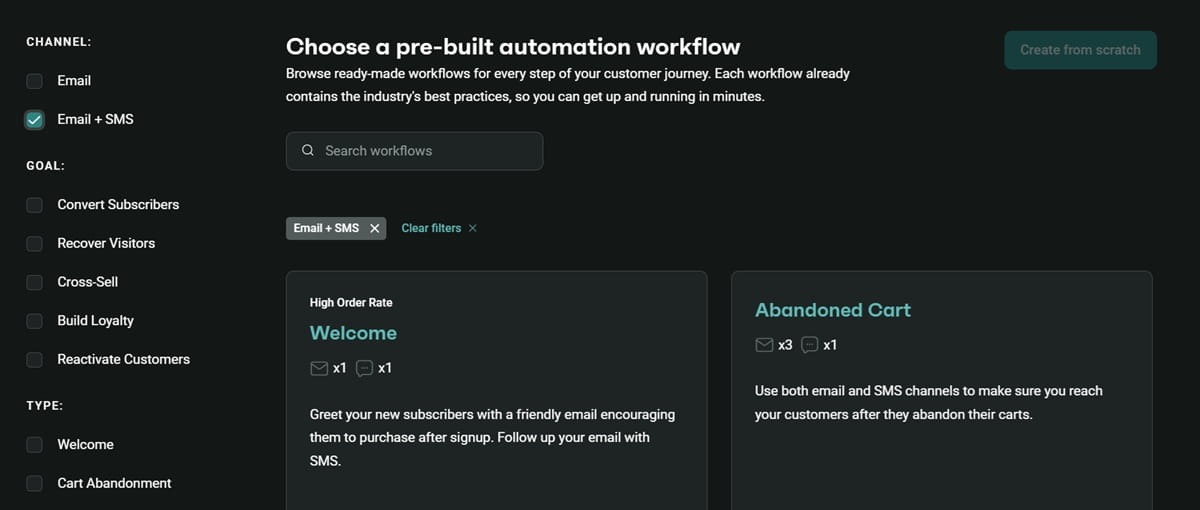
You can add SMS to popular ecommerce workflows, like abandoned cart recoveries, welcome email series, and happy birthday and anniversary campaigns. There’s also a library with various prebuilt SMS automation workflows. All workflows are customizable so you can add extra steps or change the timing and trigger conditions.
Omnisend also tracks buyer behavior on your website. It connects to your Shopify store to access additional data like purchase history. You can then use that data to segment customers and target them with more relevant SMS content and product recommendations.
Key SMS and Shopify features
- Quiet hours and frequency caps: Set safeguards around sending times and daily message volume. Review the settings for each destination.
- SMS segmentation: Create buyer segments based on purchase behavior, location, or lifecycle stage, like VIP customers vs. first-time buyers.
- Trackable discount codes: The platform lets you create trackable discount codes. This makes it easier to know how much revenue each text message generates.
- Two-way SMS and reporting: Use supported replies, link tracking, and sales attribution to review campaign performance.
Omnisend’s email personalization tools also support dynamic product recommendations. Keep the distinction clear: an email recommendation block is not an SMS feature.
Pricing and trial
For new customers, SMS requires Pro, starting at $59/month, plus a separate SMS Credits Subscription. US rates are $0.009/SMS for $10–$49.99 monthly SMS spend, falling to $0.007/SMS at $10,000 or more. The free email plan does not provide SMS access for new customers.
Pros, cons, and fit
Pro: Email and SMS can share the same ecommerce workflow. Con: New SMS customers need both Pro and a messaging subscription. Best for: Stores that will use email automation as well as SMS. Not for: Merchants choosing solely on the advertised high-volume per-message rate.
4. TxtCart: best for conversational SMS and cart recovery
TxtCart is best for Shopify stores that want SMS cart recovery, automated conversations, and an AI agent alongside their existing email setup.
TxtCart is a dedicated text messaging app with an AI agent. TxtCart doesn’t offer email marketing, so you’ll need a separate Shopify email marketing solution if email is part of your customer journey.
TxtCart supports behavior-based automation. It lets you send targeted text messages to welcome new subscribers or customers, reach cart abandoners, and win back disengaged shoppers. Choose the flow and audience conditions that match the permissions you have collected.
You can also target customers based on their purchase history and Shopify customer data. Plus, it provides popups, QR codes, and signup forms to build your SMS list. Check the plan requirements for each list-growth tool.
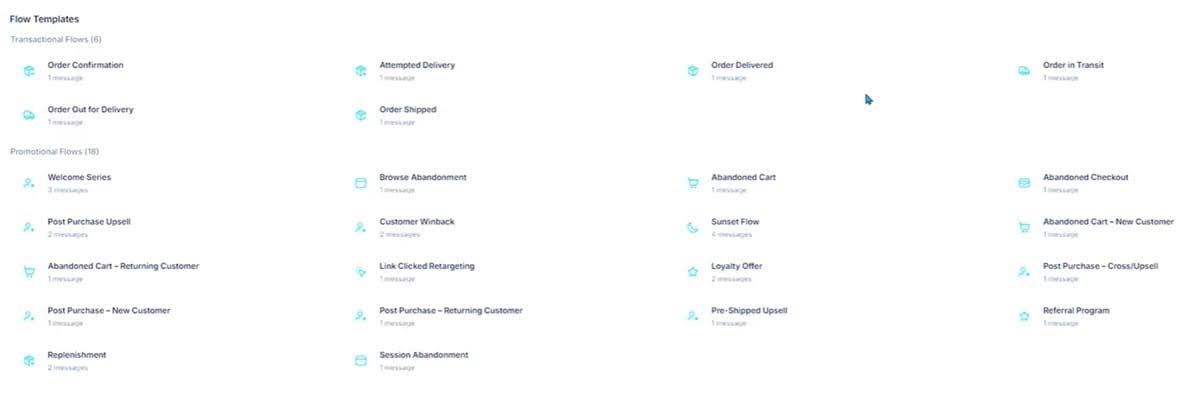
The TxtCart AI agent provides customer support on basic inquiries. It escalates conversations to human agents when necessary. And the platform provides a unified inbox, so both the AI and human agents have easy access to the context they need.
The AI agent can also recommend relevant products based on context from conversations and browsing behavior. It also supports browse and cart abandonment recovery campaigns.
Key SMS and Shopify features
- Visual automation builder: Create automated flows by simply dragging and dropping elements.
- List growth: Use popups to collect subscribers. Check the plan requirements for keywords and QR codes.
- Segmentation and testing: The Growth plan adds subscriber segmentation, advanced flow customization, and A/B testing.
- Performance reporting: Track SMS costs, sales, and ROI with the TxtCart analytics dashboard.
Pricing and trial
The Starter plan starts at $29/month for up to 500 orders. This gives you access to SMS and MMS campaigns, the workflow builder, popups, and core reporting. The AI agent is available on this plan for $0.99 per resolution. Growth costs $99/month for up to 2,000 orders, and Pro costs $499/month for up to 5,000 orders. Messaging usage and carrier fees are additional. A 14-day free trial includes test credits.
Pros, cons, and fit
Pro: SMS flows and customer conversations sit together. Con: Subscription, message usage, carrier fees, and AI resolutions all affect the bill. Best for: Stores adding conversational SMS to an established email setup. Not for: Teams looking for email and SMS in one application.
5. Brevo: best for multichannel Shopify campaigns through Brevo PushOwl
Brevo is best for Shopify merchants considering email, SMS, web push, and WhatsApp campaigns through the Brevo PushOwl app.
Brevo offers a centralized platform from which you can engage customers via SMS, email, WhatsApp, and live chat. For Shopify, the current integration is Brevo PushOwl, which brings email, SMS, web push, and WhatsApp campaigns into the store setup.
The integration syncs customers, products, collections, and order data. It integrates with your Shopify store to track customer behavior like the product pages and categories they browse. It also tracks purchase history. Enable the store tracker, and check the migration instructions if you already have a Brevo account before installing the app.
The Brevo SMS automation platform uses customer data to activate personalized SMS flows. It lets you build these flows through a drag-and-drop editor. So you can send the first message via email and follow up through text, where your plan and customer permissions support both channels.
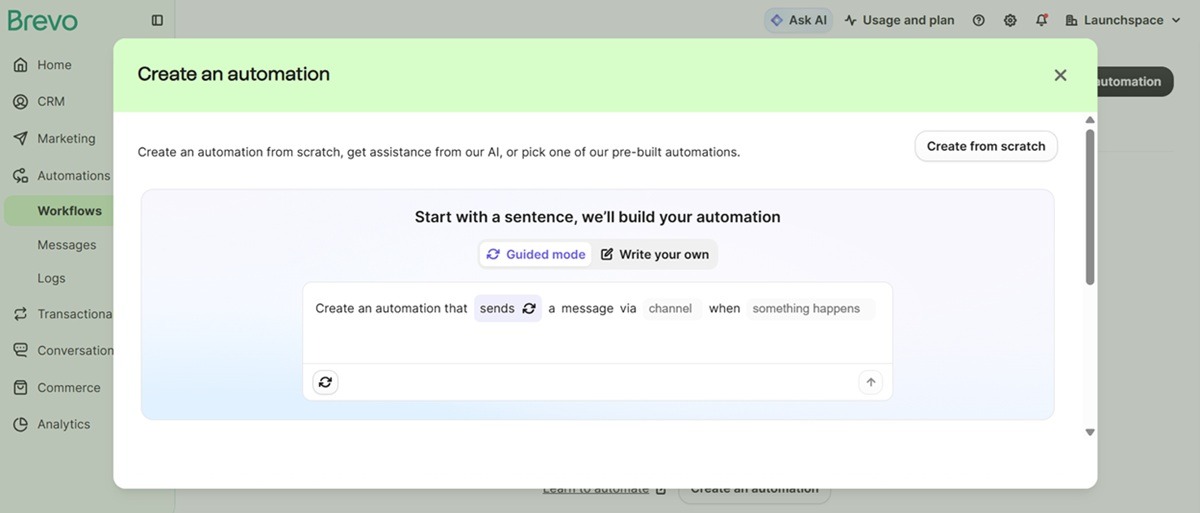
Brevo supports ecommerce segmentation. Build segments around preferences, location, order history, and behavior, then check which criteria are available in your Shopify setup.
Key SMS and Shopify features
- Shopify data sync: Keep customer, product, and order information available for campaign targeting.
- Lifecycle campaigns: Use welcome, abandoned cart, and re-engagement campaigns where the selected channel and plan support them.
- Channel choice: Coordinate email, SMS, and web push instead of sending the same promotion through every channel.
- Coupon personalization: Brevo supports imported coupon codes in email and SMS messages.
Pricing and trial
Brevo PushOwl’s Basic bundle starts at $0, with 500 monthly emails, 500 web push notifications, and no SMS credits included. Configure SMS credits in the app’s pricing calculator. Brevo’s standalone platform also sells prepaid SMS credits, but confirm which billing arrangement applies to your Shopify account.
Pros, cons, and fit
Pro: Shopify campaigns can span email, SMS, and web push. Con: Existing Brevo users need to check migration and billing before switching. Best for: Stores considering the Brevo PushOwl channel mix. Not for: Merchants assuming every standalone Brevo feature or price carries into the Shopify app.
GDPR, TCPA, and PECR compliance for Shopify SMS marketing
Shopify SMS marketing requires a documented permission process, working opt-outs, and sending rules matched to each recipient’s jurisdiction.
An app’s compliance tools help you manage those tasks. They do not guarantee that every form, audience, or campaign you create is lawful. This is general information, not legal advice; have your legal team check the rules for your markets.
- US consent: For automated marketing texts covered by the TCPA, obtain prior express written consent. Keep the disclosure clear, identify the seller, and do not make consent a purchase condition. Check the FCC’s current consent and revocation rules.
- EU and UK rules: GDPR governs personal-data processing; the ePrivacy framework and national laws govern electronic marketing in the EU. In the UK, PECR generally requires consent for marketing texts to individuals, subject to the limited soft opt-in exception. Review the EU ePrivacy rules and ICO’s text marketing guidance.
- Separate permissions: Consent for email marketing campaigns does not count as consent for SMS campaigns. Collect and record channel-specific choices when building your Shopify SMS marketing strategy.
- Clear opt-out instructions: Your campaigns must provide a clear and easy way for users to opt out of receiving promotional texts. Support STOP replies where available, or an appropriate unsubscribe route. Process requests promptly and suppress contacts across connected marketing flows.
- Quiet hours: The federal TCPA rules set an 8 a.m.–9 p.m. local-time window for covered solicitations. State restrictions can be narrower. Check the current rule and your destination requirements before scheduling.
- Consent management: Keep a record of how users consented, as well as the channels and messages they consented to. Store the date, form source, disclosure version, and withdrawal history.
- Personal-data rights: Users have a right to access the personal data you have on them. They also have a right to withdraw their consent, request deletion of the data, or update their information. GDPR rights have conditions and exceptions; establish a process to handle those requests.
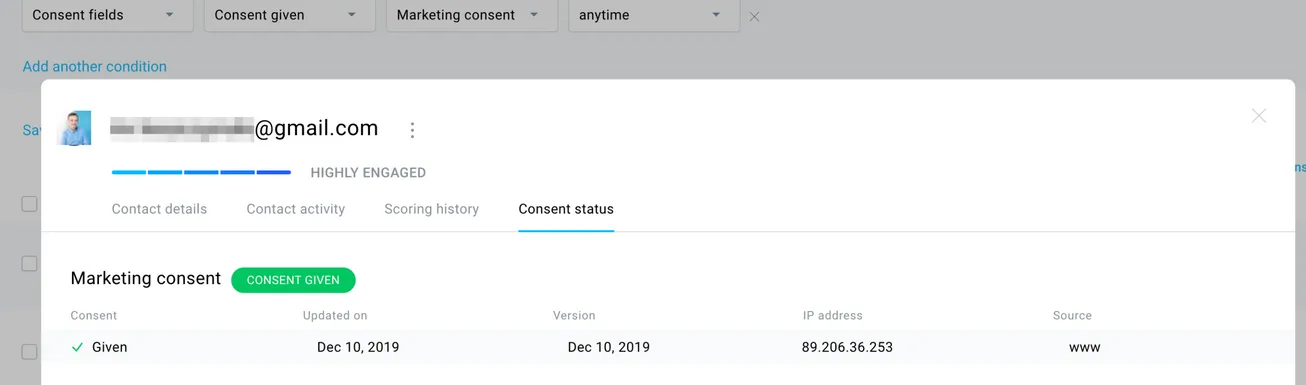
The GetResponse screenshot shows a contact’s consent status, record date, and source. Use consent records to check eligibility before an SMS workflow starts, rather than treating every imported phone number as a marketing subscriber.
How to choose the right SMS marketing app for your Shopify store
The right Shopify SMS marketing app matches your audience’s countries, existing email setup, required automation workflows, and complete monthly budget.
A shared platform makes sense when you need to coordinate SMS and email campaigns. A dedicated SMS app can also work if it integrates with your existing email service. Check what customer data and unsubscribe status pass between the tools.
Coordinating campaigns reduces the chances of overmessaging customers, sending duplicate/overlapping campaigns, or delivering conflicting messages. Check both the workflow rules and the campaign calendar; a shared platform still needs someone to manage the schedule.
Here are the other factors to consider:
- Shopify integration: Confirm support for purchase history, abandoned checkout events, customer tags, and consent status. Test the data sync before launching your first flow.
- Advanced automation workflows: For a shared platform, the app should allow you to combine SMS, email, and other channels in a single workflow. The platform should also support split logic, conditional branching, time delays, and A/B testing inside flows. Check that a purchase removes the buyer from cart recovery.
- Transparent pricing: It should be clear whether you pay based on volume, list size, or both. If it uses a credits system, check the expiration policy.
- Transactional messages: Check whether the app supports shipping and delivery updates, which plan includes them, and how permissions differ from promotional campaigns.
- Audience coverage: Confirm recipient countries, sender registration, reply support, and local-time controls. A country listed for email does not automatically support SMS.
Also, confirm whether the platform fees include advanced capabilities like complex automations, advanced segmentation, and marketing analytics like revenue attribution. Ask for a sample bill based on your list size and sending plan.
Don’t base your budget on a 98% SMS open-rate claim. Comparisons of SMS opens vs. 39.64% email opens are not a reliable forecast for your store. The linked email report is the 2024 benchmark edition; it is not a current SMS measurement source.
Track delivered messages, link clicks, conversions, opt-outs, and revenue per recipient instead. Klaviyo, for example, does not track SMS opens. Review attribution windows too, so email and SMS do not each get full credit for the same purchase.
Using GetResponse for Shopify SMS marketing
GetResponse connects Shopify purchase data and abandoned checkouts with automation tools for targeted email and SMS campaigns.
The GetResponse Shopify integration imports customer information, product catalogs, order information, and abandoned checkouts. Optional website tracking adds browsing activity. Choose the data you need, then confirm how phone numbers and SMS permissions will enter your account.
For example, you could create a Black Friday campaign that starts with early access emails and ends with SMS messages on the day of. Use email to hype your BFCM sales event and go in depth about the product categories that will be on offer.
SMS comes in as an urgent reminder when the sale is finally live or when there are only a few hours left before it ends. Send that reminder only to eligible SMS subscribers, and exclude customers whose recent purchase makes the offer irrelevant.
That is an illustrative workflow, not a reported customer result. Add a purchase check, a time delay, and a local sending window before the text goes out. Then review deliveries, clicks, orders, and unsubscribes for the campaign.
Use GetResponse marketing automation to map the sequence and the GetResponse Shopify integration to review the available store data.
Book a GetResponse MAX demo to confirm SMS access, destination coverage, and the full cost for your store.
Shopify text message marketing apps FAQs
Shopify text message marketing apps differ in automation, channel coverage, consent controls, and how they charge for SMS usage.
Can I use SMS marketing with Shopify?
Yes, you can use SMS marketing with Shopify. Apps like GetResponse, Klaviyo, and TxtCart help you launch automated SMS marketing campaigns for your Shopify business. Confirm destination coverage, sender registration, and subscriber permissions before sending.
Is SMS marketing legal?
Yes, SMS marketing is legal when you meet the rules that apply to your recipients and campaigns. Check the TCPA and state laws in the US, GDPR and national electronic-marketing laws in the EU, and PECR and UK GDPR in the UK. Compliance tools help, but your business remains responsible for its campaigns.
What is the best SMS marketing app for Shopify?
The best SMS marketing app for Shopify depends on your store’s needs. Choose GetResponse for lifecycle campaigns, Klaviyo for AI-assisted marketing, Omnisend for email-and-SMS workflows, TxtCart for conversational SMS, or Brevo PushOwl for multichannel Shopify campaigns.
What is the cheapest platform for SMS marketing?
Klaviyo’s free plan includes $5 of mobile messages per month, so it is an option for testing with a small list. There is no single cheapest paid platform for every store: compare subscription fees, recipient countries, message segments, carrier fees, and required add-ons.
Does Shopify offer free SMS marketing?
No, Shopify Messaging charges for SMS campaigns. You pay per message, and other charges can apply, including a monthly toll-free number fee for US and Canadian sending. A free app installation or email allowance does not make SMS sending free.
