
AI lead nurturing tools use artificial intelligence to automate communications with leads and move them through the customer journey. The best AI systems personalize these communications based on the lead behavior to speed up the sales process.
According to Salesforce, reps spend 60% of their time on non-selling tasks. Planning campaigns, manually entering data, and creating quotes top the list. Reps spend an additional 18% of their workweek on prospecting.
These repetitive tasks can all be automated with AI lead-nurturing tools, so your team can focus on closing sales. According to the same report, 88% of sales reps say AI and agents help them be more productive and increase the odds of hitting their targets.
This article looks at five AI lead-nurturing tools. Read on to see how each tool helps you automate customer journeys.
Key takeaways
- AI transforms lead-nurturing from static campaigns to dynamic journeys that respond to real-time lead behaviors and actions.
- Create a unified data system before setting up any AI lead-nurturing workflows. The success of your workflows relies on the AI systems having access to comprehensive, high-quality data.
- GetResponse automates the entire customer journey with tools for lead generation and nurturing as well as customer retention. It offers a self-learning AI product recommendation system and an AI assistant for building automation workflows.
- Ultimately, the best AI lead-nurturing tool depends on your business needs and context. Below is a summary of five great options.
| Tool | Best for | Key AI capabilities | Limitations | Starting price |
|---|---|---|---|---|
| HubSpot | B2B lead nurturing | Buyer-intent detection, lead scoring, AI prospecting, personalized outreach, multi-channel automation | Expensive. AI agents use credits | From $800/mo |
| GetResponse | Entire customer journey automation | AI-assisted workflows, predictive lead scoring, smart sending, AI product recommendations, email/SMS/push automation | AI product recommendations require an enterprise plan | $48.38/mo |
| Clay | Multi-source data enrichment | Data enrichment, AI agents, buying signals, TAM sourcing, CRM enrichment | Expensive | $167/mo |
| ActiveCampaign | Multi-channel automation | AI workflow creation, predictive sending, conditional content, segmentation, AI content generation | Steep learning curve | $79/mo |
| Apollo.io | Affordable lead nurturing | AI research, prospecting, automated outreach, lead routing, sales execution | Data accuracy issues | $49/seat/mo |
| Knock AI | Intent-driven B2B lead nurturing and buyer activation | AI lead qualification, enrichment, behavioral scoring, personalized AI engagement | Not a traditional email marketing automation platform | From $2,000/mo |
How AI enhances the lead nurturing process
AI lead nurturing systems track user behavior in real time to enhance customer journeys. Instead of being static, you get a dynamic lead-nurturing process that responds to individual lead behavior.
This results in personalized customer experiences. It speeds up conversions since leads receive tailored messages and offers at the right time.
Here are critical tasks AI handles in lead nurturing:
- Data analysis and enrichment – AI systems analyze customer data to enable personalized lead-nurturing campaigns. Systems like Clay connect with third-party data providers to enrich existing CRM data. They add additional lead information like job title, role, employee count, and funding history.
- Lead scoring – AI lead nurturing solutions use engagement, behavioral, and firmographic signals to score leads. Scoring helps your sales teams focus their efforts on hot leads who are closer to converting. GetResponse, for example, scores leads based on engagement signals, like when they click links in your campaigns.
- Dynamic segmentation – AI supports dynamic segmentation that moves leads to relevant groups based on real-time changes in their behavior and data. That’s unlike traditional lead nurturing that segments leads at sign-up or through manual regrouping.
- Content personalization – AI tools personalize lead nurturing content at scale. They use enriched lead data to curate the messaging and offer. Some platforms even track the channels your leads prefer and use them to send your communications.
- Automated follow-ups – The systems track lead engagement to send timely automated follow-ups. They use a combination of time- and behavior-based triggers to keep leads engaged. For example, a follow-up email can be sent the next time a lead revisits your pricing page.
- Predictive analytics – AI uses historical data to predict lead behavior. It helps you anticipate demand and build a proactive lead-nurturing system.
- Customize timing – AI systems track lead engagement patterns to send messages when leads are most likely to engage with them. Behavior-based triggers also make sure your nurturing messages are sent when intent is high.
Why so many AI lead nurturing campaigns fail
The biggest mistake most brands make is implementing AI lead-nurturing campaigns without first addressing the data problem. Data quality and silos have a significant impact on the success of AI lead-nurturing campaigns.
According to Salesforce, 40% of sales leaders say data silos and trapped data have a severe impact on their AI capabilities. Another 47% say there is some impact.
Siloed and trapped data also impacts personalization abilities.
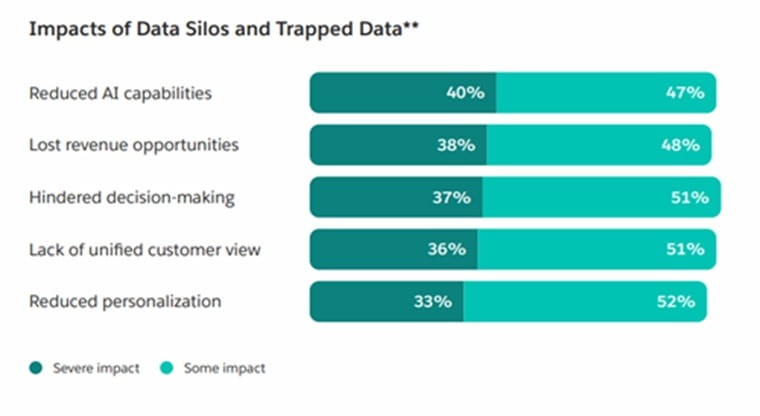
Source: Salesforce report
The 2026 State of Marketing report by Salesforce identifies the following data-related blockers that prevent marketers from implementing effective AI-powered personalization.
- Siloed data across channels
- Too much data to process
- Poor data quality
- Regulations and privacy concerns
- Difficulty scaling quality control
AI lead nurturing wins or fails depending on the data the systems have access to.
Simplify your tech stack to make customer data more accessible. Using all-in-one platforms is a great way to achieve this.
A comprehensive marketing automation solution, for example, should provide both SMS and email marketing tools in a single platform.
Seamless integration of different systems is also vital. It creates unified data AI systems can use to deliver accurate, personalized campaigns.
Lastly, focus on collecting high-quality first-party data. Use consent forms and be transparent about the data you collect and how it helps deliver better customer experiences.
Best AI lead nurturing tools
Here are the five best AI lead nurturing tools:
1. HubSpot – Best for B2B lead nurturing
HubSpot is one of the best AI lead nurturing tools because it’s an all-in-one platform. It has a CRM system, marketing, sales, and customer support tools. This resolves the data problem that causes most AI lead-nurturing campaigns to break down.
All the customer data lives in one place so you can easily orchestrate customer journeys.
HubSpot’s AI capabilities also simplify sales and marketing.
They offer an AI assistant called Breeze Assistant. Breeze has access to your business and customer data that lives on HubSpot. It understands your customers, how they shop, and their journey with your brand.
This allows the AI to plan and execute personalized lead generation and nurturing campaigns. You can prompt the AI for campaign ideas and to track performance.
The Prospecting Agent is one of HubSpot’s key lead-nurturing features. It does prospecting for your sales and marketing teams. The agent monitors buying signals to identify leads showing high intent.
It also enriches contact data by pulling additional lead data from third-party providers like Apollo and ZoomInfo. The agent can even identify entire buying committees for B2B buyers.
It creates personalized outreach messages in your sales rep’s voice.
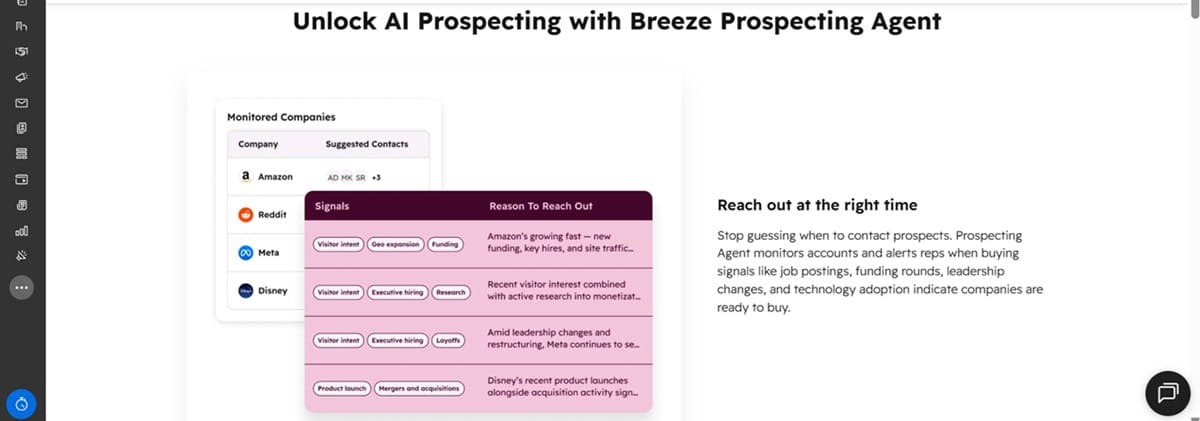
The Prospecting Agent works alongside the Breeze Assistant. Once it’s done with lead qualifying and research, the Breeze Assistant and Data Agents pull more CRM data to give your reps additional context about the lead.
For lead qualifying, the Customer Agent engages website visitors to understand their needs. HubSpot lets you give this agent a personality to determine how friendly or professional it sounds. You also customize it to determine when it books meetings and hands off leads to human sales representatives.
You choose what marketing channels the agent uses to engage leads. It can contact leads through email, website chat, Facebook Messenger, and WhatsApp.
In terms of limitations, the biggest one with HubSpot is the price tag. You need at least the $800/mo Professional plan. And it doesn’t give you unlimited access to the AI agents. You need credits to use the agents. The Professional plan comes with 3,000 HubSpot credits.
This customer review on G2 captures the pricing problem accurately.
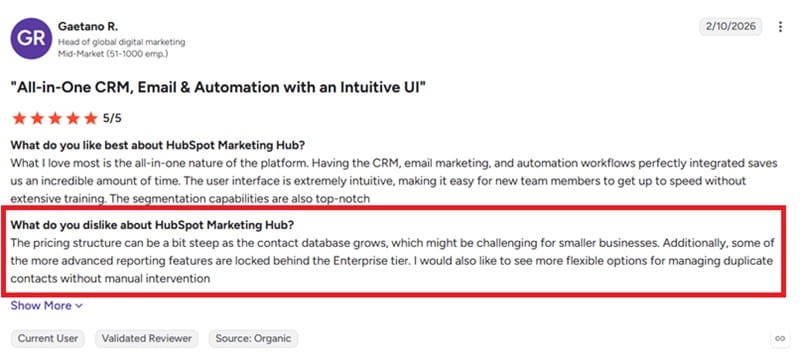
That price makes HubSpot’s AI lead-nurturing platform ideal for larger B2B and DTC brands.
Key features
- Identifies buyer intent – Breeze Assistant tracks website visitors looking for buying signals. It makes sure your sales representatives prioritize warm leads.
- Enterprise-grade security – HubSpot employs several security measures, including SOC 2 Type 2, to protect your data.
- Lead scoring – Uses fit and engagement data to score leads. The lead scoring software analyzes data from existing customers to give you useful insights into how to score leads.
- Marketing automation – Automate multi-channel marketing campaigns from one dashboard to deliver a consistent customer experience.
Pricing
The $800/mo Professional plan is the ideal starting point for effective nurturing campaigns.
It’s worth noting that the plan doesn’t give you unlimited access to the AI features. Those features use HubSpot Credits, which are limited. 3,000 credits for the Professional plan.
You can buy the credits separately at $9 per 1,000 credits.
The good news is that you only use credits with the Prospecting Agent when it drafts an outreach message to the lead.
2. GetResponse – Best for customer journey automation
GetResponse automates the entire customer journey from lead generation and lead nurturing to customer retention. It helps you capture interest, convert leads, and drive customer loyalty to optimize your CLV.
For ecommerce brands, GetResponse tracks how website visitors browse your site. It monitors the pages they visit before submitting an email address, completing a purchase, or bouncing from your site.
Additionally, the software integrates with your ecommerce platform to track what products customers buy. It also monitors the engagement levels of your campaigns.
All that data is used to automate the customer journey. Data on the pages a lead uses is used to identify their interest and target them with relevant follow-up campaigns, for example.
This is further enhanced by our AI-powered product recommendation engine.
The engine analyzes shoppers’ behavior to understand their interests and needs. It then customizes your store to show every visitor products that align with their interests.
It works the same way for service-based businesses. It monitors visitors’ behavior to match them with relevant services.
GetResponse product recommendations support rule-based recommendations too. This gives you more control over the products you want customers to see.
Our solution is popular among marketers due to its easy-to-use automation system. This GetResponse customer explains it quite well.
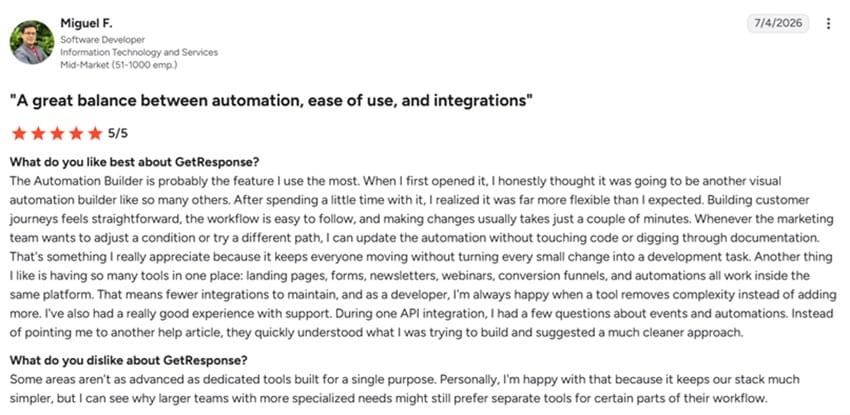
The drag-and-drop workflow builder lets you create lead-nurturing workflows triggered by specific customer actions. It supports split logic so you can take leads through different paths based on how they engage with your campaigns.
And you don’t need to build automation workflows from scratch. Describe the campaign you have in mind to the AI assistant and let it create the automation workflow for you in seconds.
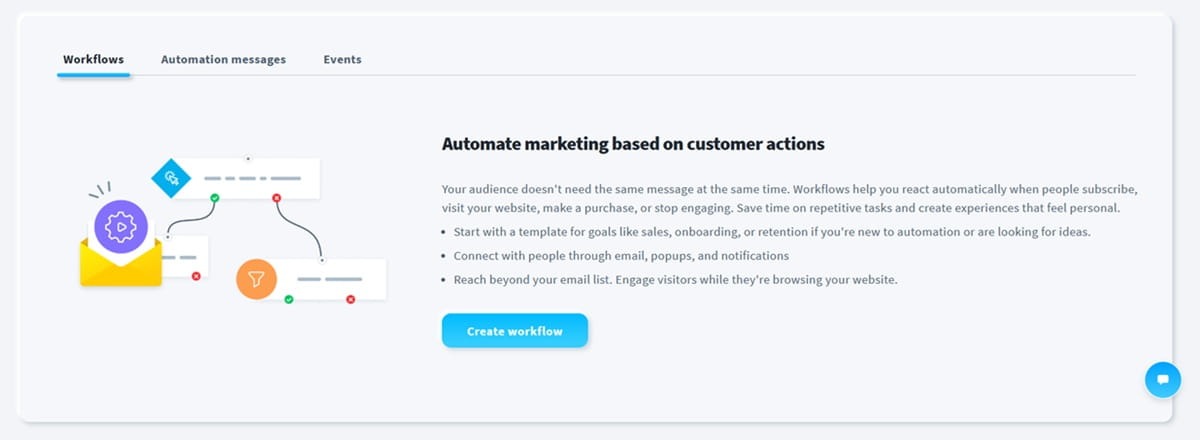
Lead scoring and contact tagging are also present. You can automatically assign a score to users who open and click certain campaigns. Contact tagging lets you label customers to facilitate segmentation and campaign personalization.
Unfortunately, AI product recommendations are only available on the Enterprise plan at the moment.
Key features
- Supports omnichannel automation – GetResponse lets you automate email, SMS, and push notification campaigns from one platform.
- AI assistant – Helps you build automation campaigns and write outreach emails.
- Extensive integrations – GetResponse connects with all major CRM and ecommerce platforms. This gives the solution access to the data it needs to deliver personalized lead nurturing campaigns.
- Smart sending – Our AI algorithm monitors subscriber engagement behavior like when they tend to open their emails. Smart Sending uses that data to deliver your campaigns at the right time for maximum engagement.
Pricing
Unlimited marketing automation and the AI assistant are available on the Marketer plan, which starts at $48.38/mo.
AI product recommendations are available on the Enterprise plan, available at a custom price. This plan unlocks omnichannel campaigns with access to SMS and mobile push notifications.
3. Clay – Best for multi-source data enrichment
Clay markets itself as a go-to-market, or GTM, platform. It supports lead-nurturing and sales functions through CRM enrichment, lead scoring, automated outreach, and TAM sourcing.
But its biggest selling points are the powerful enrichment capabilities and the AI agents that make lead qualification and nurturing effortless.
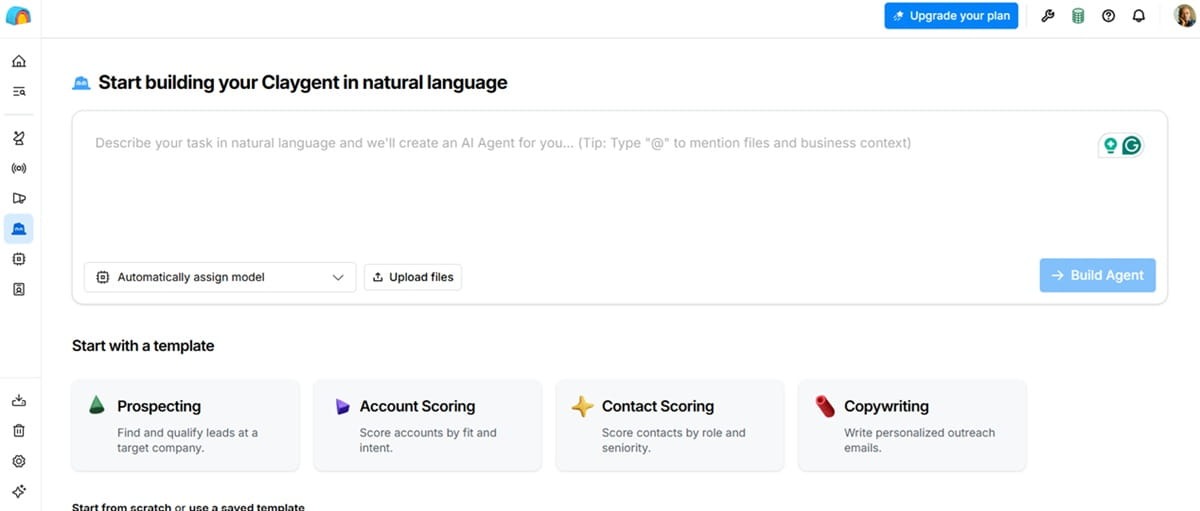
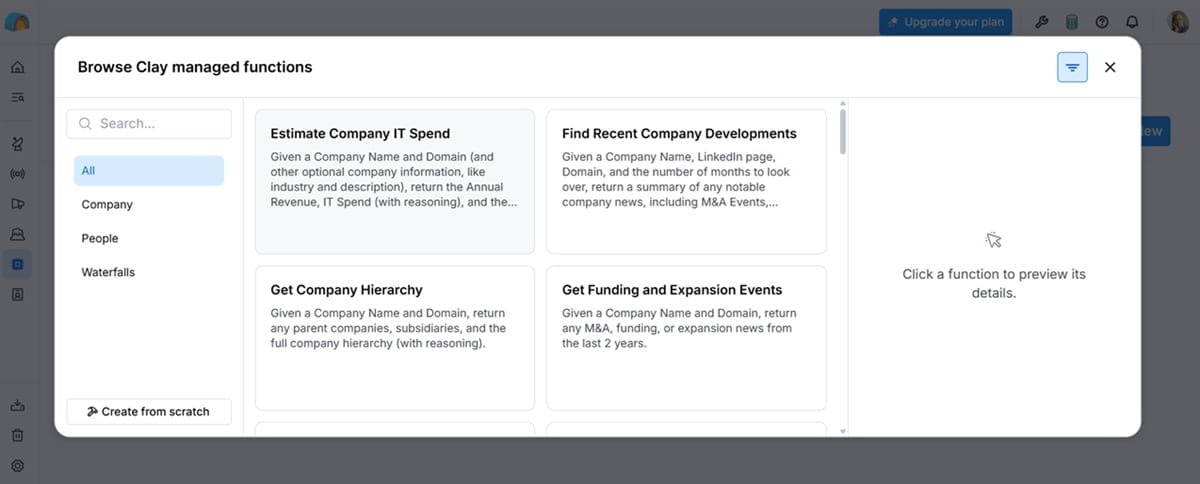
Audiences is the Clay feature that makes those AI agents pretty effective. Clay connects to your CRM and 150+ data providers, giving you a 360-degree view of every lead or customer.
It pulls all that data into the Audiences dashboard. This provides a unified data source for your automation workflows.
You can build separate audiences for different purposes, similar to segmentation. You could have warm lead audiences, for example. And these audiences update automatically as customer data changes.
Clay AI agents, called Claygents, connect to Audiences to perform different marketing tasks. The Account Research agent, for example, analyzes your audience to provide the data and context sales teams need. Use it to run research on specific segments inside audiences.
The agent can write and update CRM data. It catches new lead information as it enters audiences. That information is automatically updated in your CRM.
For lead generation, Clay tracks who visits your website, what pages they browse, and how often they return. Some brands use it to track social mentions, customer support tickets, and event attendance.
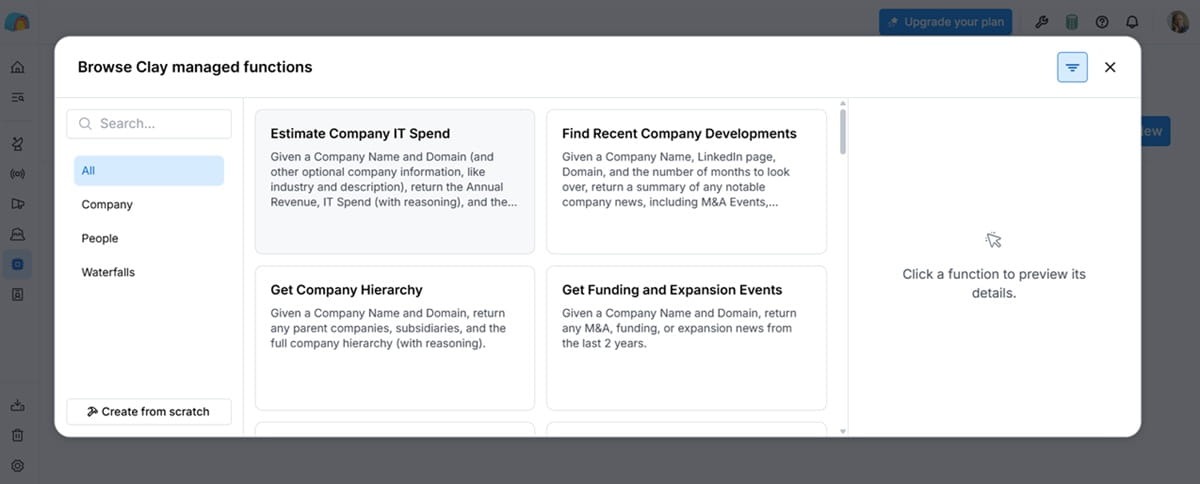
Clay alerts sales reps as buying signals accumulate. It helps reps identify both warm leads and existing customers with expansion potential. The alerts are sent automatically via a Slack integration.
Clay allows you to build custom signals from any of its over 200 data points. You can create signals that alert reps when it detects changes in website content, tech stack, job roles, funding news, and product usage, for example.
That said, one of the biggest complaints reported by Clay users on Reddit and G2 is around pricing. The platform is quite expensive.
Key features
- Social listening – Monitor mentions of specific keywords on social platforms like YouTube, LinkedIn, and Reddit to find new leads.
- Waterfall enrichment – Clay connects to 150 databases to enrich contact data and give you the context you need for successful lead-nurturing efforts. It finds both work emails and mobile numbers.
- TAM Sourcing – Find customers who match your ideal customer profile in just one search. You can also set it up to automatically add qualified leads who match your ICP to your CRM.
- Clay marketplace – Buy data and AI tools from vendors on the Clay marketplace. ZoomInfo, Hunter, Lemlist, Anthropic, and CB Insights are some of the available vendors.
Pricing
Clay has a free plan that supports basic enrichment and email sequences. You need the Launch plan, which starts at $167/mo for advanced capabilities like running unlimited searches in audiences and tracking signals like job changes.
CRM enrichment and auto-sync are available on the $446/mo Growth plan. The plan also supports auto-sync with data warehouses, unlimited ad audiences, automation via webhooks, and tracking web intent signals. Data imports from CRM and other warehouses are limited to 250K.
The Enterprise plan supports unlimited data imports, role-based access control, and SSO sign-in. You also get a dedicated growth strategist. The plan is available at a custom price.
4. ActiveCampaign – Best for multi-channel automation
ActiveCampaign is a multi-channel marketing automation platform. It supports marketing campaigns across email, SMS, and WhatsApp.
The marketing automation solution is pretty powerful, helping you build workflows with split and conditional logic.
Active Intelligence is the brain behind the platform’s AI capabilities. The AI is integrated deeply inside the platform. It has agentic capabilities, meaning it can complete any actions you describe.
You can create an entire lead nurturing workflow with a single Active Intelligence prompt, for example.
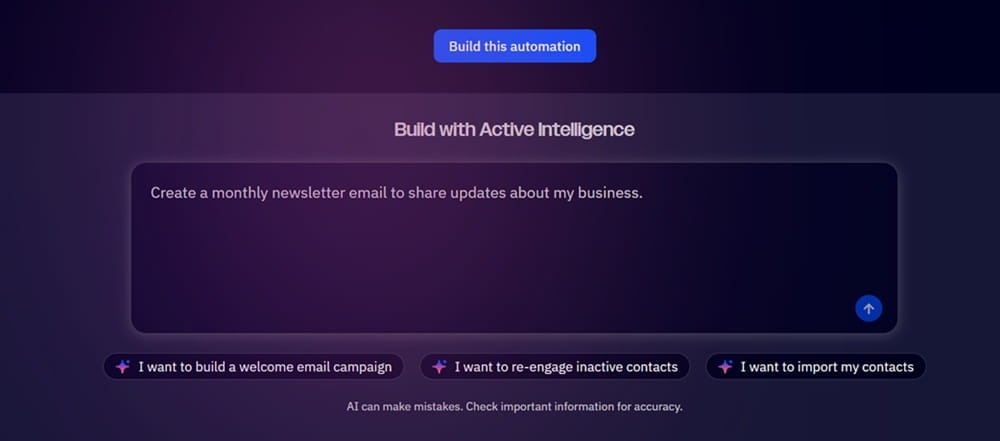
It also creates the messaging itself. Import your branding style through ActiveCampaign’s Brand Kit. This makes sure that all your campaigns remain on brand. It follows your brand voice and visual identity across every campaign.
Custom instructions enhance the experience even further. Create the instructions describing what your business does, its target audience, and communication style. This is applied consistently across every Active Intelligence output. You won’t have to provide this context every time you engage the AI.
Active Intelligence tracks customer behavior and engagement. It uses those signals to suggest different segments for your campaigns.
ActiveCampaign connects with various data sources, including ecommerce platforms like Shopify and WooCommerce and CRM systems like Zoho and Pipedrive.
You can import data by uploading a CSV or XLSX file. Active Intelligence will analyze the uploaded data, organize it into a usable format, and suggest relevant lists and tags. This makes your data usable much faster.
But the files you upload must have high-quality, well-organized data. Otherwise, data quality issues in the files will have downstream effects on your AI campaigns.
Some users also find ActiveCampaign a bit complex to use.
Key features
- Proactive insights – Active Intelligence offers proactive campaign suggestions to maximize sales opportunities.
- AI content generation – Generate text and images for your campaigns without leaving the ActiveCampaign editor.
- Predictive sending – ActiveCampaign tracks when every contact engages with your campaigns. It then optimizes send times at the contact level to ensure every subscriber receives your messages at the perfect time.
- Predictive and conditional content – Show different types of content to leads depending on their actions and segments.
- Built-in CRM – ActiveCampaign offers a Pipeline CRM as an add-on. It comes with additional features like lead scoring and deal records.
Pricing
Active Intelligence is available across all ActiveCampaign’s paid plans. But the capabilities are limited in the Starter and Plus plans.
Unlimited Active Intelligence is available on the Pro plan, which starts at $79/mo. That plan includes predictive & conditional content, advanced segmentation, premium ecommerce integrations, and attribution and conversion tracking.
The Enterprise plan starts at $145/mo. It includes premium CRM and ecommerce integrations, a dedicated account team, single sign-on, and custom objects.
Custom objects let you store and use unique data you can’t include in the standard contact form. You can store appointment history and loyalty points and use that data to activate personalized automations.
5. Apollo – Best for affordable prospecting
Apollo is a popular data enrichment platform. Both HubSpot and Clay connect to this tool for CRM enrichment.
But it’s also possible to run entire prospecting campaigns from within Apollo.
The platform provides an AI assistant that supports contact research, prospecting, and automated outreach. You describe what you have in mind, whether that’s enriching your lead list or building an outreach email sequence, and the AI executes your prompt within moments.
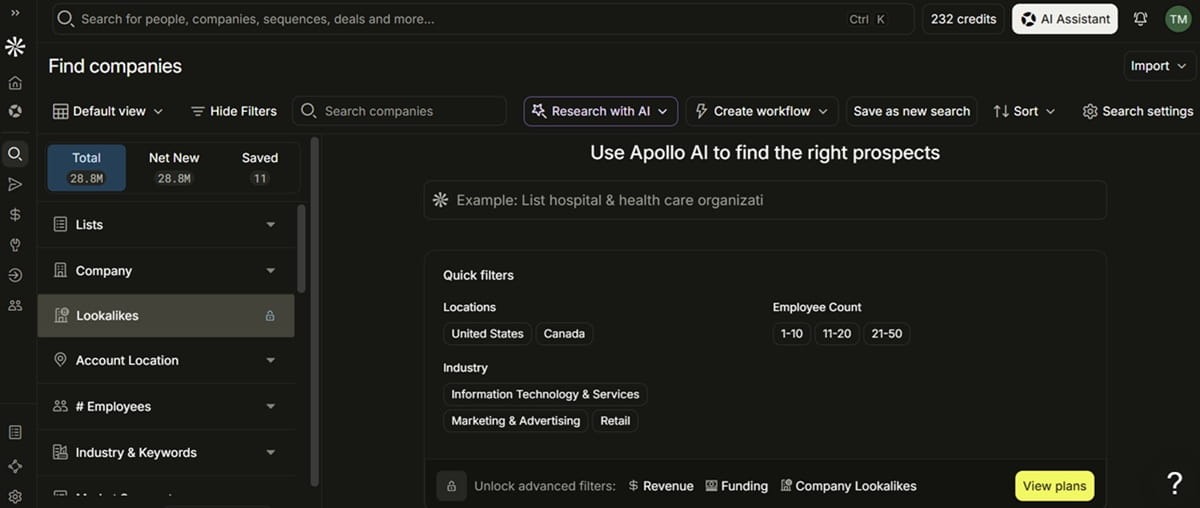
The AI builds outbound workflows with your brand in mind. As you sign up, you’ll need to provide business context like your product offerings, target customers, and brand positioning.
You do this once, but Apollo’s AI assistant will reference that context every time it creates workflows and outreach messages. And you can always go back to the Context Center to refine the business context as your brand evolves.
Apollo’s AI lead generation system tracks inbound leads as they enter your pipeline. It tracks website visitors and enriches forms with additional context. Website traffic monitoring shows you what companies your website visitors work for.
They don’t even need to fill a form for you to receive these insights. Apollo automatically identifies the companies and individuals behind those site visits.
You can use the AI research tool to get additional context like the key decision-makers for those companies.
The platform automates lead routing. It qualifies leads and routes them to the right sales representative.
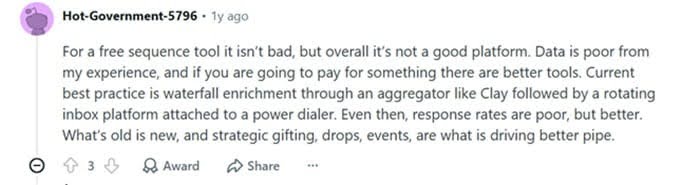
One Apollo limitation highlighted by several users is data quality. Several Reddit users reported that the platform provides inaccurate data.
Key features
- Workflow automation – Visual automation builder creates advanced workflows with multi-branch and conditional logic. It offers pre-built workflow templates to get you started quickly.
- Sales execution software – Built-in sales platform includes AI tools that give reps context, extract key moments from sales calls, update your CRM automatically, and schedule personalized follow-ups.
- US dialer – Improves your sales teams’ efficiency by dialing, waiting, and logging calls. Built-in AI assists with scripting, coaching, and logging.
- Built-in analytics – Get useful insights into the performance of your lead-nurturing and sales campaigns.
Pricing
Apollo has a free plan that supports up to two automation sequences and offers 900 credits. AI research and the AI assistant are available on this plan. It also supports prospecting and connects to Gmail and Salesforce for outreach.
Using the Apollo AI assistant does not consume any credits. Credits are only consumed when you run certain actions like data enrichment.
In the free plan, the AI assistant is limited to only five conversations per month. And they count the prompts you send and the responses you get back from the AI as separate conversations.
The AI assistant is available for free across all paid plans. But this is tagged as an introductory offer. Chances are they’ll start charging for it soon.
Paid plans start at $49 per seat per month. This Basic plan offers 30,000 credits, unlimited sequences, CRM integrations, email warmup, deliverability tools, and waterfall enrichment. It supports a US dialer and data enrichment via CSV, API, and CRM.
The Professional plan starts at $79/seat/mo. It includes 48,000 credits and additional features like call recordings (4,000 minutes) and AI insights, automated workflows, and analytics and prebuilt reports.
Finally, you have the Organization plan that starts at $119/seat/mo. You need at least 3 seats for this plan. It offers 72,000 credits per seat. It includes advanced security features, single sign-on, and up to 8,000 minutes of call recordings and AI insights.
6. Knock AI – Best for intent-driven B2B lead nurturing and buyer activation
Knock AI takes a broader approach to B2B lead nurturing than traditional marketing automation platforms. Instead of focusing primarily on what message to send after a lead enters a database, Knock uses buyer identity, first-party intent, account context, qualification, and real-time engagement signals to determine what should happen next.
Knock AI can engage inbound buyers through an AI SDR, qualify them against company-specific criteria, enrich their records, and route them to the appropriate rep, team, or workflow. Its enterprise lead routing capabilities can incorporate factors such as account ownership, territory, company characteristics, intent, opportunity status, and other business rules.
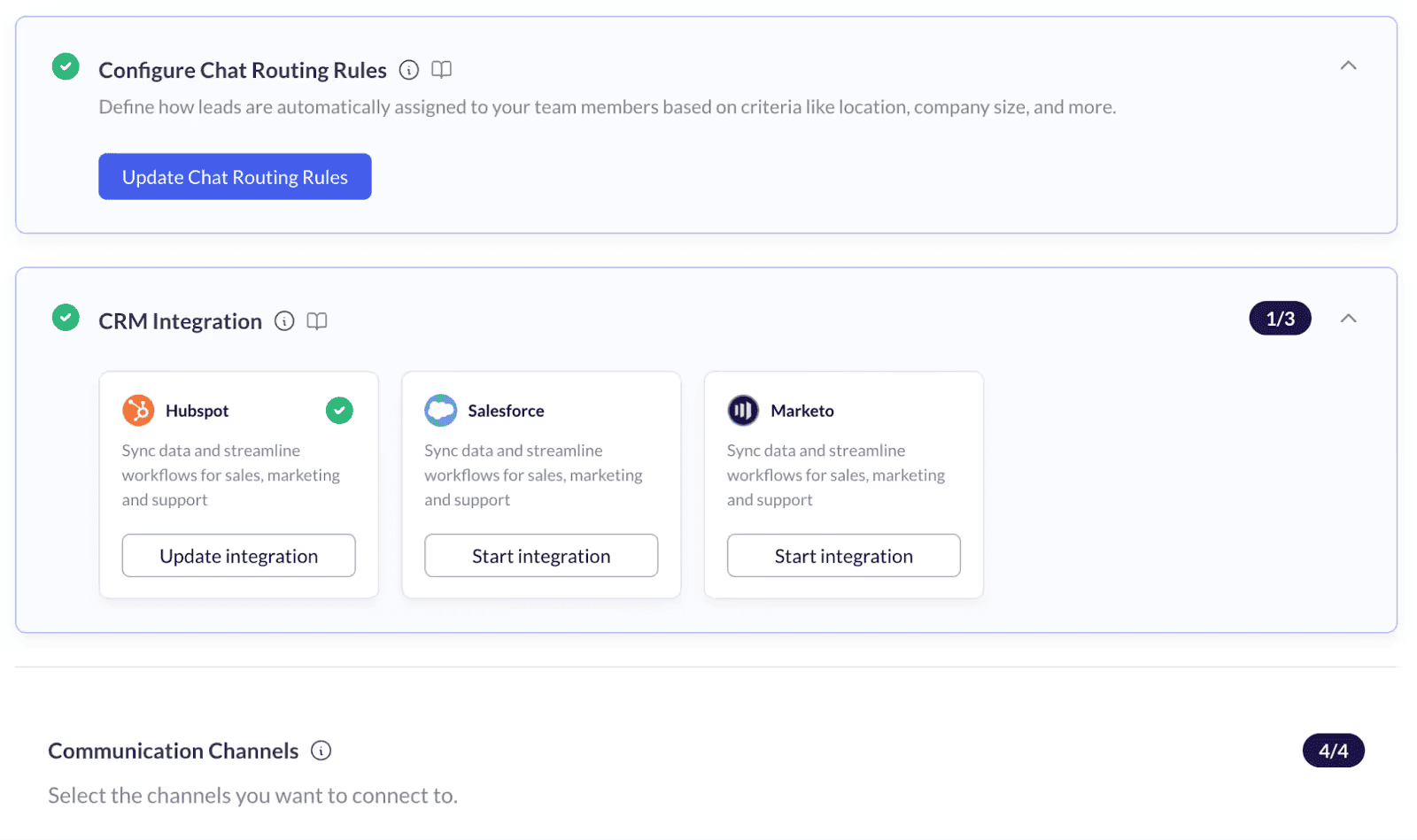
Knock AI also extends nurturing beyond traditional forms and email. Its formless funnel allows buyers to start conversations without completing a conventional form, while workflows can respond to signals from website activity, product signups, events, paid campaigns, forms, and other GTM touchpoints. Buyers can engage through supported conversational channels such as the website, LinkedIn, Slack, WhatsApp, and Telegram, with context carried across the broader relationship.
For prospects who show buying intent but do not convert, Knock AI can trigger follow-up workflows such as LinkedIn outreach. Its Website Leakage Report also helps identify high-intent buyers who reach conversion points but leave without becoming a lead, giving revenue teams a way to recover demand that would otherwise be lost.
Key features:
- Inbound AI SDR for real-time buyer engagement and qualification
- Context-aware lead qualification using ICP, intent, enrichment, and account data
- Enterprise-grade lead and account routing
- Formless conversational lead capture
- Form enrichment and automated follow-up
- Buyer engagement across website and supported messaging channels
- LinkedIn re-engagement for qualified prospects
- Ad, event, product signup, and other signal-based conversion workflows
- Website leakage and lost-pipeline recovery
- Conversational meeting scheduling
- Relationship intelligence and CRM workflows
Limitations: Knock AI is designed for B2B revenue teams that need to connect buyer signals, qualification, engagement, routing, and conversion. Teams looking primarily for email campaign creation or traditional marketing automation may prefer a dedicated marketing automation platform.
Starting price: $2,000/month
In closing
Successful AI lead-nurturing campaigns rely on quality data. Integrate your tech stack to consolidate all your customer data in one place. Only then should you think about investing in the right tool.
The five lead-nurturing tools we’ve covered are ideal for different scenarios. HubSpot, for example, is a decent option if you already use the CRM system. Though expensive, the all-in-one solution makes nurturing a lot easier.
Meanwhile, Clay is ideal if data enrichment is crucial to your industry and campaigns.
GetResponse is a great fit if you want to automate the entire customer journey. In addition to lead generation and nurturing, the marketing automation platform orchestrates the entire customer lifecycle to drive retention. It also provides an AI-powered product recommendation engine to boost sales.
AI-powered lead nurturing tools FAQs
1. What is AI lead nurturing?
AI lead-nurturing is the use of artificial intelligence to automate and personalize communications with potential customers to convert them into paying customers. A successful AI lead-nurturing strategy requires access to consolidated, high-quality data.
2. How to automate lead nurturing?
You can automate lead nurturing through specialized marketing automation tools like GetResponse, HubSpot, and ActiveCampaign. These AI-powered tools sync with your website and use behavioral triggers to send leads relevant messages based on their actions.
3. What are the best AI tools for automating lead generation?
HubSpot, GetResponse, Clay, and ActiveCampaign are some of the best AI tools for automating lead generation and nurturing. Our guide explains the strengths and limitations of each platform. Use it to find the right AI lead-nurturing tool for your unique business needs.
