
Most SaaS marketing automation campaigns fail because they are static. Marketers automate predetermined campaigns without considering how dynamic the user journey is.
That’s how you end up with isolated welcome, onboarding, and lead nurturing sequences. Customers receive your campaigns, but they just don’t resonate. So they don’t generate any revenue. That’s because you’ve automated time-based campaigns that completely ignore real-time user behavior and intent.
Successful marketing automation is built around the customer journey where workflows are triggered by both timing and behavioral signals.
This article walks you through what to do before setting up your first automated campaign. We then review the seven best marketing automation platforms that track user behavior to help you run revenue-generating automated campaigns.
Key takeaways
- Marketing automation for SaaS uses tools to automate repetitive marketing tasks like generating and nurturing leads, scoring leads, upgrading free-trial users, onboarding users, driving retention, and upselling customers to higher-tier plans.
- Successful SaaS marketing automation campaigns start by mapping the user journey to identify crucial touchpoints and milestones where automation can have the biggest impact.
- The best marketing automation tools for SaaS use engagement and behavioral signals to trigger timely, personalized campaigns.
- GetResponse offers marketing automation software that automates the entire user journey based on individual customer behavior. Users like the platform because it is easy to use, supports complex automation, and comes with responsive customer support.
SaaS marketing automation platforms comparison
| Tool | Best for | Price |
| HubSpot Marketing Hub | All-in-one automation platform | $800/mo Professional plan needed for advanced automation |
| GetResponse | Automating the entire customer lifecycle | $48.38/mo Marketer plan needed for unlimited workflows |
| ActiveCampaign | AI-powered automations | $49/mo Plus plan needed for unlimited automation actions |
| Customer.io | Data enrichment and unification | $100/mo |
| Apollo | B2B prospecting | $49/mo |
| Brevo | Multi-channel automations | From $16.17/mo, but you need $449 .08/mo Pro plan for contact scoring |
| Mailchimp | Small to mid-market SaaS brands | $20/mo Standard plan for 200 flow steps. |
Map the user journey before automating your SaaS campaigns
What does the typical customer journey look like for your specific product? What key touchpoints exist within that journey?
Those are the questions customer journey mapping is supposed to answer.
Define your customer journey to understand how users move from discovery, demo requests, and trial sign-ups to activation, expansion, and renewal. Next, identify the friction points and milestones that exist within each lifecycle stage.
Friction points and milestones present automation opportunities that can have a high impact on the customer experience.
Consider a user who signs up for a free trial but doesn’t complete setup or struggles integrating their other systems. A timely automated campaign sharing educational content resolves this pain point and moves the user closer to experiencing your product’s value.
Or consider an existing customer who has hit their plan’s usage limit. An automated upselling campaign and in-app prompt make the upgrading decision feel natural at this point.
Once you understand how users experience your product, connect their actions (and inactions) to specific automation triggers.
For example, a lead submits a form to access gated content. This can trigger an automated educational content series. The first email delivers the lead magnet. Subsequent emails share helpful content around the same topic.
Another example is a user who signs up for a free trial but hasn’t connected their data source or used the product in any way for 48 hours. This should trigger an automated follow-up email showing the user how to get set up and the benefits that wait on the other side.
Another user signs up for a free trial, connects relevant apps, and invites several team members. Those touchpoints indicate a high buying intent. So they should activate a high-intent onboarding sequence. The account or lead score should be updated in the CRM to reflect their strong buying signal, and an account manager should be alerted.
That’s the value of mapping the user journey before deploying automated campaigns. It helps you run personalized automations based on real user behavior and actions.
You can then use segmentation to take your campaigns to the next level. Segment your audience by role, company size, use case, and engagement level.
For B2B SaaS, where accounts have multiple users from different departments, segment by both account attributes and individual user roles for better targeting.
Decision makers can receive automated email campaigns showing high-level team performance. Developers receive content on topics like API documentation. And end users get content on daily workflow improvements.
7 best SaaS marketing automation tools
Here are the best marketing automation platforms for SaaS companies.
1. HubSpot Marketing Hub – Best all-in-one automation platform
HubSpot is one of the best marketing automation platforms because it comes with built-in data management and CRM solutions. The CRM and data hubs connect all your customer data. Plus, the platform also has customer support and sales systems.
That means all the customer data the automation systems need to run effectively lives in one place. As a result, the automations have all the business and customer context they need for effective personalized campaigns.
But this is only an advantage if your business already uses the HubSpot CRM.
HubSpot connects with your software to track user behavior. It monitors product usage and uses those signals for lead scoring.
For example, it tracks free trial users and looks for high-intent product usage signals. Users showing the highest intent are automatically routed to account executives for personalized outreach.
The platform also tracks users who are not making the most of their free trials. This triggers automated follow-up workflows that encourage product usage.
Building workflows is super easy. HubSpot provides a drag-and-drop workflow builder. You can also use prebuilt workflow templates instead of building flows from scratch.
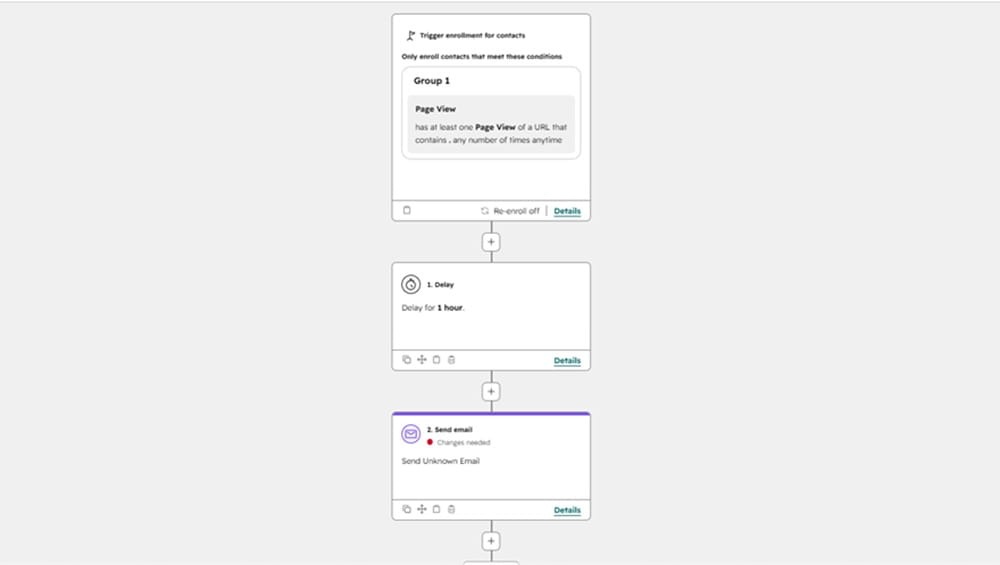
HubSpot supports user retention through automated account monitoring. The platform uses product usage signals, engagement levels, and customer support tickets to identify at-risk accounts.
This is another advantage of having an all-in-one marketing automation platform.
You’ll see the at-risk accounts weeks before plan renewal dates. You can set up automated workflows to engage at-risk accounts and address their concerns before the renewal conversation.
It also allows account executives to step in and prevent churn while there’s still time.
HubSpot’s AI agents help with automating SaaS marketing campaigns. The Prospecting Agent, for example, automates account research and follow-ups. It also updates CRM data automatically, with your approval.
As for the downsides, HubSpot has a fairly steep learning curve. Some companies are forced to hire HubSpot specialists, which adds extra costs.
Small and some mid-sized SaaS companies may also find the automation platform expensive, especially since you also need to use the CRM to unlock its full potential.
Key features
- Pathfinder – Create a customer journey report to track the most effective customer touchpoints.
- Data agent – Makes insights from your CRM, emails, and calls easily accessible, so marketing and sales teams can work smarter. The platform also offers a dashboard to manage your social media marketing campaigns.
- Smart deal progression – This AI-powered tool recommends next steps after sales calls. It also suggests relevant email follow-ups and CRM updates.
- Agent builder – Build custom agents based on your customer data for your unique business use cases.
- Customer agent – Handles customer support tickets across various channels. It can also qualify leads from the support conversations.
Pricing
Simple marketing automation is available on the $7/mo marketing plan. But the truth is, most SaaS businesses need at least the $800/mo Professional plan for effective marketing automation.
The Professional plan gets you access to omnichannel marketing automation, the agent hub, and a social media management tool. That plan includes three seats and accommodates up to 2,000 marketing contacts. You’ll need to pay extra for additional contacts at $225/mo per 5,000 contacts for 2,000 to 22,000 contacts.
There’s also a one-time onboarding fee of $3,000.
Lastly, this plan includes 3,000 HubSpot credits. You need the credits to use HubSpot’s AI tools, like the Breeze Assistant.
The enterprise plan starts at $3,600/mo. It offers additional tools like customer journey analytics, multi-touch revenue attribution, and behavioral event triggers and reports.
Email approval is also available here, which forces one to have or request approval before sending a marketing email.
That plan includes five core seats (additional seats at $75/mo), 10,000 marketing contacts, and 5,000 HubSpot credits.
2. GetResponse – Best for automating the customer lifecycle
The GetResponse marketing automation software automates the entire customer lifecycle. It lets you build workflows for lead generation, lead nurturing, customer retention, and brand advocacy.
The platform connects with your software to track user behavior. It monitors the landing pages they visit and how they engage with your campaigns. These behavioral signals are used as triggers to activate personalized automated campaigns.
For example, it matches the specific landing page the user visited to the appropriate lead nurturing workflow. So leads receive relevant content tailored to their interests.
Building workflows on GetResponse is straightforward, thanks to the visual automation builder. You can build entire workflows from scratch or use prebuilt automation workflows to speed up the process.
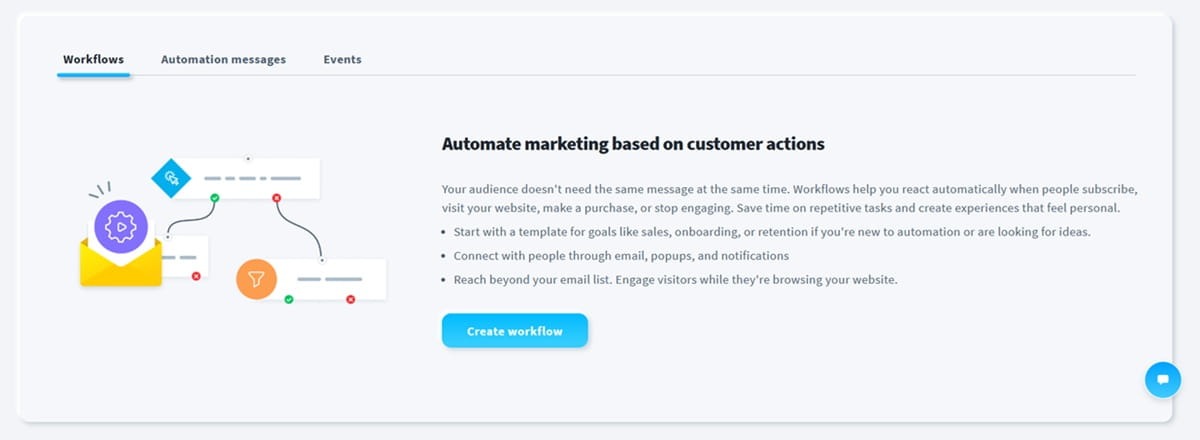
Our solution includes an AI wizard that helps with building workflows. Describe your campaign goal and give the AI a few seconds to create the workflow for you.
The workflows support dynamic content and split logic. Dynamic content allows you to insert different content in your automated campaigns based on the user’s attributes.
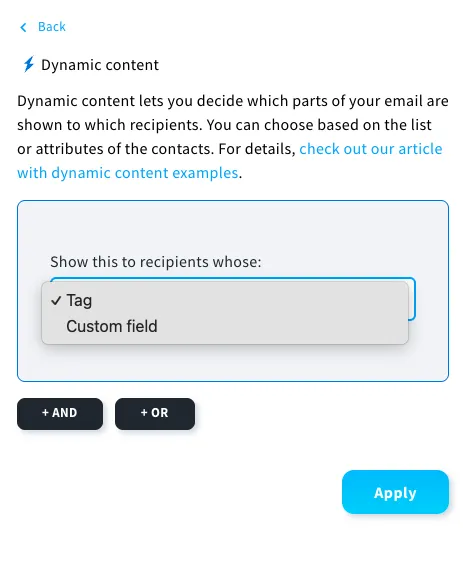
Meanwhile, split logic takes users through distinct customer journeys based on how they engage with your campaigns. These help you run personalized automated campaigns at scale.
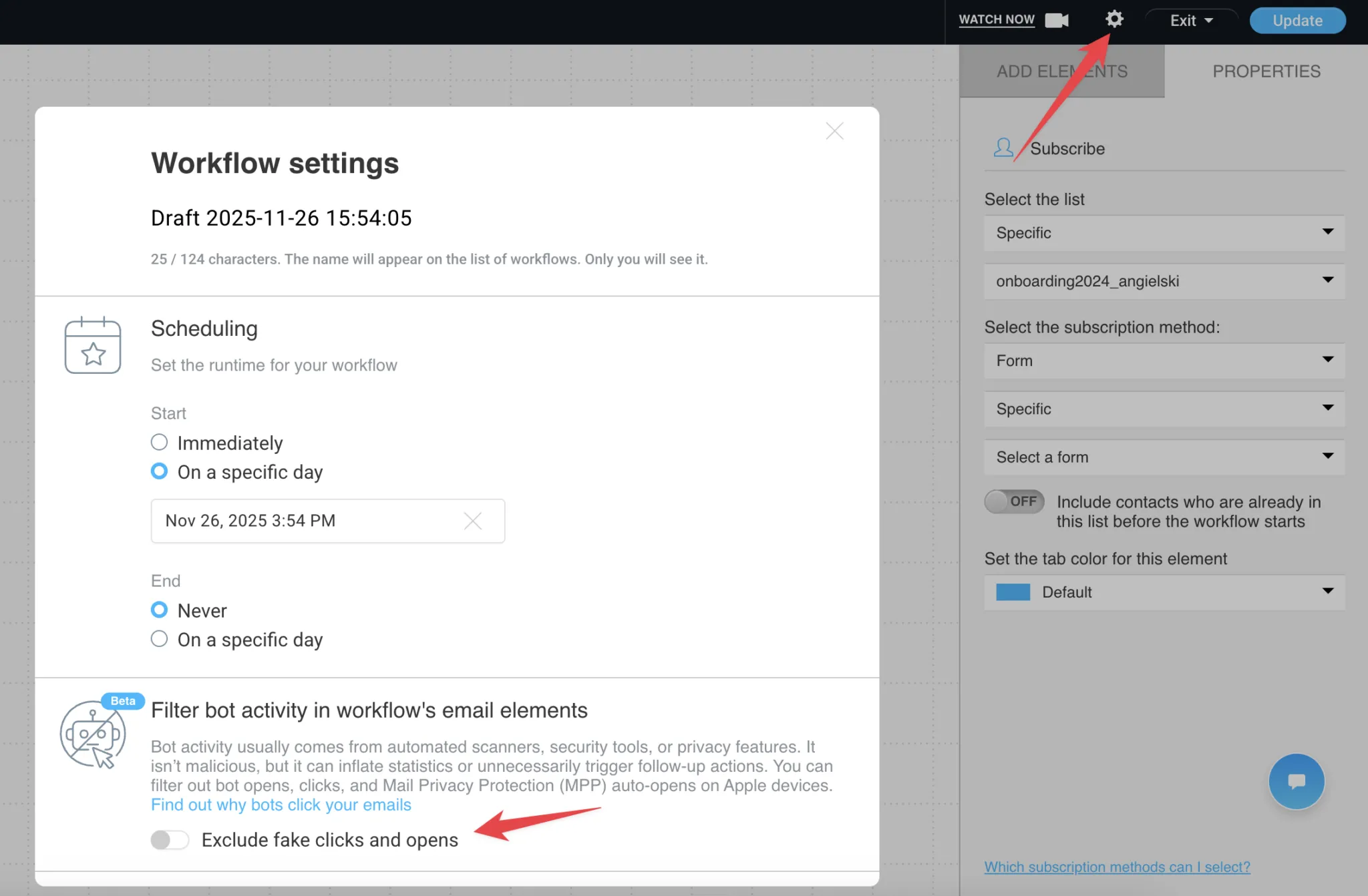
You can also enable bot detection within your automations. This stops opens and clicks generated by bots from activating automation workflows. It prevents unnecessary follow-up triggers, keeps your analytics clean, and ensures your campaigns are only activated by real human behavior.
GetResponse supports contact tagging and scoring. The platform scores leads based on engagement behavior and their actions on your site. You can tag the leads with an unlimited number of relevant labels. Tagging and scoring enable advanced segmentation for personalized campaigns.
Lead scoring also allows sales and marketing teams to identify hot leads ready for a sales call more easily.
Key features
- Omnichannel marketing automation – Automate campaigns across email, SMS, and web push notifications from one platform.
- Sales funnel software – Build opt-in, lead magnet, and webinar funnels to generate, nurture, and convert leads.
- Landing page builder – Create high-converting landing pages with the AI-powered landing page builder.
- Sign-up forms – Build GDPR-compliant sign-up forms using our drag-and-drop tools. You can use predesigned templates or build a unique form from scratch with HTML.
- Paid ads – Manage paid ads across Google and Meta platforms from GetResponse. The tool lets you retarget landing page visitors and build lookalike audiences using your contact list.
- Revenue attribution – Track how much revenue every campaign and workflow generates to identify your highest-performing marketing efforts.
Pricing
Marketing automation is available on the $15.58/mo Starter plan. But this plan limits you to only one custom workflow.
You need the $48.38/mo Marketer plan for unlimited automation workflows. This plan starts with 1,000 marketing contacts and five users. It includes AI content generators, a landing page builder, welcome email series, sales funnels, advanced segmentation, unlimited web push notifications, revenue reports, and sales funnels.
An enterprise plan is available at a custom price. This plan offers a dedicated sending domain, assisted IP warm-up, mobile push notifications, unlimited users, phone support, dedicated onboarding, and a dedicated customer experience manager.
The enterprise plan also supports SMS marketing automation and transactional email services.
3. ActiveCampaign – Best for AI-powered automations
ActiveCampaign is an AI-powered marketing automation platform. It offers a powerful AI called Active Intelligence. This AI is available throughout the platform, helping you with campaign planning and execution.
Instead of building workflows from scratch, describe your campaign goal to Active Intelligence. It creates the flow for you within minutes. You can then approve and customize it from the visual builder before deploying it.
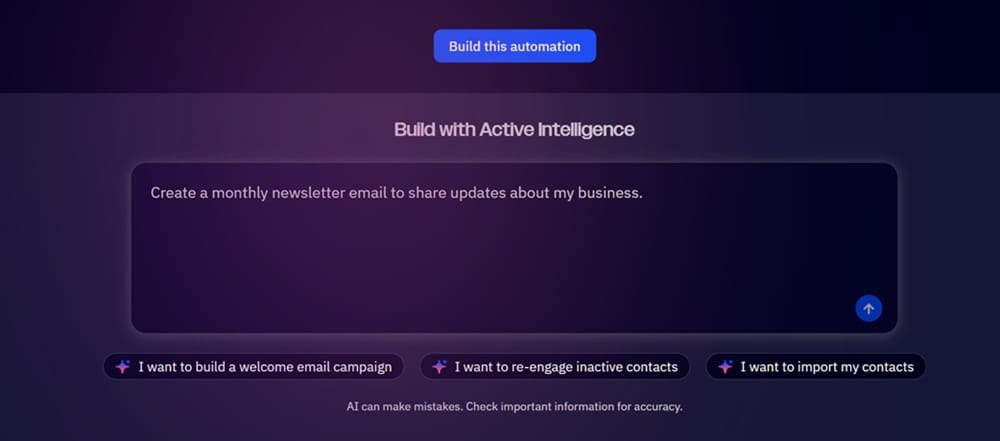
In fact, once you finish setting up your ActiveCampaign account, the AI analyzes your business right away. It checks your product offerings and tries to understand your ideal customer profile. It then suggests relevant automation workflows.
ActiveCampaign lets you select business goals, like growing your subscriber list, increasing free trial to paid conversion, and reducing churn. The number of goals you have depends on your plan. The cheapest plan supports only 15 active goals. The AI uses your business goals to suggest relevant workflows, customer segments, and other actions.
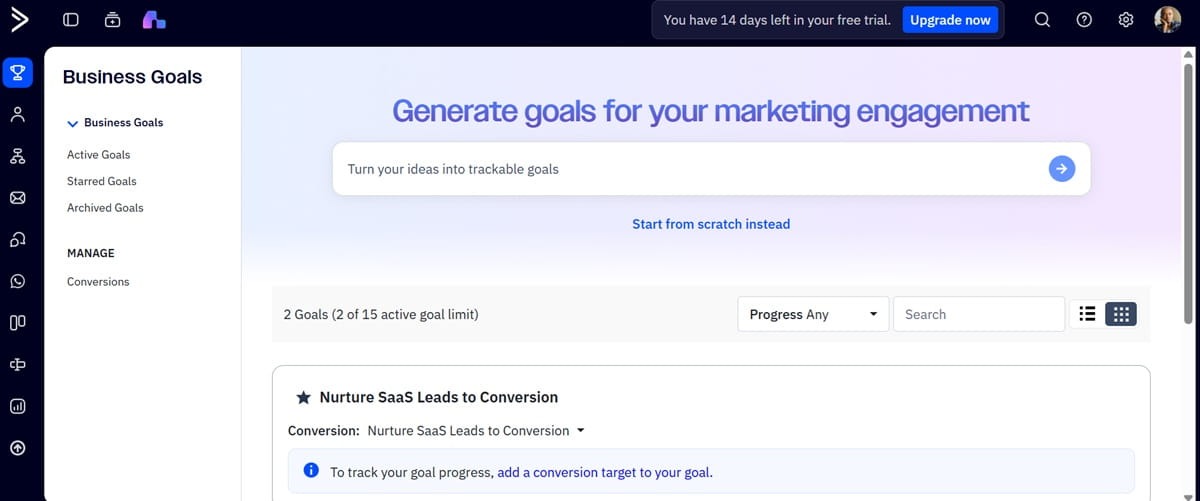
Active Intelligence also monitors campaign performance in real time in the background. The AI can then suggest workflow improvements and new customer segments that’ll bring you closer to achieving your goals.
ActiveCampaign tracks user behavior on your website or app. It supports over 1,000 integrations with different sales and marketing tools. Additionally, the platform offers a built-in CRM system.
The integrations track key events on your website and app. The events trigger personalized workflows that respond to user actions.
That said, advanced features like lead scoring and pipeline management don’t come with the free built-in CRM system. You must pay for the Pipeline-enhanced CRM add-on to access those features.
Still, the platform provides detailed marketing analytics showing campaign performance. It offers campaign and automation reporting, which tracks the performance of individual campaigns and workflows.
Revenue reporting shows how different campaigns and channels contribute to your bottom line. Then there’s the business goal AI tracker. This is on at all times, tracking progress and suggesting new campaigns, journeys, and actions.
Advanced analytics like BotSense, which detects email opens and clicks from bots, and attribution and conversion tracking are only available on the highest-tier paid plans.
That’s unlike GetResponse, which allows you to filter out bot activity in the Standard $48.38/mo Marketer plan. Our GetResponse and ActiveCampaign comparison shares more details on how the two platforms are different.
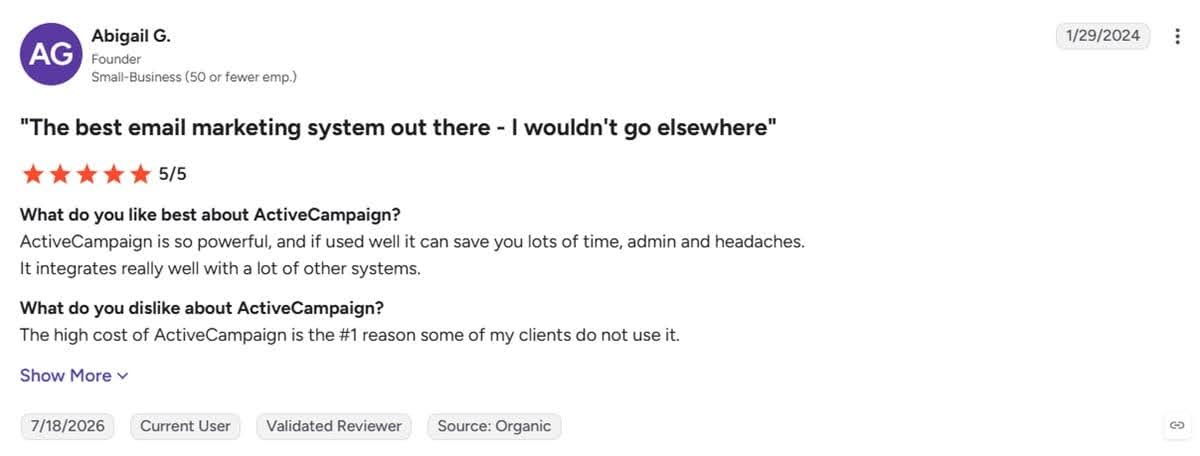
Pricing is a common complaint among ActiveCampaign users, as shown below. The platform tends to get expensive as your send volume and campaign needs grow.
Key features
- Omnichannel automation – Automate campaigns across email, SMS, WhatsApp, and paid advertising. The platform lets you orchestrate cross-channel campaigns from one dashboard.
- Predictive sending – Delivers email campaigns to recipients at times when they’re most likely to open them. It’s similar to GetResponse’s Perfect Timing feature.
- Event tracking – Tracks how customers engage with your website, app, and campaigns. It shows what images, emails, and links they click to help you understand the user journey and identify high-impact touchpoints.
- AI email builder – Design on-brand marketing emails fast with Active Intelligence.
Pricing
Marketing automation is available from the $15/mo Starter plan. The plan supports multi-step automations with up to five actions per automation. Actions are what happens when an automation is triggered, like sending an email or updating a contact tag.
The Starter plan supports email marketing automation only.
The Plus plan starts at $49/mo for 25 business goals, 1,000 contacts, and 10,000 monthly email sends. It includes unlimited automation actions and sales automation campaigns like sales outreach and scheduling meetings. This plan does not support conditional content and predictive sending.
The Pro plan starts at $79/mo for 200 active goals, 1,000 contacts, and 12,000 email sends. It accommodates three users and supports both predictive sending and conditional content.
You also get A/B testing for both emails and automations. Plus, an automation map showing how all your workflows connect to one another.
Finally, the enterprise plan includes custom reporting, premium CRM integrations, single sign-on, premium audience segmentation, and a dedicated account team.
The enterprise plan starts at $145/mo for five seats, 1,000 contacts, and 15,000 monthly email sends.
SMS and WhatsApp messaging are available as separate add-ons.
4. Customer.io – Best for data enrichment and unification
Customer.io is a marketing automation solution that unifies customer data to deliver tailored user experiences.
The platform supports seamless integration with hundreds of data sources. It lets you use prebuilt integrations, SDKs, APIs, webhooks, and reverse ETL to pull customer data into the platform.
Next, it supports data enrichment, which gives your automation data even more context.
That data powers multi-channel automations across email, SMS, in-app, and push notifications.
The automation solution can track what channels customers prefer. Users then receive campaigns on their preferred channels for maximum engagement. Plus, you can use time delays, time windows, and wait untils to ensure campaigns are delivered at the perfect time.
Customer.io provides a visual automation builder for creating multi-step workflows. Several team members can also collaborate within the dashboard. Development, sales, and marketing teams can leave notes within the dashboard to give team members additional context.
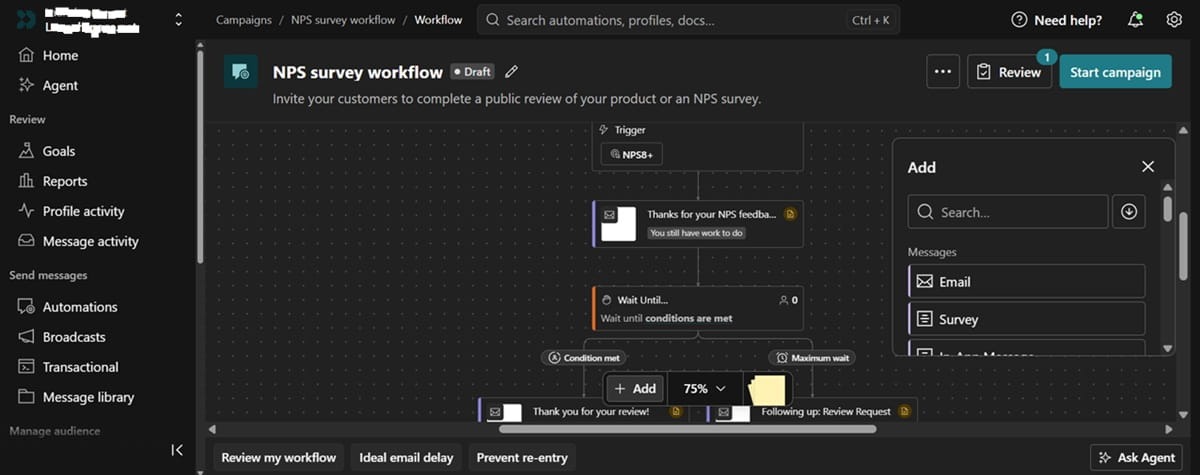
Customer.io’s workflows support branching logic. This lets you take customers through curated journeys based on their unique attributes and how they engage with your campaigns.
You can tailor user experiences further through advanced customer segmentation. The platform uses behavioral signals and real-time customer data to create data-driven customer segments.
It can track and group customers based on the features they use inside your SaaS app, for example.
It also lets you sync your audiences with paid ad platforms. That allows you to retarget customers more effectively with relevant content based on how they interact with your product.
You can also exclude existing customers from paid ad campaigns. This can lower your cost per acquisition.
Customer.io is a marketing automation tool worth considering if you are an early-stage SaaS startup that has raised less than $10M. You’ll be able to use the platform for free for 12 months through their Startup Program.
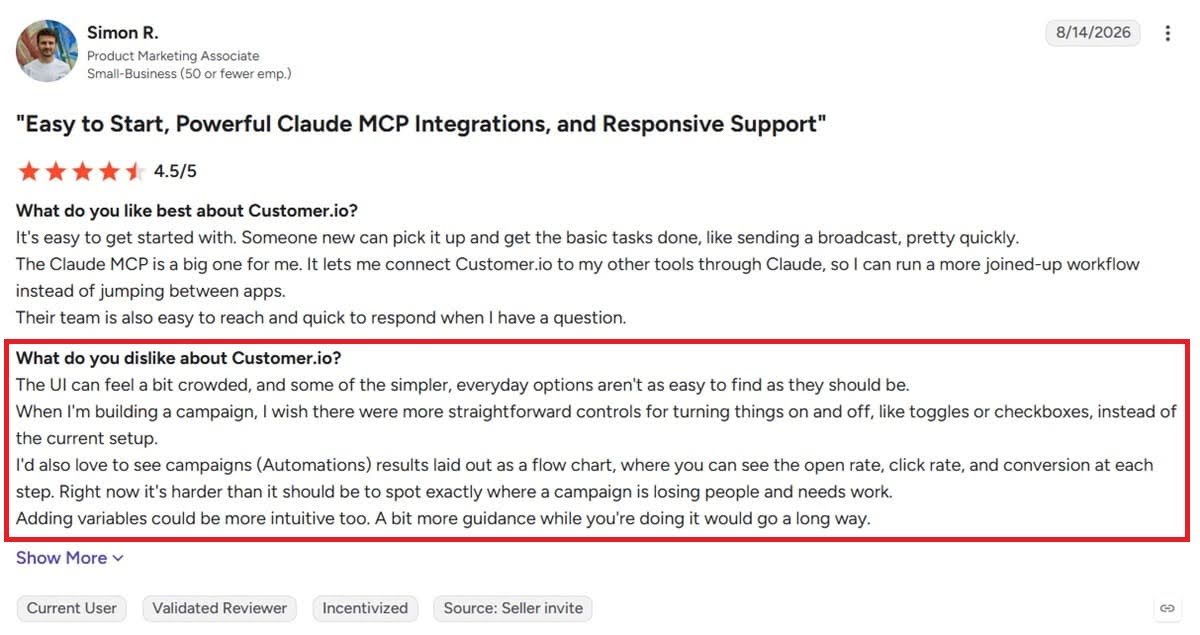
Prepare for a relatively steep learning curve if you choose this automation platform. The UI is not the neatest we’ve seen. Users on Reddit and G2 complain about the same thing, as explained by Simon below.
Key features
- Multivariate testing – Run workflow A/B tests to see what paths resonate the most with your users.
- Design studio – Design stunning email campaigns with the drag-and-drop editor. It supports version control, JavaScript for advanced editing, and commenting for collaboration.
- Marketing analytics – Offers revenue attribution and AI-powered performance analysis.
- AI agent – The agent remembers business context, including your goals, brand voice, and ICP. It suggests campaigns, builds them, tracks performance, and recommends improvements.
Pricing
The startup program allows early-stage startups to use Customer.io for free for 12 months for email, SMS, and push notification automation. The plan accommodates up to 30K profiles but has limited customer support.
Paid plans start at $100/mo for 5K profiles. You can add more profiles at $0.009 per profile.
That plan supports 1 million emails per month, the AI agent, and email and community support.
The premium plan starts at $1,000/mo. You get a custom profile size and email send volume. The plan includes advanced AI agent limits with custom skills, 90-day onboarding support, HIPAA compliance, and premium chat and email support.
You need the premium plan for advanced integrations with tools like Salesforce.
An enterprise plan is available if you need migration support, a dedicated customer success manager, dedicated hardware, and audit logging. It also comes with priority support and a dedicated technical implementation specialist. The plan is available at a custom price.
5. Apollo – Best for B2B prospecting
Apollo is more popular as a data enrichment platform. Companies use it to research accounts and enrich their records for better prospecting.
The platform supports waterfall enrichment, which allows you to find verified email and phone numbers for outbound campaigns. It connects to over a dozen data sources and many more business tools to collect accurate customer data.
Beyond enrichment, Apollo now supports marketing automation. The platform lets you put the data you’ve collected into use through powerful automation campaigns. It connects to your CRM to track and capture real-time customer data.
You get a visual workflow builder to build your workflows. The builder supports branching and conditional logic so you can take users through different paths based on their actions.
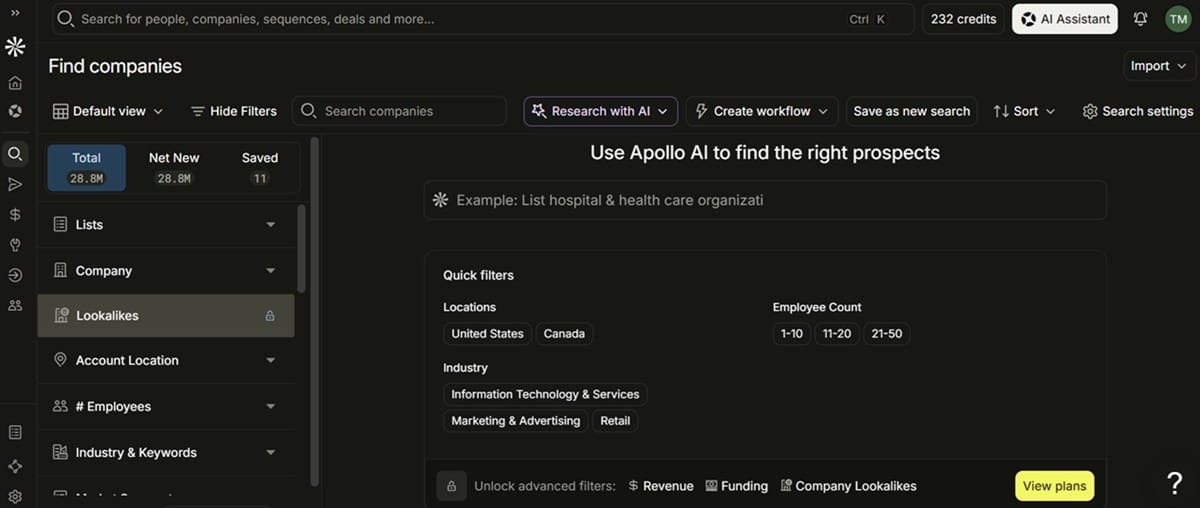
The platform takes leads through automated lead-nurturing campaigns while monitoring buying signals. Leads showing high buying intent are automatically routed to specific sales executives. The platform alerts your team via email and Slack notifications.
Apollo’s lead management tool also uses buying signals and customer engagement behavior to score leads. The platform uses account records like team size, industry, and revenue for accurate scoring.
Apollo supports inbound campaigns, too. As new leads fill out your lead generation forms, the platform enriches the data and qualifies the lead to determine whether they’re a good fit for your company. The leads are then put through the appropriate workflow depending on how good a fit they are.
Besides the leads who submit forms, Apollo shows you the B2B companies and contacts visiting your website. You can set up automations to follow up with these contacts after they visit your website.
It’s a great B2B prospecting feature, but it’s only available on the highest-tier Organization plan.
Key features
- AI assistant – Use the assistant to research accounts, build lists, and create automated sequences. The assistant uses the business context you provide to create campaigns that sound like you.
- Deal management – Manage your entire sales pipeline on Apollo with the deal management software. It helps you track deal progress, sync CRM updates, and receive alerts when deals stall.
- Apollo data – Access accurate B2B data with over 65 data points. The data comes from Apollo’s contributor network, third-party providers, and public crawling.
- Sales call recording – Apollo AI analyzes sales calls and recommends next steps for your teams.
- Analytics – Prebuilt reports and dashboards show performance at the campaign level and for your entire sales funnel. It lets you build a custom dashboard to track specific sales and marketing metrics.
Pricing
Apollo has a free plan that supports two automated sequences.
Paid plans start at $49/seat per month with the Basic plan. That plan includes 30,000 credits per year. You need Apollo credits to enrich data, access verified emails and phone numbers, use the US & international dialer, and access the AI research tool.
The basic plan supports unlimited sequences, prospecting with Gmail and Salesforce extensions, email warm-up, waterfall enrichment, and CSV, CRM, and API data enrichment.
The plan also offers real-time form enrichment (10 limit), call recording (150 minutes), and a US dialer.
The Professional plan starts at $79/seat per month. It offers 48,000 credits per year and includes additional features like 4,000 minutes of call recordings with AI insights, analytics and prebuilt reports, unlimited inbound routers, job change enrichment, goal setting and tracking, and pre-meeting AI insights.
Finally, the Organization plan starts at $119 per seat per month for a minimum of 3 seats (so $357 per month for the 3 seats). It offers 72K credits per seat per year. It supports 8,000 minutes of call recordings and AI insights, advanced security configurations, and Single Sign-On (SSO). It also identifies up to 100 website visitors monthly.
6. Brevo – Best for multi-channel automations
Brevo is a marketing and sales automation platform. It supports omnichannel automation campaigns across email, SMS, live chat, web & mobile push, and WhatsApp.
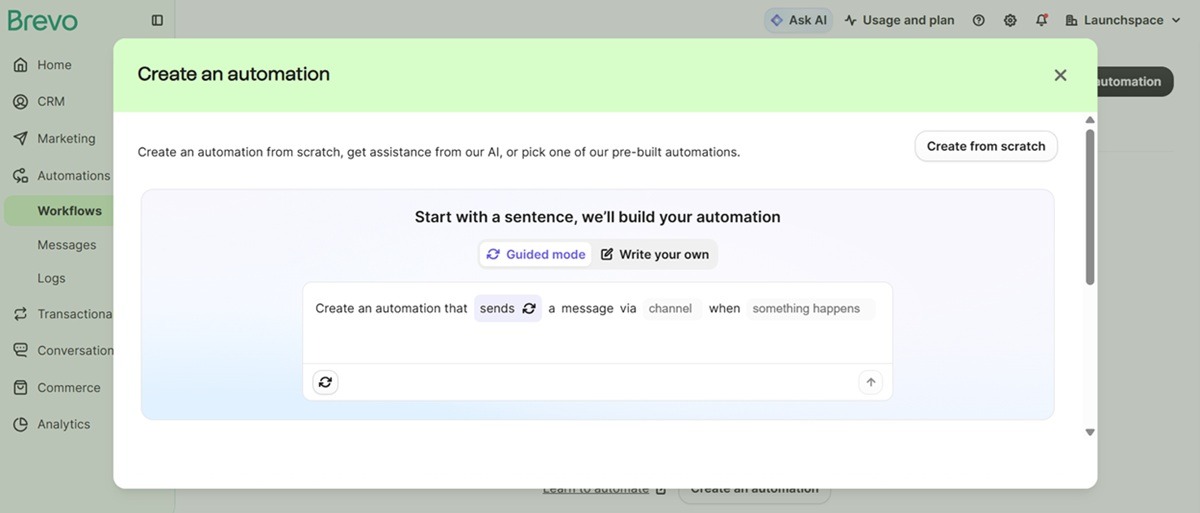
The platform has a 99% email deliverability rate and supports SMS campaigns across 180+ countries. It offers an easy-to-use automation builder with a decent selection of workflow templates to get you started.
Brevo unifies your customer data through a built-in customer data platform (CDP). It connects to your existing marketing stack through 150+ integrations to bring all the customer data to one place.
Additionally, it tracks real-time customer behavior and interactions. These are used to trigger personalized workflows with dynamic content that speaks to individual customers’ needs.
The platform supports contact tagging. This helps with advanced segmentation for precise targeting.
Brevo also offers a helpful AI called Aura. You can use the AI to build campaigns and track performance. Aura also creates content, builds customer segments, and optimizes send times based on user engagement behavior.
Key features
- ROI tracking – Track different conversion metrics (purchases, signups, or other custom events) to determine what channels and campaigns are most profitable. The analytics also show real-time performance metrics and click heatmaps.
- Transactional messaging – Send transactional campaigns like password resets and account activation.
- Visual email editor – Design emails quickly with a drag-and-drop email editor. It also comes with several prebuilt email templates.
- Sales management system – Manage your entire sales pipeline with the sales software add-on. It delivers sales reports to track win rate, revenue, and team performance.
Pricing
Marketing automation is available from the Standard plan, which starts at $16.17 per month for 500 contacts and 5,000 email sends. In addition to automation, the plan supports web and event tracking, advanced email reporting, A/B testing, and landing pages.
One problem with Brevo is that useful automation features like contact scoring, AI segmentation, and omnichannel marketing are only available on the Professional plan. And the jump from the Standard to Professional plan is massive.
The Professional package starts at $449/mo. It comes with phone support, deliverability specialist support, and an AI data analyst that lets you ask Aura AI questions and get answers grounded in your customer data.
An enterprise plan is available at a custom price for enterprise SaaS companies that need multi-account management, dedicated IP, custom data integrations, tailored onboarding, and SSO.
SMS marketing is available as an add-on, starting at $1.09 for 100 SMS messages in the US.
Sales tools like sales automation and deal management are also sold separately starting at $27.92/mo. You can access phone VoIP on the Sales Advanced plan add-on at $58.50 per month.
7. Mailchimp – Best for small to mid-market SaaS brands
Mailchimp is a fairly popular marketing automation platform among small businesses. And although it’s commonly used by ecommerce and service-based businesses, it can also support email automation for SaaS companies.
The platform offers a drag-and-drop automation builder and email editor. The workflow builder lets you create automated workflows for email and SMS campaigns on one dashboard.
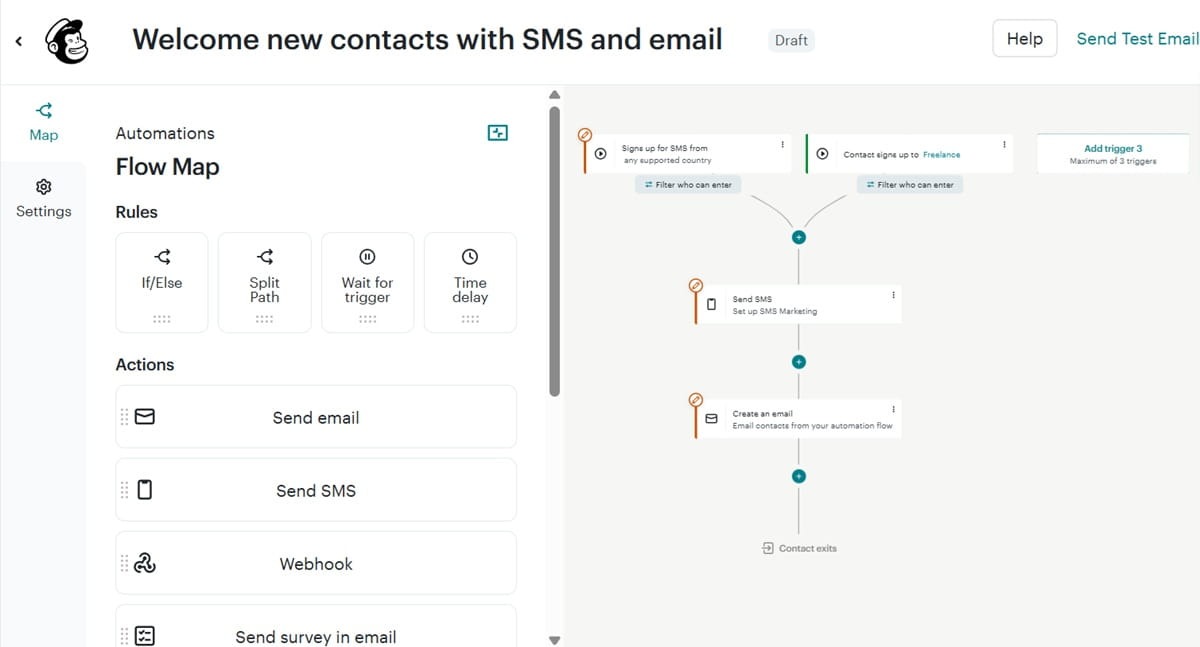
Mailchimp tracks user behavior on your website. It uses behavioral triggers to activate workflows and build advanced customer segments for better targeting.
The platform also delivers advanced AI capabilities through Intuit AI. Mailchimp’s AI analyzes campaign performance to help you identify what’s working for your business.
The AI creates SMS and social content based on your best-performing email campaigns. This takes content repurposing tasks off your team’s hands.
Intuit AI can also build entire workflows and email marketing campaigns based on your prompts. You simply need to review and approve the campaigns before they go live.
Unfortunately, while Mailchimp’s starting prices seem affordable, the platform is infamous for getting expensive as your contact list grows. This is a common complaint by Mailchimp users across G2 and Reddit.
Additionally, some users report that the platform is not very good for advanced or complex automations.
Key features
- Campaign manager – Plan, analyze, and manage all your campaigns on one dashboard.
- Marketing analytics – Track performance across various marketing channels from one platform. It also provides audience analytics showing who and where your most valued customers come from.
- Predictive segmentation – The data tools predict future buying behavior of your customers and create relevant segments to target users more effectively.
- Content studio – manage your marketing assets conveniently inside the content studio.
Pricing
Mailchimp prices start at $13/mo for 500 contacts and 6,000 monthly email sends. This plan supports marketing automation, but flows are limited to up to four steps.
It accommodates three seats and does not include dynamic content.
The Standard plan starts at $20/mo for 500 contacts and 6,000 email sends. The plan supports up to 200 flow steps and includes generative AI features, five seats, email scheduling, dynamic content, and custom reports.
The Premium plan starts at $350/mo for 500 contacts and 7,500 email sends. It comes with additional features like unlimited users, unlimited audiences, priority support, and a dedicated onboarding specialist.
Automate your SaaS user journey with GetResponse
The best marketing automation campaigns are grounded in accurate customer data and user behavior. It’s also important not to fall into the trap of trying to automate everything. Maintaining workflows can be a headache. You don’t want to build more workflows than you need. The better strategy is to identify the most crucial touchpoints where automation will have the biggest impact.
Start by mapping your customer journey to find opportunities where automation will enhance the user experience while supporting your business goals. Then, invest in the right marketing automation platform that aligns with your needs.
We recommend GetResponse if you want a solution that can automate the entire customer journey. This is our solution, and we’re a bit biased. But don’t just take our word for it.
GetResponse was recently recognized as the Best Marketing Optimization Platform of the Year in the 2026 MarTech Breakthrough Awards. Our automation platform was also a finalist in the Best SaaS Product for Workflow Automation category in the 2026 SaaS Awards hosted by the Cloud Awards.
Sign up for a free trial to experience the GetResponse automation product first-hand. You don’t need a credit card to activate the trial or access the premium features.
Marketing automation for SaaS FAQs
1. What is the best marketing automation tool for SaaS companies?
The best marketing automation tools for SaaS companies are HubSpot, GetResponse, Customer.io, and ActiveCampaign. HubSpot is ideal if you already use the platform’s CRM. GetResponse is great when you want to automate the entire user journey. This article explores five other automation tools and their best use cases.
2. What are the top features to look for in marketing automation software for SaaS?
The top features to look for in marketing automation software for SaaS companies are behavior-based workflows, lead scoring, advanced segmentation, and revenue attribution analytics. Deep integration with your CRM and other data sources is also crucial to ensure workflows access the necessary user data.
3. How can SaaS businesses use automation to improve trial conversion rates?
SaaS businesses can use automation software to track trial users showing strong buying intent and take them through high-intent workflows to increase conversion rates. These leads can be routed to sales teams for personalized outreach to speed up conversions.
Automation can also keep trial users engaged with timely product usage tips and educational content to prevent drop-offs and help them reach their “aha moments” faster.
