
Holiday email marketing helps shoppers choose gifts, meet real deadlines, and return after their first purchase. These 11 campaign ideas combine archived creative with email, SMS, and automation lessons for online stores in 2026. Plan the message around the customer’s next step, from gift discovery to a repeat order.
Plan your holiday email marketing calendar for 2026
Holiday email marketing in 2026 needs a calendar that connects each shopping occasion with your store’s offer, delivery promises, and follow-up plan.
| Date or stage | Campaign focus | Email, SMS, and automation role |
|---|---|---|
| November 26: U.S. Thanksgiving | A relevant thank-you, gift guide, or preview. | Email explains the value; open promised VIP access only to the eligible segment. |
| November 27: Black Friday; November 30: Cyber Monday | Launch and close a clearly defined offer. | Coordinate email and opted-in SMS; check purchases before sending another reminder. |
| December 4–12: Hanukkah | Relevant gift ideas for people who observe it. | Plan around the first night where appropriate; verify destination-specific delivery cutoffs. |
| Before your confirmed Christmas delivery cutoff | Delivery reminders, pickup, and available alternatives. | Use verified order-by times; stop physical-delivery promises when the cutoff passes. |
| December 25–26: Christmas and Boxing Day where relevant | Greetings, useful order care, or a self-gifting offer. | Keep service messages distinct from promotions and avoid repeating offers to recent buyers. |
| Late December into January 2027 | A 2026 recap, product education, and a relevant next purchase. | Use accurate customer data and order-based follow-ups rather than restarting the same sale. |
The 2026 holiday calendar confirms the U.S. shopping dates. Hanukkah begins at sundown on December 4 and ends at nightfall on December 12. Choose the occasions your customers actually celebrate, and set the time zone for every deadline.
The 11 ideas below keep the original campaign examples as archive material and add newer references from Goody, REI, and Spotify. Pictured prices, codes, dates, and reported milestones are historical. The analysis explains creative choices; it does not claim that these brands have announced matching 2026 offers or published conversion results.
Before scheduling, confirm stock, shipping services, returns, channel permission, and a working order-data connection. There is no universal Christmas shipping cutoff or best send count. Use your own fulfillment promises and normal customer cadence.
1. Make holiday delivery deadlines easy to act on
Holiday delivery emails help late shoppers decide when they state a verified order-by time, delivery method, and destination eligibility together.
Holiday email example: PUMA and ASOS
PUMA’s archived message led with free overnight shipping and a 2 p.m. EST cutoff. Those were the terms of that earlier promotion, not a delivery promise for Christmas 2026.

The archived email is a simple message that includes all the usual elements – a couple of banners, a few links to different secondary offers, a navigational bar, and social media icons.
The offer is first mentioned in the subject line, then again in the preheader, and finally in the banner that’s centrally placed in the above-the-fold part of the email.
Besides the main offer, there are four other elements (secondary offers) that have been emphasized. The sale event, gift cards, gift ideas guide, and Holiday FAQ. These give late shoppers useful alternatives without making them search the whole store.
Remember when and how your audience is going to read your email marketing communication. Do they have much time to read through it? Or maybe they’re tight on their schedule and need to act fast? Use this information when designing your message and when it’s needed, go straight to the point with your offer.
ASOS used the same delivery-reminder idea with an animated design and a seasonal joke. Keep the deadline understandable without the animation.

For your store: send an email with the full conditions, then an optional SMS reminder to eligible opted-in shoppers before the real cutoff. Check the customer’s destination and order status. After the cutoff, switch to collection or digital gifts only where those options are actually available.
2. Turn holiday errands into a useful shopping checklist
Holiday checklist emails give busy shoppers a scannable route through gift buying, party preparation, and the products that fit those jobs.
Holiday email example: Bonobos
Bonobos used a Thanksgiving to-do list instead of a product-grid promotion. The archived subject line introduced the holidays, while the checklist mixed useful shopping links with familiar family errands.

This isn’t just a simple shopping list. It mixes useful errands with humor – for example, Memorize cousins’ kids’ names – and hyperlinks that’ll help me complete some of the errands, like Get something nice to wear for dinner.
The copy looks like it was written by someone who understands the target audience very well. The email itself is really easy to scan and fun to engage with. The links give each item a next step.
A newer reference is Goody’s 2025 Holiday Gift Guide email. It organized the choice around teams, clients, smaller budgets, and global gifting. An online store can adapt the principle by recipient, interest, or budget instead of showing every product at once.
For your store: use email to present the checklist and collect preference clicks. Let an automation use those choices to send a relevant category follow-up. Keep SMS for a genuinely useful reminder, such as an expiring collection window, with separate SMS permission.
3. Give your holiday campaign a reason beyond the discount
A holiday campaign can lead with a brand’s purpose when the message connects a specific action with what customers value about the business.
Holiday email example: United By Blue
United By Blue’s archived Blue Friday email led with a cleanup and invited readers to learn more or organize one locally. The sale appeared farther down. The creative shows the brand putting its outdoor mission into the message.

The email doesn’t lead with product descriptions. Instead, it invites you to learn more about Blue Friday and how to host your own cleanup, and shows you the people who joined them for this wonderful project.
What’s more, their message is mostly about getting people to participate or even host a cleanup in their own neighborhood. The information about the sale pictured in the archive for Black Friday comes much, much later.
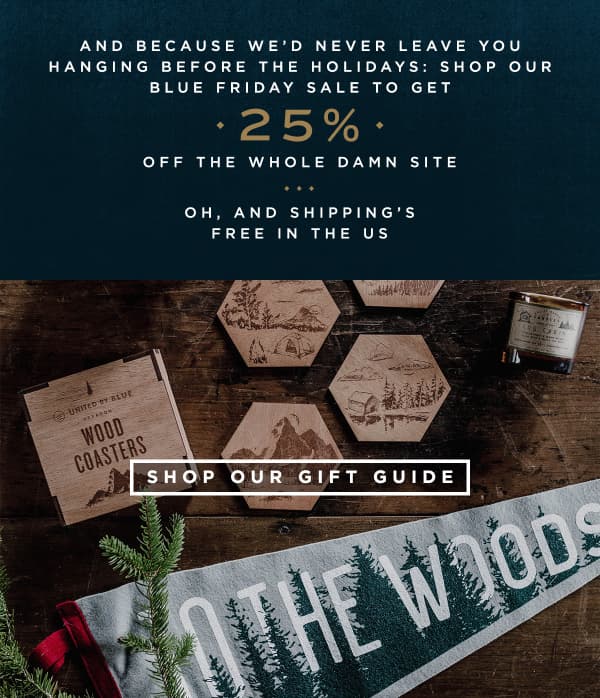
For a newer retail reference, REI’s October 2025 Opt Outside announcement confirmed that its stores would close on Black Friday and employees would receive a paid day outside. That is a brand-action example, not evidence of an email’s sales performance.
Cards Against Humanity took a different route with deliberately absurd Black Friday emails. The archived messages asked for money in exchange for nothing and invited people to fund a hole. The creative suits that brand’s voice; it is not a general recommendation for a store promotion.


For your store: if a cause belongs in the campaign, explain the recipient, contribution basis, cap, and period. Keep promises consistent across email, SMS, and checkout. Use verified actions and totals, and avoid turning a charitable story into an unsupported performance claim.
4. Build a final-call email around a real deadline
Holiday final-call emails work as useful reminders when the deadline is genuine and the recipient has a relevant next purchase to consider.
Holiday email example: Casper
Casper’s archived Black Friday email used an alarm-clock interface to connect its mattress offer with the idea of sleeping through the sale.
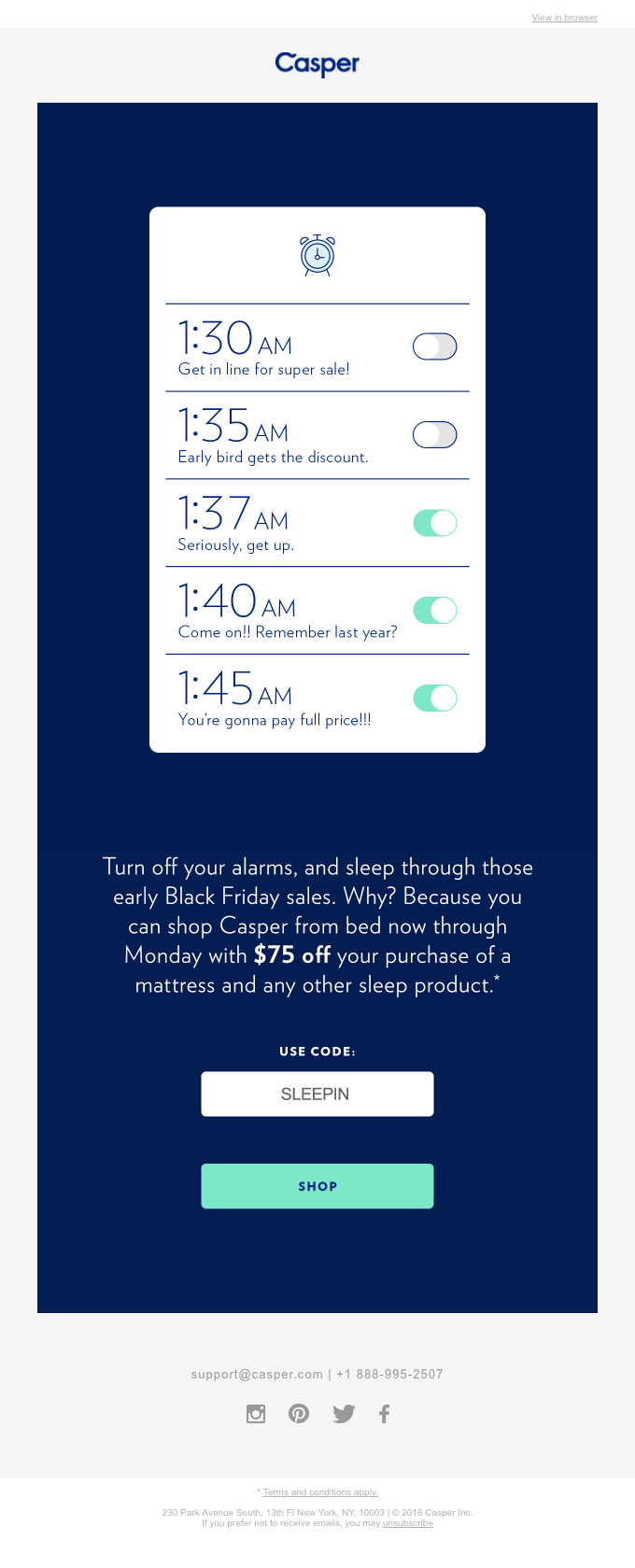
When you look closer at the image, you see that each alarm has a special name. Along with witty names, you also find information about the super sale and early bird discount shown in the archived promotion.
The email’s relatively short and manages to quickly communicate that you can shop online, without ever leaving your bed. The concept, offer, and CTA all use the same sleep theme.
A related follow-up keeps the same idea and says there is one more day to use the pictured offer. The screenshots do not establish that Casper unexpectedly extended an original deadline.

Make sure each element of your email reemphasizes what you’re actually trying to say. A good design can often help and deliver the message much quicker than words ever could. But that doesn’t mean you should forget about good copy.
For your store: schedule the closing email against the offer’s actual expiry. Before an SMS follow-up, check channel permission, local sending time, recent messages, stock, and purchases. Remove customers from prompts for an order they have completed, and stop the offer when the deadline passes.
5. Choose seasonal moments that fit your products
Seasonal email campaigns give a store another useful occasion to contact customers when the timing and creative fit its products and audience.
Archive examples: Casper’s seasonal campaigns
When referring to the holidays, you might be thinking about Thanksgiving, Christmas, or maybe Hanukkah.
But, there are so many other holidays along the way. Choose the occasions that connect naturally with your customers and products.
Casper connected the autumn clock change with extra sleep, then used a summer-to-slumber idea in a separate campaign. These are archived seasonal examples, not November 2026 launch instructions. Local clock-change dates and observance vary.


The summer-to-slumber email uses the top bar summing up the main offer (located above the fold), one single CTA button that says “Start hibernating”, and an image with flip flops and warm slippers to connect the offer with the season.
Foot Locker’s Father’s Day creative and American Eagle’s Halloween message show the same principle in other retail categories. Keep them as ideas for the next relevant season rather than adding past dates to your current holiday schedule.


For additional seasonal references, keep Wickedly-effective Halloween newsletter templates and Halloween email examples and best practices in your planning library.
For your store: tag the occasion and customer interest in your campaign plan. Use preference and purchase data to select recipients, and keep year-round replenishment and order-care workflows running alongside seasonal promotions.
6. Make your year-in-review email about the customer
Year-in-review emails turn verified customer activity into a useful recap, giving people a reason to reconnect beyond another sale announcement.
When preparing their marketing campaigns, most marketers focus on what they’ve got prepared for their customers. Their sale, free delivery, contest, or new line of products.
Less often, they focus on their customers – what they’ve done and what they’ve contributed to.
It’s not just about summarizing the products someone bought over the year – choose details that mean something to the customer.
Archive examples: Sevenly, Spotify, and Google Local Guides
Sevenly’s thank-you email displayed company-reported giving milestones. The source does not establish that every pictured total belongs to 2017 alone, so use it as an example of the thank-you format rather than a current benchmark.

The sender’s name, aka “from” name, also stands out. In your inbox, it says the email came from “Your Friends at Sevenly”.
Spotify’s 2016 and 2017 emails show two versions of a recap: a detailed summary inside the message and a short invitation to view more. The archived Google Local Guides message similarly puts the recipient’s contributions at the center.


The newer Spotify Wrapped 2025 experience retained personalized listening stories and shareable cards. Spotify’s announcement describes the app experience; it does not prove the performance of a particular email.
For your store: summarize accurate 2026 activity such as a customer’s favorite category, loyalty benefit, or verified contribution to a cause. Give the reporting period, handle sparse data with a useful fallback, and send one relevant next step. A recap sent after New Year should review 2026 and welcome 2027.
7. Give loyal customers a specific holiday benefit
Holiday loyalty emails make membership useful when the customer can clearly see the benefit, eligibility, and steps needed to claim it.
Holiday email examples: Williams Sonoma and Mark and Graham
Williams Sonoma’s archived fall email promoted a cardholder appreciation benefit. Mark and Graham used an email-exclusive offer. Both messages give the audience a reason to pay attention beyond the product image.


In the archived message from Mark and Graham, right below the navigational bar and above the main headline in the header, there’s a message that says, “Email Exclusive Offer”.
Options include early access to your new product lines, exclusive products, additional bonus points, free shipping and returns, or additional content available to the eligible subscriber segment.
Make the distinction explicit. Early access, a loyalty reward, and a store-card promotion are different benefits with different conditions. Show those conditions before the customer reaches checkout, and do not describe a public discount as exclusive.
For your store: use a current loyalty segment or purchase-history rule to select the offer. Check eligibility again before sending. An opted-in SMS can announce that access has opened, while the email explains the choices and conditions. Once the customer redeems the offer, move them into the appropriate purchase follow-up.
8. Plan a post-Christmas self-gifting campaign
Post-Christmas emails can shift from gifts for other people to a relevant purchase the recipient has been considering for themselves.
Holiday email example: Mahabis

For customers who celebrate, holidays can include spending time with family and friends, eating dinner together, and exchanging gifts.
In the archived newsletter, Mahabis took a slightly different approach.
They focused on the fact that you too might have wanted to receive a special gift.
What you see in this message is a self-gifting offer that lets you extend the holiday feeling by treating yourself with a pair of slippers.
When preparing your holiday campaigns, consider changing the focus to your recipients as individuals. Think about what they need or want this holiday season.
Maybe they want to look good for a New Year gathering? Perhaps they’re hosting the party and want to make sure it’s going to be a blast? Or maybe they just want to treat themselves with something nice?
For your store: build the follow-up from browsing preferences, wishlists where available, or a complementary purchase. Suppress repeat prompts for products already bought. Keep returns and delivery-support messages useful on their own, and wait for a sensible moment before adding another promotion.
Boxing Day is December 26 where it is observed. Adapt the occasion to your market, and keep January 2027 replenishment, product education, and repeat-purchase messages in the plan. You can draw on 17 happy new year emails worth celebrating for the next stage.
9. Pair a gift purchase with a clearly defined reward
Holiday give-and-get emails add a reward to a qualifying purchase, but the reward’s value depends on its redemption conditions.
There’s something special about holiday gifts. We like giving them probably just as much as we enjoy receiving them. Now, what if you could combine these two positive experiences?
One way to do this is by giving your customers a gift with a qualifying purchase. Explain the purchase threshold and reward before checkout.
Holiday email example: Taco Bell

The archived offer paired a $15 eGift Card purchase with a $5 eBonus card, subject to the promotion’s terms.
In other words, by buying someone a gift, you’re also receiving one. And if you and your friend or a family member are big fans of Taco Bell, then it’s an experience you want to share.
The useful distinction is between the gift card and the promotional bonus. Check where and when the bonus can be used, whether a minimum spend applies, and when it expires. Do not describe the arrangement as an automatic cash discount on the original purchase.
For your store: trigger reward delivery only after the qualifying purchase is confirmed. Record the balance or code accurately, and send an eligible reminder before a real redemption deadline. Use marketing SMS only with the appropriate permission, and stop reward reminders after redemption or expiry.
Measure redemption, repeat orders, and margin after the reward cost. The creative alone does not establish a conversion lift, higher lifetime value, or additional spend beyond the bonus.
10. Help shoppers remember another gift recipient
Holiday reminder emails can introduce an overlooked gift recipient when the idea fits the customer’s interests and your store’s products.
While doing holiday gift shopping, we often focus on our loved ones and friends. And sometimes we forget about those who are just as close to us and love us unconditionally – our pets.
That’s why if your business offers products or services for pet lovers, a pet-gifting reminder can fit naturally into the campaign.
Holiday email example: BarkBox

Although a simple reminder email could do the trick, why not take this opportunity andamp; put a smile on your recipients’ faces?
BarkBox used a singing dog, a gift box, and a joke about a chew to turn pet gifting into the main idea. The subject line and the design keep the same playful tone without needing a long explanation.
Below the fold, you can see a header that says, “BarkBox is the only thing on every dog’s wishlist.” Right underneath it is a prominent call to action button enticing you to send a gift of BarkBox.
The email template is also designed well. It’s based on a single column layout, uses the header section, and keeps you focused on the main call-to-action.
For your store: use stated preferences or relevant purchase history to select the audience. Ask for missing preferences rather than guessing sensitive information. Keep the pet-owner, host, traveler, or hobbyist version useful, and provide a general gift guide as the fallback.
Test the subject line, first GIF frame, live-text offer, and CTA on mobile. Humor can make the message enjoyable; assess clicks, purchases, complaints, and unsubscribes before deciding whether it helped the business.
11. Make holiday shopping easier with useful gift sets
Holiday gift-set emails reduce the work of choosing a present when the bundle, contents, price, and intended recipient are easy to understand.
The holiday season might be a stressful time for your customers. They’re running around, organizing and coordinating, so the last thing they want to do is stress about holiday shopping.
To help your customers relax a little, and enjoy the holidays a bit more, offer them gift sets and gift bundles.
By putting your best-selling products together with complementary items and offering them as ready-made sets, you can offer a ready-made choice. Check the bundle’s margin and fulfillment cost before promoting it.
Holiday email example: AWAY

This holiday email explains the concept well. It announces the arrival of gift sets consisting of toiletry bags bundled together with personal care products that go well with them.
The typography highlights what’s important: the arrival of the gift sets, the daily-set theme, what each bundle includes, and its intended use.
The zig-zag layout is engaging and leads the recipient through the whole message, which is short enough to not be overloaded with information.
Look out for ways you can help your customers enjoy the holidays more and achieve their goals with less effort. While gift guides are great, they’re not going to be of much help for those running short on time. In such cases, offering a gift set might be a better option that puts solutions at the forefront. Make the choice easy without hiding the price or conditions.
Mark and Graham’s archived under-$100 gift selection adds a budget-based route into the catalog. Use your own current prices and available stock when adapting the idea.

For your store: send the bundle email to a relevant category segment. A clicked category can guide a follow-up; an abandoned cart can trigger an eligible reminder. After purchase, stop the same-bundle prompts and move to delivery support, product care, and a complementary offer at a suitable time.
Connect holiday emails, SMS, and store automations
Holiday marketing automation connects the campaign with actual shopping behavior, while shared contact rules prevent overlapping email and SMS reminders.
Start with a reliable catalog, cart, order, and consent connection. Keep email permission separate from SMS permission. An email signup or checkout phone number is not automatic permission for promotional texts. Apply destination-specific rules, sender requirements, opt-outs, and local-time controls; UK ICO guidance on electronic marketing explains consent and the limited existing-customer exception in that jurisdiction.
- Welcome and preference capture: deliver the promised guide or access details, then use declared interests to choose relevant holiday content.
- Cart recovery: wait after a valid abandonment event, check whether the order is complete, and send an eligible reminder. Recheck stock, offer expiry, SMS permission, and recent messages before any later text.
- Purchase follow-up: stop recovery for the completed order, provide useful delivery or product-care information, and schedule a relevant complementary offer after an appropriate interval.
- Repeat purchase or win-back: use product-use patterns and purchase history to identify a sensible next step; exclude unresolved service cases and respect opt-outs.
These are illustrative workflow rules, not claims about how the featured brands configured their campaigns. A newsletter email blast and triggered messages need one contact-frequency policy. Avoid sending the same promotion through both channels just because both are available.
Measure orders, recovered carts, repeat purchases, average order value, and contribution margin after discounts and messaging costs. Do not add email- and SMS-attributed sales without checking overlap. Opens alone do not establish purchase intent or incremental sales.
Keep the fundamentals in your launch review: General email marketing best practices, Email design best practices, Email segmentation, and Email list management.
Email list segmentation and management are particularly important at this time of the year, as subscribers face increased email volumes in their mailboxes and may show lower engagement.
Use GetResponse to build and coordinate the holiday journey
GetResponse combines email creation, segmentation, and marketing automation; choose the plan and channel options that fit your store and account location.
GetResponse Email Creator includes editable templates for seasonal campaigns. You can begin with free holiday email templates and customize the message, product selection, and CTA. The current GetResponse pricing page offers a 14-day premium trial with limitations; it does not mean every channel or premium feature is available free indefinitely.

For a store campaign, connect the catalog and order data, then use GetResponse marketing automation for relevant welcome, recommendation, and abandoned-cart email journeys. GetResponse SMS marketing can add a timely text where your account and market support it. Confirm sender approval, destination availability, and SMS charges before scheduling.
The self-service SMS guide documents account-location restrictions and setup requirements. GetResponse’s Ecommerce Abandoned Cart guide also explains the native marketing-consent requirements and purchase exit. Avoid running duplicate recovery flows for the same cart.
If you want a starting layout, use one of the ready-made email templates that are available for you to use.

You can sign up for a free account to explore GetResponse email creation. Check the trial and plan limits, preview the campaign on mobile, and complete a test purchase before launch.
The existing Email Creator walkthrough is retained as background. Its interface may differ from the current account.
More seasonal email examples for your planning library
Seasonal email examples help with future planning when you adapt the occasion, audience, and current offer instead of reusing an old promotion unchanged.
The archived Father’s Day, Halloween, and summer messages show creative patterns that can inform a wider calendar. For the November–December peak, prioritize the occasions your current audience celebrates and the dates your fulfillment team can support. A year-round idea belongs on the next relevant date, not in an automatic resend during the holiday rush.
Use the examples to ask concrete questions: is the message easy to scan, does the offer fit the customer, and does the destination match the CTA? Test animation, product recommendations, and budget filters with your own catalog. A visually appealing email does not establish a conversion lift.
Keep these related guides with your campaign plan. They cover greetings, ecommerce fundamentals, and other retail occasions, so you can prepare the next campaign after this holiday peak:
You may also like:
1. 17 happy new year emails worth celebrating
2. How to write a heartfelt thanksgiving email (with examples)
3. Essential guide to ecommerce email marketing
For sale-message inspiration, compare 10 super Cyber Monday emails & tips for real results and Black Friday email campaign tips and examples. You can also review the broader email campaign collection when planning a different creative approach.
Keep one record of the offer, intended audience, launch time, expiry, destination page, and purchase-exit rule for every campaign. That makes it easier to coordinate the next email or SMS and to stop a message whose terms no longer apply.
Holiday email marketing FAQs
Holiday email marketing needs a useful offer, reliable store data, and coordinated follow-ups; the right schedule depends on your audience, products, and delivery terms.
When should I start my 2026 holiday email campaigns?
Start before the audience’s main shopping occasion, with time to test the offer, collect preferences, and deliver any promised early access. In 2026, Black Friday is November 27 and Cyber Monday is November 30; use your own confirmed delivery cutoffs for later gift-shopping messages.
How should an online store combine holiday email and SMS?
Use email for the full offer, gift choices, and conditions, and reserve promotional SMS for opted-in customers at a useful moment. Coordinate broadcasts and triggered messages, check recent purchases, and apply local sending rules and a shared contact-frequency policy.
Which holiday automations should a store prepare?
Prepare welcome and preference capture, eligible cart recovery, purchase follow-up, and a relevant repeat-purchase or win-back journey. Check order status, channel permission, stock, and offer expiry before follow-ups, and stop recovery for completed orders.
Can I copy the discounts and shipping deadlines in these examples?
The pictured campaigns are archived creative, not current 2026 offers. Use your own verified prices, stock, delivery services, eligibility, and deadlines, and make sure the email, SMS, landing page, and checkout agree.
What should a store send after Christmas?
Send useful order care and product guidance, then a relevant self-gifting, complementary-product, or replenishment message when appropriate. A late-December or January recap should summarize verified 2026 activity and introduce 2027 without repeating expired holiday offers.
How do I measure holiday campaign success?
Review orders, contribution margin, recovered carts, and repeat purchases alongside complaints and unsubscribes. Check attribution overlap between email and SMS, and use a holdout group where practical to estimate incremental results rather than relying on opens alone.
